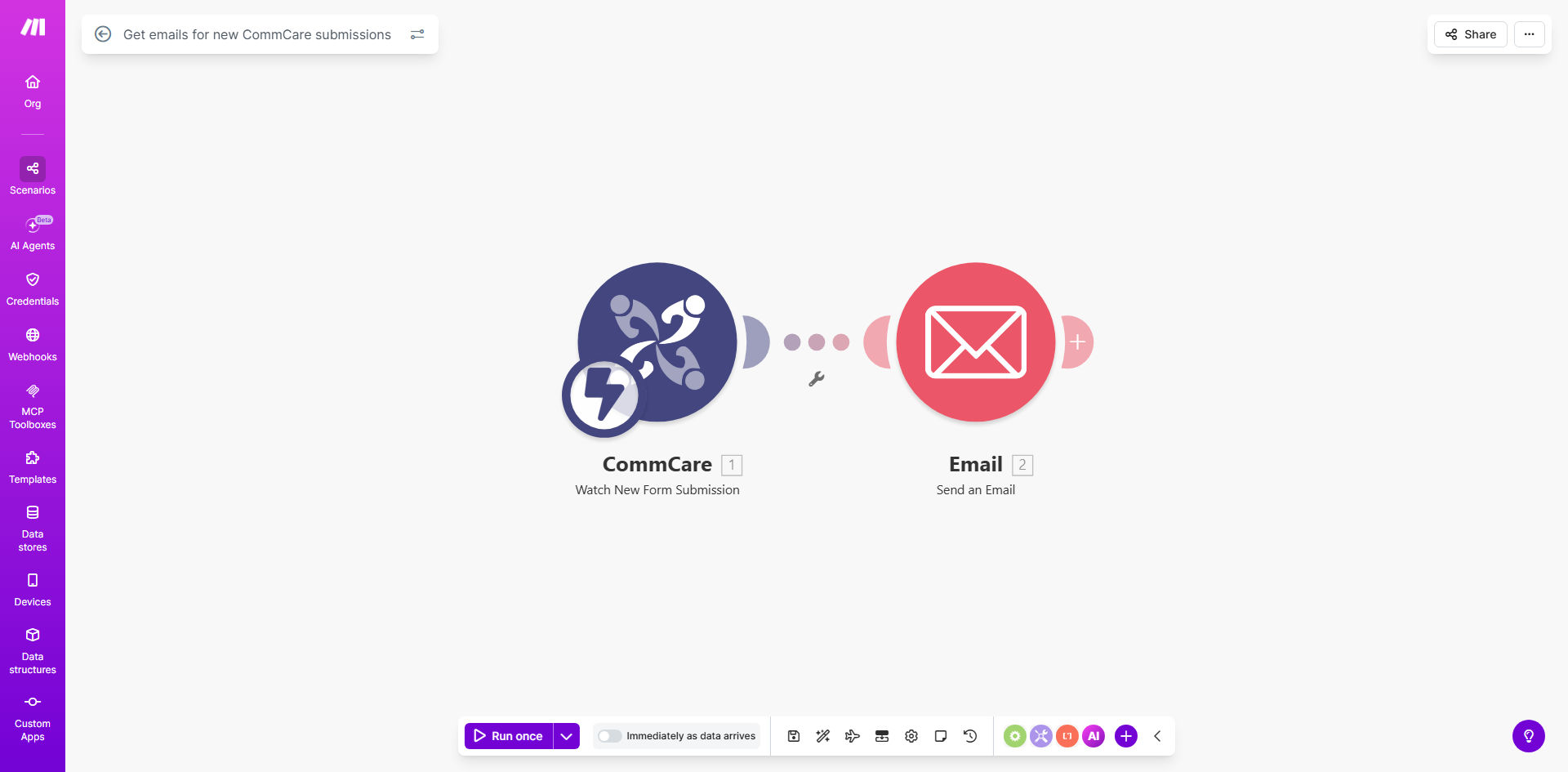
What This Workflow Does
For organizations using CommCare for mobile data collection—such as health surveys, field assessments, or community feedback—the challenge is often timely awareness. Field teams submit data remotely, but managers or analysts may not know about new submissions until they manually log in to check. This delay can slow down critical responses, data processing, and decision-making.
This automation workflow solves that problem by creating an instant bridge between CommCare and your email. Every time a new response is completed and submitted in CommCare, the system automatically triggers and sends a notification email to a designated address. This ensures that the right people are informed immediately, without any manual intervention.
The business value is clear: you reduce the time-to-awareness from hours or days to seconds. This leads to faster follow-up actions, improved data responsiveness, and frees up staff from the tedious task of constantly monitoring the platform. It turns passive data collection into an active, alert-driven process.
How It Works
The workflow is built on Make.com and operates on a simple trigger-action principle.
Step 1: Monitoring CommCare for New Submissions
The Make.com scenario is configured to watch your specific CommCare project. It uses the CommCare module to poll for new submissions or listens via a webhook. Whenever a form is finalized and submitted by a field agent, the system detects this new event almost instantly.
Step 2: Capturing the Submission Data
Once triggered, the workflow retrieves key details from the submission. This can include the form ID, the time of submission, the respondent's information, and even specific answers from the survey. This data is passed along to the next step, providing context for the alert.
Step 3: Composing and Sending the Email Alert
Using the Email module (like Gmail, Outlook, or SMTP), Make.com dynamically generates an email message. You can customize the subject line, body, and include the captured submission data. The email is then sent to one or more predefined recipients—your project manager, data team, or support staff.
Pro tip: You can format the email to highlight critical responses. For example, if a health survey flags an urgent case, you can make that the first line of the email, ensuring priority attention.
Who This Is For
This automation is ideal for any organization or team that relies on CommCare for field data collection and needs prompt notification.
Public Health & NGO Programs: Teams conducting health surveys, vaccination tracking, or nutrition assessments require immediate data visibility to trigger interventions.
Research & Evaluation Groups: Academics and monitoring teams collecting field data for studies benefit from instant alerts to begin data cleaning and analysis without delay.
Community Development Projects: Organizations gathering community feedback or service requests can use alerts to quickly assign follow-up tasks to field officers.
Any Manager Overseeing Remote Data Collection: If you manage a team that submits data via CommCare, this automation keeps you informed in real-time, replacing manual check-ins.
What You'll Need
- A CommCare account with a project containing the forms you want to monitor.
- A Make.com account (free tier available) to build and run the automation scenario.
- API access or webhook setup permissions for your CommCare project (typically available in the CommCare settings).
- The email address(es) of the recipients who should receive the alerts.
- Basic understanding of how to connect modules in Make.com (the template provides a starting structure).
Quick Setup Guide
Follow these steps to deploy this workflow using the provided template.
- Clone the Template: Use the "Get This Workflow" button to open the template on Make.com. Click "Copy scenario" to create your own version.
- Connect Your CommCare Account: In the first module, add your CommCare connection by entering your API credentials or configuring the webhook trigger for your specific project.
- Set the Monitoring Parameters: Specify which CommCare form or application you want to watch for new submissions. You can filter by form type or project.
- Configure the Email Module: Add your email service (Gmail, SMTP, etc.) and set the recipient email address. Customize the email subject and body text. You can insert dynamic data from the CommCare submission using variables.
- Test and Activate: Run a test by submitting a dummy form in CommCare. Verify that the email alert arrives correctly. Once confirmed, activate the scenario to run continuously.
Key Benefits
Instant Operational Awareness: Reduce the lag between data submission and team notification from hours to seconds, enabling quicker decisions and actions.
100% Data Capture Notification: Eliminate the risk of missing submissions due to manual oversight. Every single new response triggers an alert, ensuring complete data visibility.
Free Up Staff Time: Save managers and data clerks from the repetitive task of logging into CommCare multiple times a day to check for updates. This time can be redirected to analysis or fieldwork.
Scalable for Any Volume: The automation works flawlessly whether you receive ten submissions a day or a thousand. It scales with your project without additional manual effort.
Foundation for Extended Automation: This email alert can be the first step in a larger data pipeline. Once set up, you can easily add steps to log data into a spreadsheet, create tasks, or update dashboards.