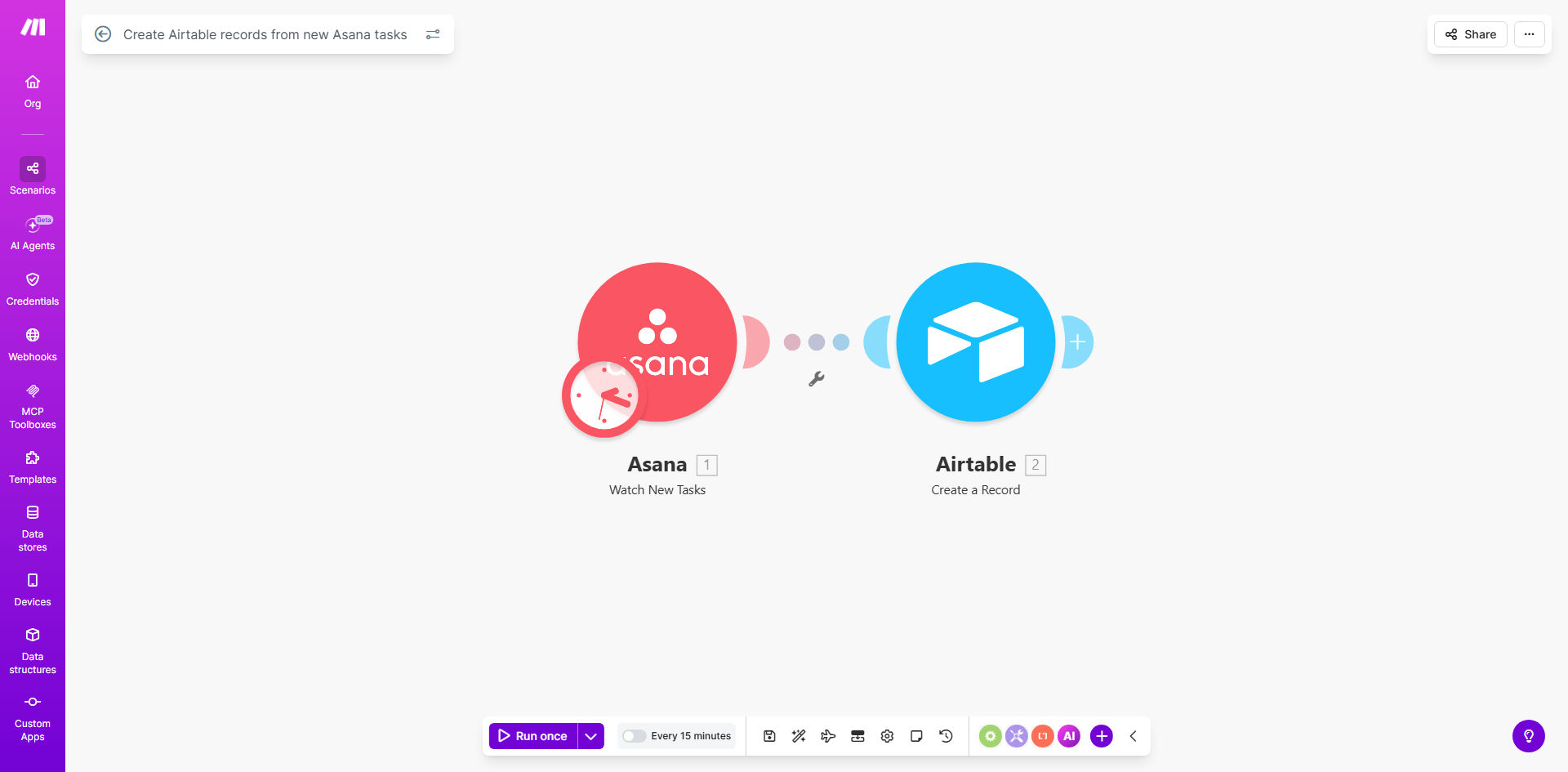
What This Workflow Does
Managing projects across multiple tools creates a common headache: data silos. Your team creates tasks in Asana, but your reports, dashboards, and client updates rely on data in Airtable. Manually copying task details is slow, error-prone, and leaves your Airtable base outdated. This automation solves that by creating a live bridge between your task manager and your database.
Whenever a new task is created in Asana—whether it's a client request, internal milestone, or bug fix—this Make.com workflow instantly captures its details and creates a corresponding record in your designated Airtable base. It transfers key information like task name, description, assignee, due date, project, and custom fields. This ensures your central project database is always synchronized, providing real-time visibility without manual effort.
The business value is clear: you save hours each week on administrative copying, eliminate transcription errors, and empower your team with accurate, up-to-date data for decision-making. Project managers can track progress from Airtable dashboards, finance teams can link tasks to budgets, and clients can receive automated updates—all because the data flows automatically.
How It Works
Step 1: Trigger on New Asana Tasks
The workflow starts by monitoring your specified Asana project or workspace. The Make.com scenario uses Asana's "Watch Tasks" module, which instantly triggers whenever a new task is created. You can filter this trigger to only capture tasks from certain projects, with specific tags, or assigned to particular team members.
Step 2: Extract Task Data
Once triggered, the scenario pulls all relevant data from the new Asana task. This includes the task name, detailed description, assignee name and email, due date, priority, status, custom fields, and even attachments or comments. This data is structured and prepared for mapping to Airtable fields.
Step 3: Map Fields to Airtable
The core of the automation is mapping each piece of Asana data to the correct field in your Airtable table. You configure which Airtable base and table to use, and define how each Asana attribute (like "Due Date") corresponds to an Airtable column (like "Deadline"). This mapping ensures data consistency and format compatibility.
Step 4: Create the Airtable Record
Finally, the workflow uses Airtable's "Create a Record" module to insert the new row into your base. The record is created with all the mapped data, instantly populating your database. You can also set up conditional logic to only create records for tasks meeting certain criteria, keeping your Airtable base clean and relevant.
Pro tip: Use Airtable's formula fields to automatically calculate derived metrics from the synced task data, like "Days Until Deadline" or "Status Based on Due Date." This adds intelligence beyond simple data copying.
Who This Is For
This automation is ideal for any team that uses Asana for task management but needs centralized data in Airtable for reporting, analysis, or cross-functional workflows.
Project Managers & Operations Teams: They benefit from having all task data automatically available in Airtable for generating progress reports, resource allocation dashboards, and client updates without manual consolidation.
Marketing & Creative Agencies: Client projects often involve hundreds of tasks. Syncing them to Airtable allows for easy tracking of deliverables, deadlines, and team workload across multiple clients.
Product & Development Teams: They can sync bug reports, feature requests, and sprint tasks to Airtable to link them with product specs, user feedback, and release timelines stored in the same base.
Small Businesses & Startups: For teams without dedicated data administrators, this automation ensures their project database stays accurate and updated, enabling better oversight and planning.
What You'll Need
- A Make.com account (free tier sufficient for this workflow).
- An Asana account with at least one project containing tasks you want to sync.
- An Airtable account and a base with a table ready to receive the task records.
- API connections: You'll need to connect your Asana and Airtable accounts to Make.com via their respective modules, which requires your API keys or OAuth access.
- Clear field mapping: Identify which Asana task fields (name, due date, assignee, etc.) you want to transfer and ensure your Airtable table has corresponding columns.
Quick Setup Guide
Follow these steps to deploy this automation in under 15 minutes:
- Clone the template: Use the "Get This Workflow" button above to copy the pre-built scenario into your Make.com account.
- Connect your apps: In the Make.com scenario, authorize the Asana and Airtable modules by logging into your accounts.
- Configure the trigger: Select the specific Asana project or workspace you want to monitor for new tasks.
- Map your fields: In the Airtable module, select your base and table, then map each Asana data point to the correct Airtable column.
- Test the flow: Create a test task in Asana and verify that a record appears in your Airtable table with the correct data.
- Activate the scenario: Turn on the scenario in Make.com. It will now run automatically for every new task.
Key Benefits
Save 2–5 hours per week per team member on manual data entry. Eliminate the tedious copying of task details between platforms. This reclaimed time can be redirected to actual project work, boosting overall productivity.
Ensure 100% data accuracy and real-time updates. Automated sync prevents human transcription errors and delays. Your Airtable base reflects the exact current state of your Asana projects, enabling reliable reporting and decision-making.
Create a unified project intelligence hub. By centralizing task data in Airtable, you can link it with financial data, client information, or resource plans. This creates a single source of truth for cross-functional analysis.
Scale your project management without administrative overhead. As your team grows and task volume increases, the automation handles the increased data flow seamlessly, without requiring additional manual effort.
Enable advanced automation workflows. With tasks now living in Airtable, you can trigger further automations—like sending Slack notifications for high-priority tasks, generating weekly reports, or updating client portals.