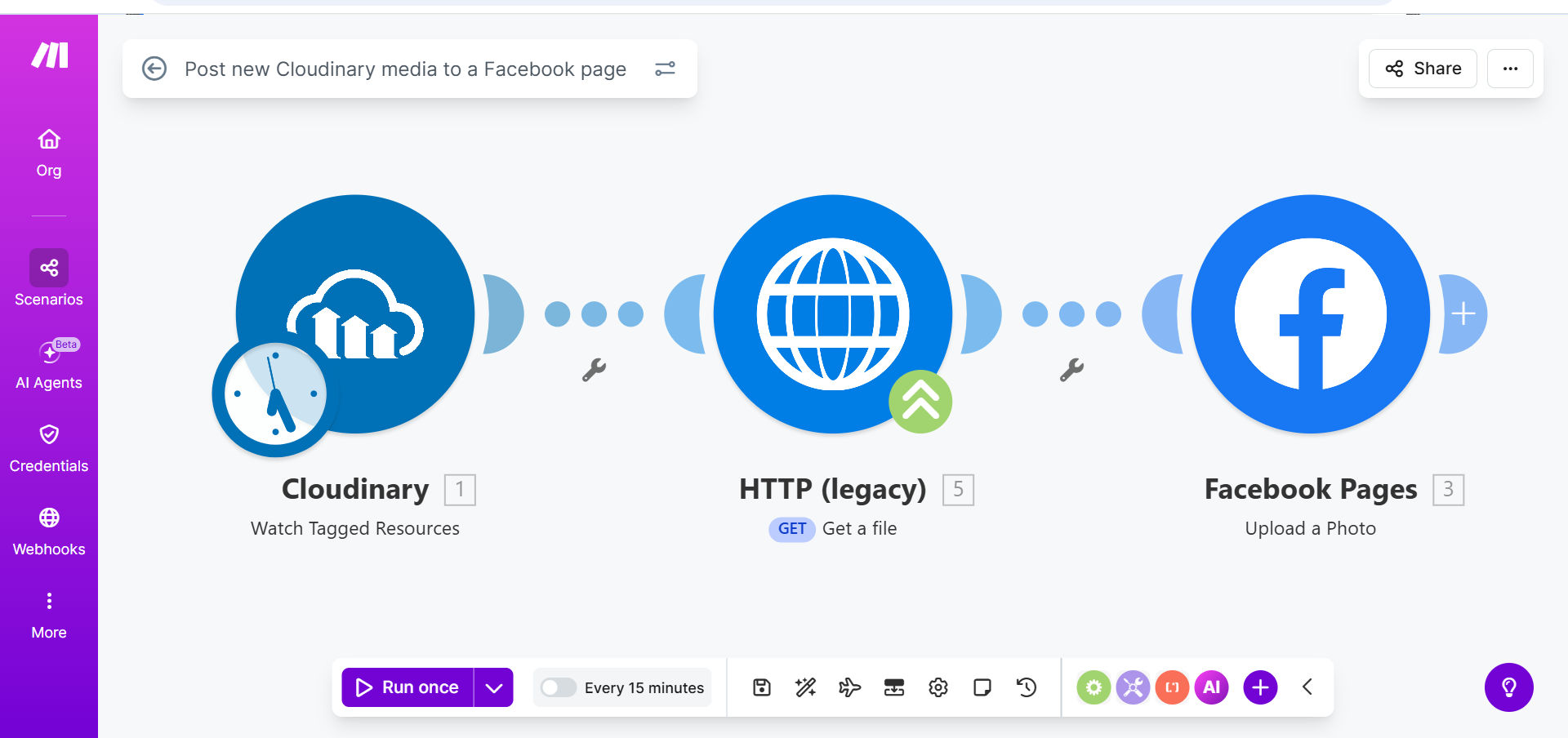
What This Workflow Does
For marketers, content creators, and agencies, managing visual content across platforms is a repetitive, time-consuming task. You create great graphics or videos, store them in Cloudinary, and then face the manual chore of downloading, formatting, and uploading them to Facebook. This process is not only slow but also prone to errors—forgetting to post, using the wrong file, or inconsistent captioning.
This automation solves that by creating a seamless bridge between your digital asset manager and your social audience. Every time you add a new piece of media to a specific folder or tag it (e.g., "ready-for-fb") in Cloudinary, the workflow automatically detects it, formats the post, and publishes it directly to your connected Facebook Page. It turns a 5–10 minute manual task into a zero-touch, instantaneous process.
The business value is clear: it reclaims hours per week for your creative team, ensures your social media calendar is consistently filled with fresh visual content, and reduces the risk of human error. Your Facebook Page stays active and engaging without constant manual intervention.
How It Works
The workflow operates on a simple trigger-and-action principle, orchestrating data between Cloudinary and Facebook via Make.com.
Step 1: Monitoring Cloudinary for New Media
The scenario starts with a Cloudinary module set to watch a specific resource—like a folder, tag, or your entire media library. It polls for new assets at regular intervals. When a new image or video that matches your criteria (e.g., tagged with "facebook_post") is uploaded, the workflow is triggered, and the file's URL and metadata are captured.
Step 2: Preparing the Post Content
Before posting, the workflow can enrich the content. This step is flexible: it can pull a caption from a Cloudinary description field, generate one using AI, or append standard branding hashtags. You can also resize or reformat the image URL if needed to meet Facebook's optimal specifications, ensuring the best possible display.
Step 3: Publishing to Your Facebook Page
The final action is handled by the Facebook module. It takes the prepared media URL and caption, authenticates with your Page's permissions, and creates a new post. The workflow can be configured to post immediately or, with additional logic, schedule it for a specific time. A success log can be sent to a Google Sheet or notification app for your records.
Pro tip: Use Cloudinary's powerful transformation URLs within the workflow to automatically optimize images for Facebook's feed—like cropping to a 1:1 or 16:9 aspect ratio—before they are ever posted, ensuring perfect presentation every time.
Who This Is For
This automation is ideal for any business or individual that relies on visual content for social engagement. Digital marketing agencies can use it to streamline posting for multiple clients. E-commerce brands can automatically post new product images. Photographers, designers, and content creators can instantly share their latest portfolio work. Event organizers can live-post photos from an event as they are uploaded to Cloudinary by a photographer.
What You'll Need
- A Make.com account (free tier available).
- A Cloudinary account with media uploaded and, ideally, a tagging system in place.
- A Facebook Page that you manage with admin permissions.
- The Facebook Page connected to a Facebook Developer App (standard process for API access, which Make.com will guide you through).
- Basic understanding of what triggers the post (e.g., a specific tag like "social_post").
Quick Setup Guide
You can have this automation running in under 15 minutes.
- Clone the Template: Click "Get This Workflow" and duplicate the scenario into your Make.com account.
- Connect Cloudinary: In the first module, authorize Make.com to access your Cloudinary account using your API key and secret.
- Set the Trigger: Configure the Cloudinary module to watch for new resources by a specific tag or in a designated folder.
- Connect Facebook: Authorize the Facebook module with the account that manages your target Page. Grant the necessary "pages_read_engagement" and "pages_manage_posts" permissions.
- Customize the Post: Map the media URL from Cloudinary to the Facebook post module. Add a static caption or map dynamic text from Cloudinary's metadata.
- Test & Activate: Run the scenario once manually to test. Upload a test image with your chosen tag to Cloudinary. If it posts successfully to your Facebook Page, activate the scenario to run automatically.
Key Benefits
Save 5+ hours per month per social channel. Eliminate the repetitive download-upload-caption cycle for every piece of visual content. This time can be reinvested into content strategy and community engagement.
Ensure 100% consistency in your posting schedule. Never miss a post because someone was busy or forgot. When media is tagged and ready in Cloudinary, it goes live automatically, keeping your audience consistently engaged.
Reduce human error to zero. No more posting the wrong image, broken links, or typos in captions that were rushed during manual uploads. The automation follows the exact rules you set, every single time.
Scale your visual content marketing effortlessly. What works for one Facebook Page can be replicated for multiple clients or brand channels. This template provides a foundation that can be easily scaled and customized.
Improve content ROI. By ensuring every piece of created visual content is promptly and properly shared, you maximize its exposure and potential engagement, getting more value from your creative efforts.