Make.com Chatra Google Sheets Support Automation Data Logging

Automatically Save Chatra Conversations to Google Sheets

Capture every finished live chat conversation in a structured spreadsheet row—no manual work required. Centralize support data for analysis and follow-up.

Get This Workflow → Make.com · Chatra · Free Template
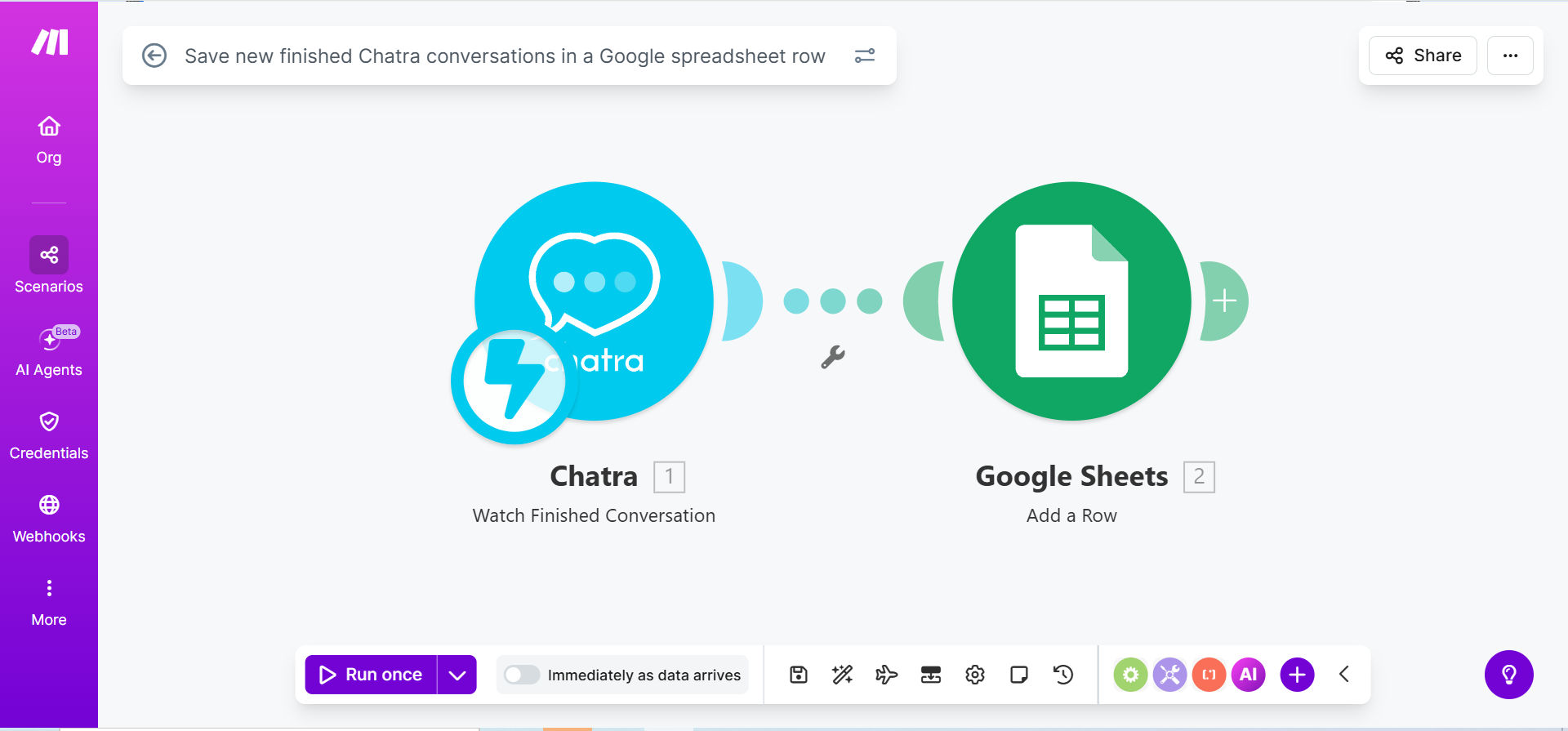
Make.com workflow diagram connecting Chatra to Google Sheets for conversation logging

What This Workflow Does

Live chat is a powerful tool for instant customer support, but the valuable data from these conversations often gets lost in the platform's history. Manually copying chat details into a spreadsheet is tedious, error-prone, and rarely gets done consistently. This creates a gap in your customer intelligence—you can't easily analyze support trends, measure agent performance, or follow up with visitors based on their chat topics.

This Make.com automation solves that problem by creating a seamless bridge between Chatra and Google Sheets. Every time a conversation is marked as finished in Chatra, the workflow automatically triggers. It captures key data points—like visitor information, conversation timestamps, the chat summary, and any tags—and appends them as a new, organized row in your designated Google Sheets spreadsheet. This turns transient chat data into a permanent, searchable business asset.

How It Works

The workflow operates on a simple trigger-action principle, ensuring zero manual intervention once set up.

Step 1: Monitor Chatra for Finished Conversations

The automation continuously watches your Chatra account for a specific event: a conversation changing its status to "finished." This is the trigger that kicks off the entire process. Make.com polls Chatra at regular intervals, ensuring no completed chat is missed.

Step 2: Extract and Format Conversation Data

Once a finished conversation is detected, the workflow retrieves the relevant data from Chatra. This typically includes the visitor's name and email, the start and end time of the chat, the conversation summary or full transcript, the assigned agent, and any custom tags applied to the chat.

Pro tip: You can customize which data points are captured. Focus on fields that are most valuable for your reporting, like customer issue category, satisfaction rating, or product mentioned.

Step 3: Add a New Row to Google Sheets

The formatted data is then sent to Google Sheets. The workflow locates your specified spreadsheet and appends a new row at the bottom. Each piece of information is placed into its own column, creating a clean, structured log. The template includes a sample spreadsheet structure to get you started immediately.

Who This Is For

This automation is ideal for any business using Chatra for customer support, sales, or engagement. It's particularly valuable for support teams that need to report on common issues, e-commerce stores that want to follow up on abandoned cart chats, SaaS companies tracking feature requests, and agencies that need to log client communications for accountability. If you have more than a handful of chats per week and want to turn those interactions into actionable data, this workflow is for you.

What You'll Need

  1. A Make.com account (free tier available).
  2. A Chatra account with active conversations.
  3. A Google Sheets spreadsheet (you can use the provided template or your own).
  4. API connections between Make.com and both Chatra and Google Sheets (guided setup within Make).

Quick Setup Guide

You can have this automation running in under 10 minutes.

  1. Copy the template: Click "Get This Workflow" to duplicate the scenario into your Make.com account.
  2. Connect your apps: Authorize Make.com to access your Chatra and Google Sheets accounts when prompted.
  3. Configure the trigger: In the first module, ensure it's set to watch for "Finished" conversations in your correct Chatra account.
  4. Map your spreadsheet: Point the Google Sheets module to your target spreadsheet and worksheet. The template maps common data fields, but you can adjust the column mapping to fit your sheet's structure.
  5. Test and activate: Run a test by finishing a conversation in Chatra. Check if a new row appears in your sheet. Once confirmed, turn the scenario on.

Key Benefits

Eliminate manual data entry and save 2-5 minutes per conversation. Your team spends time supporting customers, not copying and pasting chat logs. This can recover over 15 hours per month for a busy support team.

Create a centralized customer interaction database. All chat history is in one searchable, sortable spreadsheet. No more jumping between Chatra history and other tools to analyze support trends.

Improve follow-up and customer nurturing. With visitor emails and chat context automatically logged, you can trigger personalized email sequences, add contacts to specific CRM lists, or flag chats that require further action.

Gain actionable insights from support data. Use Sheets' analysis features to identify frequent issues, measure agent response times, and track conversation volume patterns to optimize staffing and resources.

Build a foundation for advanced automation. This logged data can trigger other workflows, like creating support tickets, sending Slack alerts for negative feedback, or updating a CRM record, creating a fully automated support ecosystem.

Frequently Asked Questions

Common questions about Chatra and Google Sheets automation and integration

Logging Chatra conversations in Google Sheets creates a central, searchable database of all customer interactions. This allows you to analyze support trends, identify common questions, and track agent performance over time. It turns live chat data from a transient conversation into a valuable business intelligence asset that can inform product development, training, and resource allocation.

For example, a SaaS company can track how often a specific feature is mentioned in support chats, providing direct user feedback. An e-commerce store can analyze which products generate the most pre-purchase questions, revealing opportunities to improve product descriptions.

The most valuable data points to save include visitor name and email, conversation start and end times, the full chat transcript or summary, and any tags or ratings assigned. This information helps with follow-up marketing, support quality analysis, and understanding customer intent without needing to search through the Chatra dashboard.

Beyond basics, consider capturing custom fields like "Issue Type" or "Product Category" if you use them in Chatra. The goal is to capture enough context so that anyone reviewing the sheet later understands what the conversation was about and what outcome was achieved, enabling deeper analysis.

  • Visitor contact info enables follow-up.
  • Timestamps help calculate handle time.
  • Tags allow for categorization and filtering.

Absolutely. By capturing visitor emails and conversation context in Sheets, you can create targeted email sequences, personalized follow-ups, or add contacts to specific nurture campaigns based on their chat topics. This turns a support interaction into a sales or retention opportunity.

For instance, if a visitor chats about pricing but doesn't buy, you can automatically add them to a "Pricing Interest" list in your email marketing platform. If they had a technical issue that was resolved, you can send a satisfaction survey a few days later. This proactive engagement significantly increases customer lifetime value.

Automation eliminates the manual copy-paste process after each chat, saving 2-5 minutes per conversation. For teams handling 20+ chats daily, this recovers over 15 hours monthly that can be redirected to actual customer support. It also ensures no conversation is ever missed in reporting due to human error.

The time savings compound with team size and chat volume. More importantly, it removes a tedious, low-value task from your team's plate, boosting morale and allowing them to focus on complex problem-solving where human judgment is essential. The data is also logged instantly and consistently, improving report accuracy.

Make.com provides a reliable, no-code connection that works in real-time without requiring API development. It handles data formatting between the two platforms automatically and can be extended to trigger additional actions, like sending Slack notifications or creating follow-up tasks, creating a complete support workflow ecosystem.

Unlike one-off scripts or manual processes, a Make.com scenario is maintainable, scalable, and visible. You can see the data flow, add error handling, and easily modify the logic as your business needs change. It's a professional automation tool built for business processes, ensuring reliability and support.

With all conversations in Sheets, you can use pivot tables to analyze common issues by frequency, calculate average response times, track conversation volume by day/hour, and identify which agents resolve chats fastest. You can also connect Sheets to data visualization tools like Google Data Studio for executive dashboards.

Create a weekly report that shows top 5 customer issues, busiest support hours, and average resolution time. This data helps you proactively create help content for frequent issues, schedule staff more efficiently during peak times, and recognize top-performing support agents based on objective metrics.

  • Use filters to view data by date range or agent.
  • Create charts to visualize trends over time.
  • Use COUNTIF to tally specific issue types.

Yes, GrowwStacks specializes in building custom Chatra automations tailored to your specific business processes. We can design workflows that not only log conversations but also route chats based on content, update CRM records, trigger internal alerts for high-priority issues, and create comprehensive support analytics dashboards.

Our team will work with you to understand your unique support funnel, identify key data points, and design an automation system that saves time, improves customer experience, and provides valuable insights. We handle the entire setup, testing, and documentation, so you get a turnkey solution that works from day one.

  • Integration with your CRM (HubSpot, Salesforce).
  • Automated ticket creation from chat topics.
  • Real-time alerts for negative sentiment.

Need a Custom Chatra Automation?

This free template is a starting point. Our team builds fully tailored automation systems for your specific business needs.