Make.com Everhour Gmail Time Tracking Reporting

Automated Time Reporting from Everhour to Gmail

Stop manual weekly reports. This free template automatically extracts time entries from Everhour and sends a clean, formatted summary table directly to your inbox every Monday.

Get This Workflow → Make.com · Everhour · Free Template
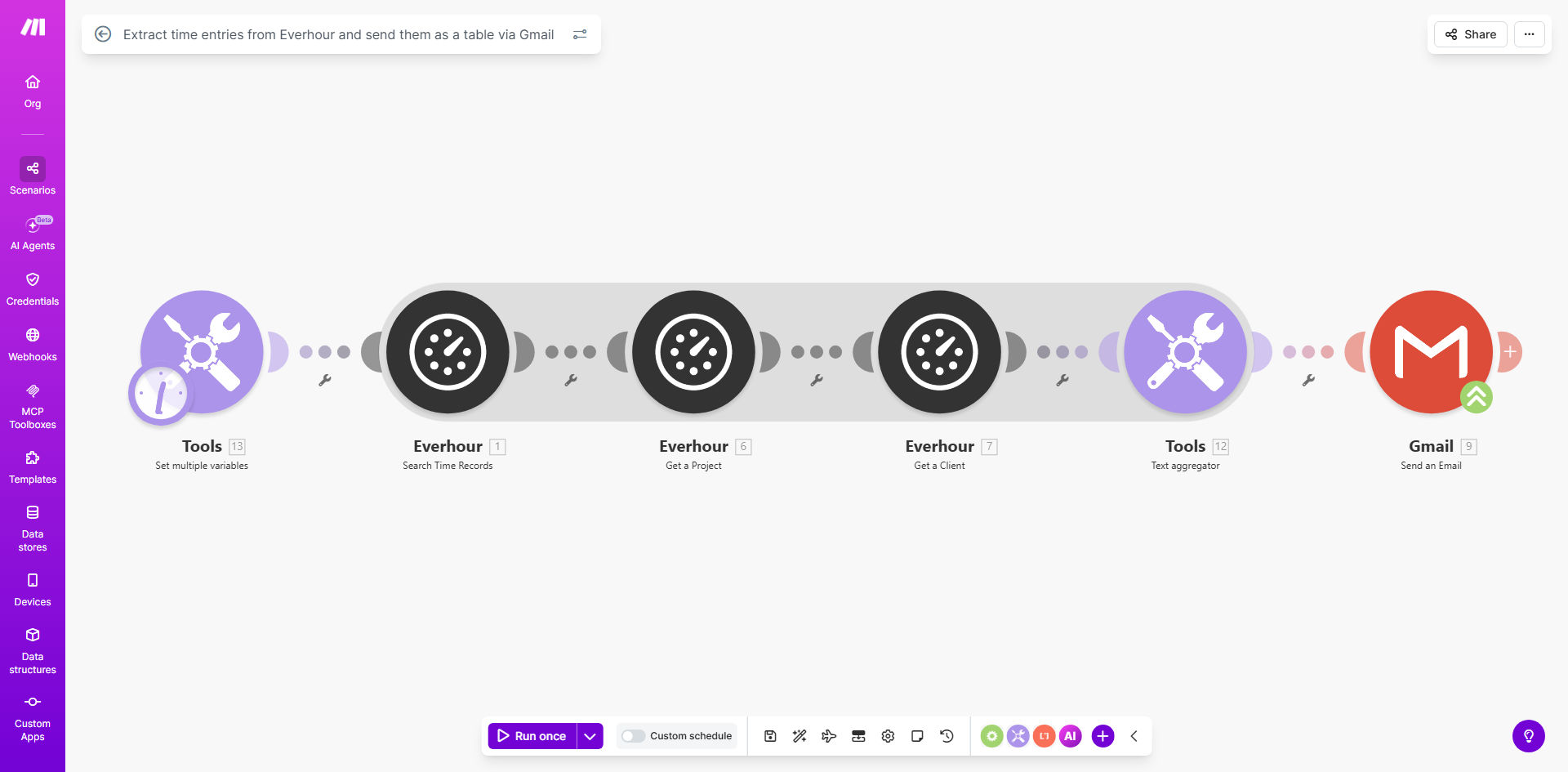
Make.com automation workflow diagram showing Everhour connected to Gmail for time reporting

What This Workflow Does

For agencies, consultants, and remote teams, manually compiling time entries from Everhour into a weekly report is a tedious, error-prone task that steals valuable hours from billable work. This automation solves that by creating a hands-off reporting system.

The workflow connects your Everhour account to Gmail, pulling time data for a specified period (default is the last 7 days), organizing it into a clear table with columns for date, task, project, client, and cost, and then emailing it to designated recipients on a schedule you set. It turns raw time-tracking data into actionable business intelligence delivered on autopilot.

How It Works

The automation runs on a reliable, scheduled cycle, ensuring your reports are never forgotten.

Step 1: Scheduled Trigger & Data Fetch

Every Monday at 8 AM (configurable), the scenario activates. It immediately queries your Everhour account for all time entries logged within the lookback window, securely pulling the raw data into Make.com for processing.

Step 2: Data Structuring & Table Creation

The workflow maps the retrieved data into a structured format. It extracts the key columns—created at, task name, project name, client name, and cost—and prepares them to be rendered as a clean HTML table, ready for email.

Step 3: Email Composition & Dispatch

Using Gmail, the automation composes a new email. It sets the subject (e.g., "Weekly Time Report: [Date Range]"), addresses it to your chosen stakeholders, and inserts the formatted HTML table into the body. The email is then sent automatically, completing the report cycle.

Pro tip: Use the email's BCC field to send a copy to your finance team or a dedicated Slack channel via email integration, keeping everyone informed without cluttering primary inboxes.

Who This Is For

This automation is a game-changer for service-based businesses and internal teams that rely on accurate time tracking for operations and billing.

  • Digital Agencies & Consultancies: To provide transparent weekly updates to clients on how time was spent on their projects.
  • Freelancers & Solopreneurs: To keep a personal, automated log of billable hours for invoicing and productivity review.
  • Remote Team Managers: To get a consolidated view of team output without needing to ask for manual updates.
  • Finance & Operations Departments: To receive standardized cost data for project accounting and profitability analysis.

What You'll Need

  1. A Make.com account (free tier available).
  2. An Everhour account with API access enabled (available on paid plans).
  3. A Gmail account or Google Workspace account from which to send the reports.
  4. The email addresses of the report recipients (project managers, clients, etc.).

Quick Setup Guide

You can have this automation running in under 15 minutes.

  1. Clone the Template: Click "Get This Workflow" and duplicate the scenario into your Make.com workspace.
  2. Connect Your Apps: In the first module, authorize the connection to your Everhour account using your API token. Then, authorize the Gmail module with your Google account.
  3. Set the Schedule: Configure the scheduler module to run on your preferred day and time (e.g., every Friday afternoon).
  4. Define Recipients: In the Gmail module, enter the "To" and "BCC" email addresses for who should receive the report.
  5. Test & Activate: Run the scenario once manually to ensure it fetches data and sends an email correctly. Then, turn the scenario "ON" to let it run automatically.

Key Benefits

Save 2–3 hours per week per manager previously spent on manual data compilation, copying, pasting, and emailing. This time is now reclaimed for strategic work.

Eliminate human error in reporting by automating the data transfer. The numbers in the email table match Everhour exactly, ensuring billing and payroll accuracy.

Improve client transparency and trust with consistent, professional-looking reports delivered on schedule, demonstrating accountability and organization.

Gain real-time visibility into project costs with weekly snapshots, allowing for quicker budget adjustments and preventing profit margin erosion.

Standardize the reporting process across your entire organization, ensuring every team and client receives information in the same clear format.

Frequently Asked Questions

Common questions about time tracking automation and integration

Automating time reports saves hours of manual work each week, ensures data is always accurate and on time, and provides clear visibility into project costs and team productivity for better business decisions. It transforms a reactive administrative task into a proactive strategic tool.

For example, a marketing agency can automatically send weekly time summaries to each client, building trust through transparency and freeing up account managers to focus on strategy rather than data entry.

The main benefit is seamless, scheduled communication. Project managers and clients automatically receive formatted time reports in their inbox without anyone needing to remember to compile or send data. This improves transparency and billing accuracy.

Beyond convenience, it creates a reliable paper trail. Every report is a recorded email that can be referenced later for billing disputes, project audits, or performance reviews, all generated automatically.

Reports should go to project managers, team leads, finance departments, and external clients. Tailoring the recipient list ensures stakeholders see the data relevant to them, improving accountability and client trust.

Consider creating different report streams: a detailed version with costs for internal finance, a client-friendly summary excluding internal rates, and a high-level overview for company leadership to track overall capacity and utilization.

By seeing real-time labor costs per project, you can identify budget overruns early, adjust resource allocation, and ensure accurate client billing. This data-driven approach directly protects your profit margins.

For instance, if a development project is consistently consuming more hours than budgeted, the weekly report flags it immediately. You can then investigate scope creep, provide additional training, or initiate a client conversation about change orders before the project becomes unprofitable.

Weekly reports are ideal for most teams, providing timely insights without overwhelming recipients. Monthly summaries are better for high-level client billing. The frequency should match your project review and billing cycles.

Start with weekly reports for internal teams to catch issues quickly. For clients, align the report frequency with your invoicing schedule—weekly for retainer clients, monthly for project-based work. The automation can be easily duplicated and scheduled differently for each audience.

Yes. Beyond the standard columns, you can add billable vs. non-billable hours, hourly rates, employee names, or custom tags. This allows you to create reports tailored for internal analysis or detailed client invoices.

With Make.com's visual builder, you can filter data (e.g., only show billable hours), perform calculations (e.g., total cost per project), and even format the email with your company logo and branding for a professional touch.

Common mistakes include not filtering data by project or date range, sending reports to the wrong people, and failing to format the email for clarity. Always test the automation with a small data set first.

Other pitfalls are setting the lookback window incorrectly (causing duplicate or missed entries) and not securing API credentials properly. Ensure your Everhour API token has the correct read-only permissions and is stored securely within Make.com's connection settings.

Absolutely. GrowwStacks specializes in building custom automation that fits your exact reporting needs, integrates with your other tools like QuickBooks or Slack, and scales with your business. Book a free consultation to discuss your requirements.

We can design a system that not only emails reports but also posts summaries to a Slack channel, updates a Google Sheet dashboard, or triggers alerts when projects exceed budgeted hours. Our goal is to create a complete, hands-off operational insight system for you.

Need a Custom Time Reporting Automation?

This free template is a starting point. Our team builds fully tailored automation systems for your specific business needs.