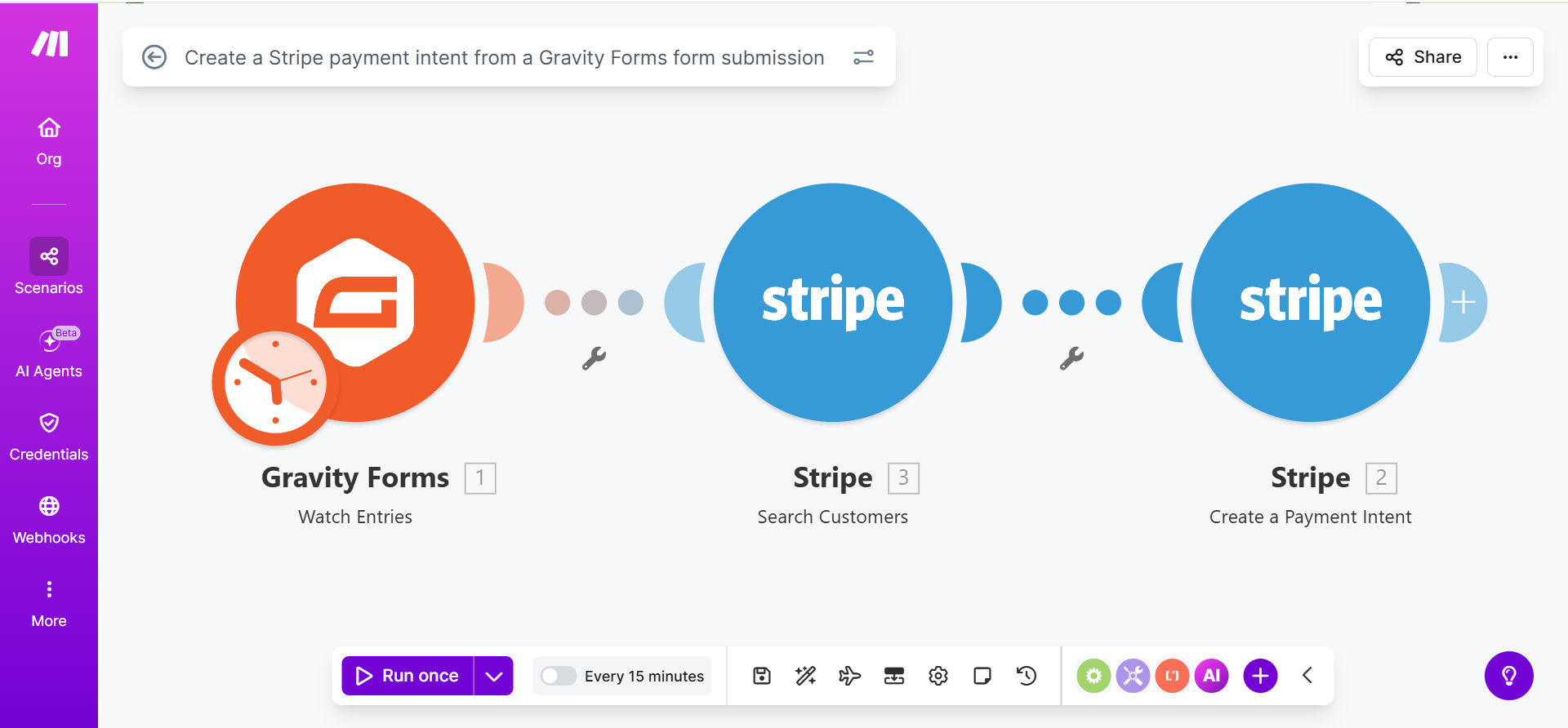
What This Workflow Does
Manually processing payments from online forms is a time-consuming and error-prone bottleneck. After a customer submits a Gravity Forms form for a donation, event ticket, or product order, someone on your team must manually create an invoice or payment link in Stripe, send it to the customer, and track its status. This delays payment, creates administrative overhead, and can lead to lost revenue if a step is forgotten.
This automation solves that by creating a direct, real-time bridge between Gravity Forms and Stripe. The moment a form is submitted, the workflow instantly creates a Stripe Payment Intent—a secure object that represents your intent to collect payment. This automatically generates a secure checkout link for the customer, ensuring the payment process begins immediately without any manual intervention from your team.
How It Works
The workflow is a streamlined, three-step process that runs silently in the background, turning form submissions into actionable payment requests.
Step 1: Trigger on Form Submission
The automation is triggered every time a new entry is submitted to your specified Gravity Forms form. Make.com watches for this event and immediately captures all the submitted data, such as the customer's name, email, and the critical payment amount.
Pro tip: Ensure your Gravity Forms form includes a dedicated number or calculation field for the payment amount. This provides a clean, reliable data point for Stripe.
Step 2: Map Data to Stripe
The workflow then routes the captured form data to Stripe via its API. It maps the form fields to the parameters required to create a Payment Intent. This includes the amount (converted to cents), the customer's email for receipt, and a descriptive statement descriptor that will appear on their bank statement.
Step 3: Create the Payment Intent & Notify
Stripe receives the request and creates a secure Payment Intent object. This object contains a unique client secret and a payment link. The workflow can then be extended to email this payment link directly to the customer or store the transaction details in a spreadsheet or CRM for your records, closing the loop automatically.
Who This Is For
This template is ideal for any business or organization that uses Gravity Forms on WordPress and needs to collect payments. It's particularly valuable for:
- Nonprofits & Charities: To instantly generate donation payment links after a supporter fills out a contact or dedication form.
- Event Organizers & Coaches: To automate registration fee collection for workshops, webinars, or training programs.
- Small E-commerce & Service Businesses: To process orders for custom goods, digital products, or service deposits directly through a quote or order form.
- Membership Sites: To handle one-time initiation fees as part of a membership application form.
What You'll Need
- A Make.com account (free tier available).
- A Stripe account with API keys (found in your Stripe Dashboard under Developers).
- A WordPress website with Gravity Forms installed and a form built.
- Your Gravity Forms form must include a field for the payment amount and ideally the customer's email.
- The Gravity Forms API (via the "Gravity Forms Webhooks" add-on or similar) enabled to send data to Make.com.
Quick Setup Guide
- Clone the Template: Click "Get This Workflow" and duplicate the scenario into your Make.com account.
- Connect Gravity Forms: In the first module, authenticate and select the specific form that will trigger the payment process.
- Connect Stripe: Add your Stripe API secret key to the Stripe module to establish a secure connection.
- Map the Fields: Map the form field containing the payment amount to the Stripe 'amount' field (remembering to multiply by 100 to convert to cents). Map the customer email field as well.
- Test & Activate: Run a test submission with a small amount (e.g., $1.00) to ensure a Payment Intent is created successfully in your Stripe test mode. Then, switch to live mode and activate the scenario.
Key Benefits
Accelerate Cash Flow: Payments are initiated within seconds of form submission, dramatically reducing the time between a customer's intent to pay and the actual payment collection. This improves your working capital and revenue predictability.
Eliminate Manual Admin: Completely remove the repetitive task of manually creating invoices or payment links. This can save several hours per week, allowing your team to focus on higher-value activities like customer service or business growth.
Reduce Human Error: Automating the data transfer between forms and Stripe ensures accuracy. There's no risk of typos in the payment amount or customer email, which can lead to failed payments or customer frustration.
Enhance Professionalism & Trust: Providing an instant, secure Stripe checkout link directly after form submission creates a seamless and professional user experience. It builds trust and increases the likelihood of payment completion.
Scale Operations Effortlessly: Whether you receive 10 or 1000 form submissions a day, the automation handles each one instantly and consistently. Your payment processing system scales automatically with your business growth.