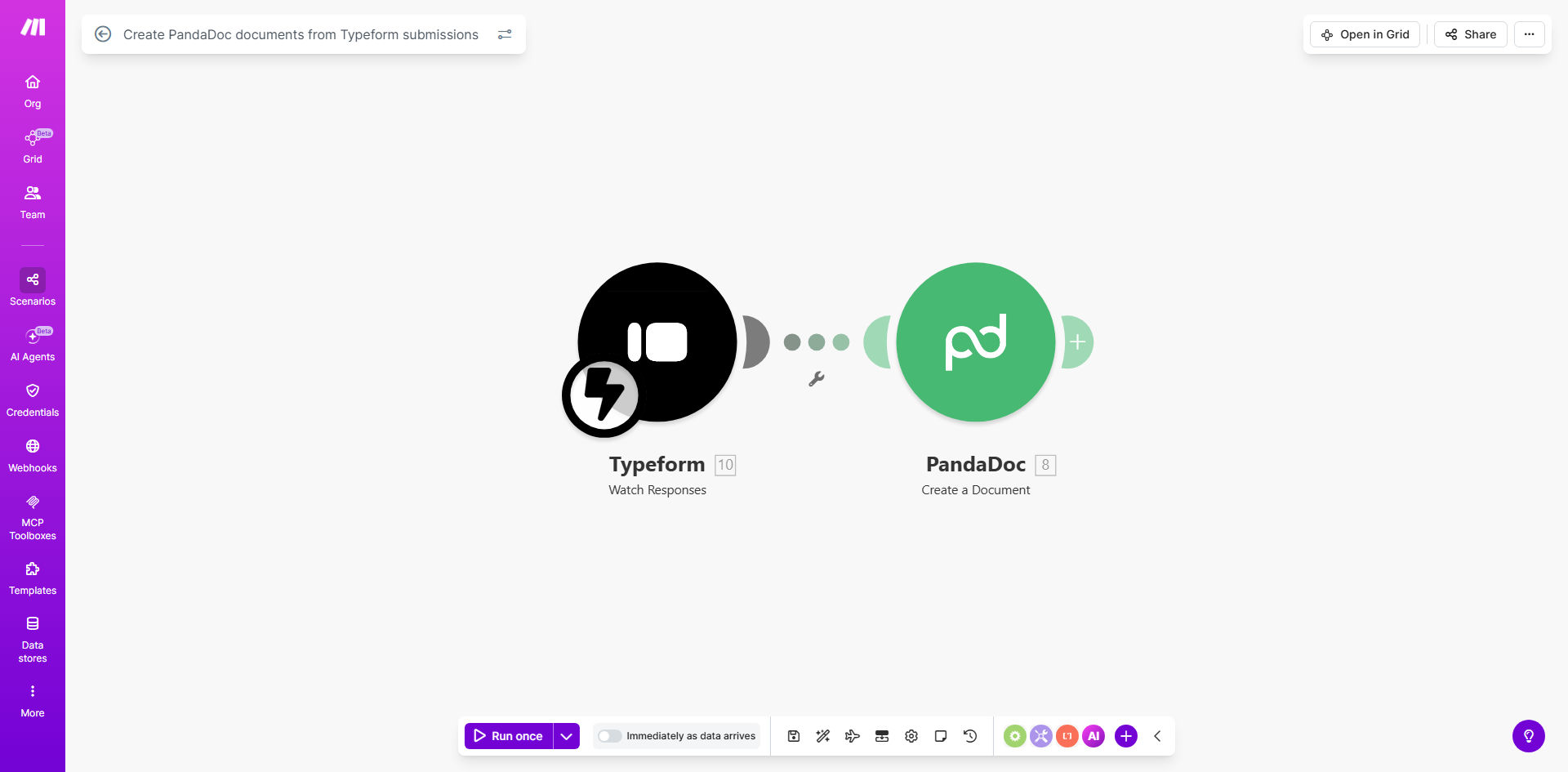
What This Workflow Does
For businesses that rely on forms to capture client information—like consultancies, agencies, or service providers—the gap between receiving a lead and sending a formal proposal is often filled with tedious, error-prone manual work. Someone must copy data from a Typeform submission into a Word or PDF template, format it, and then send it out. This process can take 15–30 minutes per lead and introduces risks of typos or outdated pricing.
This automation solves that by creating a seamless bridge between Typeform and PandaDoc. The moment a prospect submits your qualification or quote request form, this workflow instantly triggers. It takes the submitted data—company name, contact details, project specifics—and uses it to populate a pre-designed, professional PandaDoc template. The result is a fully personalized document, such as a sales proposal, service agreement, or statement of work, generated in seconds instead of hours.
The business value is immense: you respond to leads while their interest is highest, you present a consistently professional image, and you free your team from administrative drudgery to focus on selling and serving clients. It turns a lead capture form into a powerful document engine.
How It Works
The workflow operates on a simple "trigger-and-action" principle within Make.com, connecting two powerful platforms without any code.
Step 1: Trigger on New Typeform Submission
The automation starts when a new response is submitted to your designated Typeform. Make.com watches for this event and immediately captures all the answer data from the form fields.
Step 2: Map Data to PandaDoc Variables
The core of the automation is data mapping. Make.com takes the specific answers (e.g., "Company name" from Typeform) and assigns them to corresponding custom variables in your PandaDoc template (e.g., [Client.Company]). This step ensures the document is populated accurately.
Pro tip: Name your Typeform fields clearly (e.g., "Client Company Name") to make mapping intuitive in Make.com's visual interface. This prevents confusion during setup and maintenance.
Step 3: Create (and Optionally Send) the Document
Using the mapped data, Make.com instructs PandaDoc to create a new document from your chosen template. The document is generated with all client details in place. You can configure the workflow to automatically send the document to the client via PandaDoc's email system for e-signature, or simply create it as a draft for your team to review first.
Step 4: Notify Your Team or Update Your CRM
As a final step, you can add modules to notify your sales team via Slack or email that a new proposal has been generated, or even log the activity in your CRM like HubSpot or Salesforce. This creates a complete, closed-loop process from lead to document.
Who This Is For
This automation is a game-changer for any professional service business or individual that uses forms to initiate client engagements. It's perfectly suited for:
- Consultants & Freelancers: Quickly generate project proposals and contracts after a discovery call questionnaire.
- Marketing & Web Design Agencies: Automate quote and scope-of-work creation from project inquiry forms.
- SAAS Companies & Tech Services: Streamline the onboarding process by generating service agreements from sign-up forms.
- Coaches & Course Creators: Send personalized enrollment agreements or program outlines automatically.
- Small Business Sales Teams: Accelerate the sales cycle by providing instant, professional proposals to qualified leads.
What You'll Need
To implement this workflow successfully, you'll need the following set up in advance:
- A Typeform account with a live form that collects the necessary client information (e.g., company name, address, contact person).
- A PandaDoc account with a professional document template already created. This template must use custom variables (tokens) like
[Client.Company]and[Client.RepresentedBy]where the dynamic data will go. - A Make.com account (free tier works to start) to build and run the automation.
- The API connections between Make.com and both Typeform and PandaDoc, which are simple one-click authorizations.
- A clear understanding of which Typeform question corresponds to which PandaDoc template variable for accurate mapping.
Quick Setup Guide
Follow these steps to get your automation live in under 30 minutes:
- Prepare Your PandaDoc Template: In PandaDoc, create or duplicate your proposal/contract template. Insert custom variables (tokens) for every piece of information you'll pull from Typeform (e.g.,
[Client.StreetAddress],[Client.City]). Save the template and note its ID. - Clone the Template in Make.com: Use the "Get This Workflow" button above to open the pre-built template in Make.com. Click "Copy" to add it to your own scenarios.
- Connect Your Apps: In the Make.com scenario, click on the Typeform and PandaDoc modules. Authorize each to connect to your respective accounts.
- Configure the Trigger: Select the specific Typeform you want to use as the trigger for the automation.
- Map the Data Fields: This is the crucial step. In the PandaDoc "Create a Document from Template" module, map each required field (like "Recipient Name" or "Custom Variable Value") to the corresponding answer from the Typeform module above it. Use the drop-down menus to select the correct data.
- Test and Activate: Turn on the scenario and submit a test entry to your Typeform. Check your PandaDoc account to verify a new document was created with all data correctly populated. Once confirmed, your automation is live!
Pro tip: Always use a test email address and dummy company data for your first few runs. This allows you to verify formatting and data flow without sending anything to a real client.
Key Benefits
Cut document creation time from 30 minutes to 30 seconds. The most immediate benefit is massive time savings. What was a manual, multi-step task for your team becomes an instantaneous background process, allowing them to handle more leads and focus on relationship-building.
Eliminate costly errors and ensure brand consistency. Manual data entry is prone to typos, forgotten fields, and version control issues. Automation guarantees that every document is generated from the latest, approved template with 100% accurate data, protecting your professional reputation.
Accelerate your sales cycle and improve close rates. Speed is a competitive advantage. Sending a personalized proposal within minutes of a form submission demonstrates professionalism and responsiveness, significantly increasing the likelihood of closing the deal while the lead is still engaged.
Scale your operations without adding administrative overhead. As your business grows, the volume of documents doesn't become a bottleneck. This system handles one or one hundred submissions with the same efficiency, enabling you to scale your client onboarding or sales process seamlessly.
Gain visibility and track document status automatically. By integrating with your CRM or notification systems, you create an audit trail. You'll always know when a proposal was sent and can track its opening and signing status directly from PandaDoc, improving follow-up and pipeline management.