Make.com LinkedIn Zoho CRM Lead Generation Sales Automation

Automatically Sync LinkedIn Leads to Zoho CRM

Capture high-intent LinkedIn leads instantly in your CRM. This free template eliminates manual entry, speeds up sales follow-up, and ensures no lead falls through the cracks.

Get This Workflow Make.com · LinkedIn & Zoho CRM · Free Template
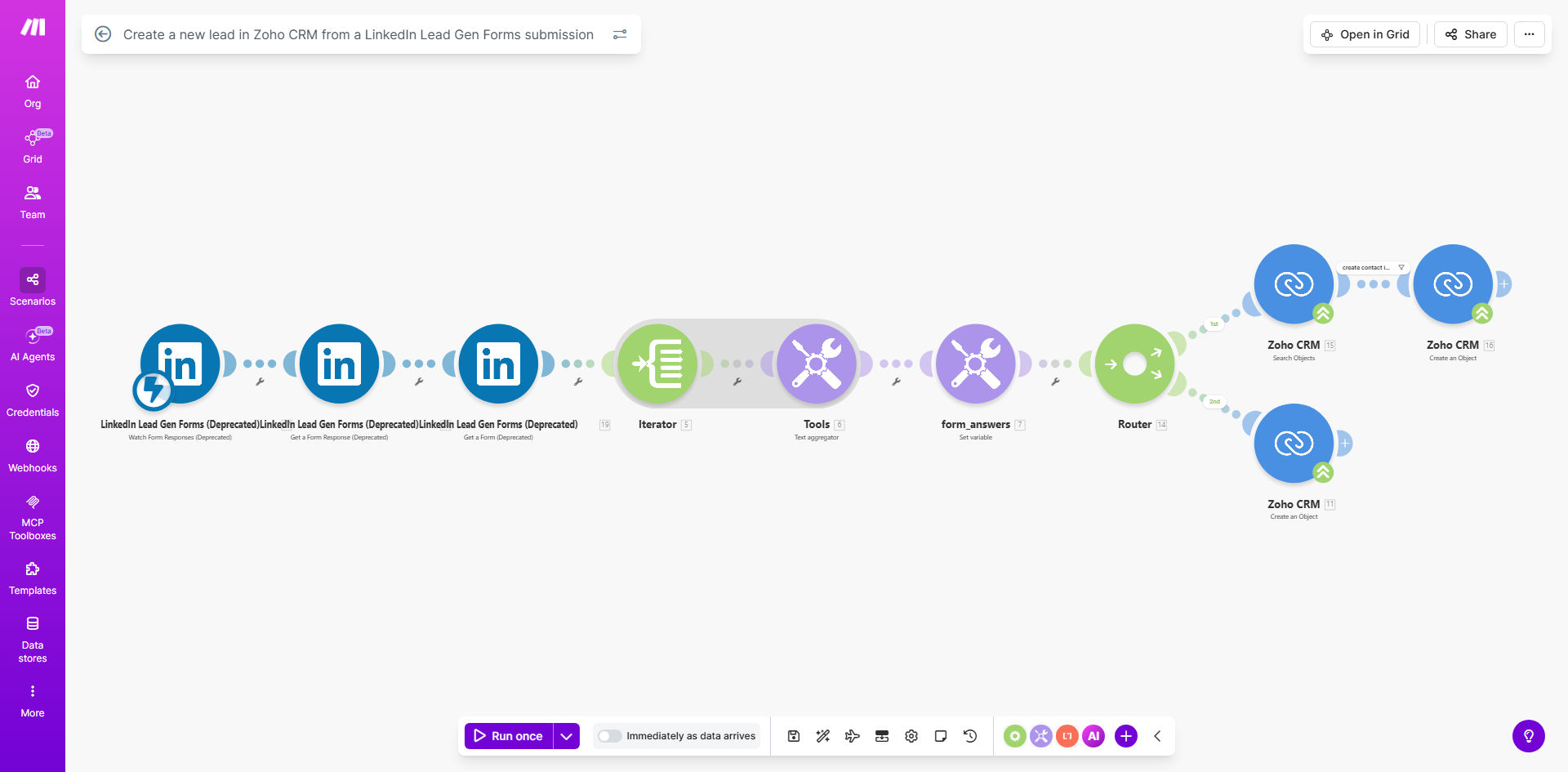
Diagram showing automation flow from LinkedIn Lead Gen Form to Zoho CRM creating a new lead

What This Workflow Does

For B2B marketers and sales teams, LinkedIn Lead Gen Forms are a goldmine of high-quality prospects. However, the value is lost if those leads sit in a spreadsheet or require manual transfer into your Customer Relationship Management (CRM) system. This delay creates a bottleneck, slowing response times and potentially losing deals to faster competitors.

This automated workflow solves that problem by acting as a real-time bridge between LinkedIn and Zoho CRM. Every time a prospect submits their information through your LinkedIn ad form, this system springs into action. It intelligently checks if the contact already exists in Zoho CRM to prevent duplicates, then creates both a new contact record and a new sales lead, complete with all the captured details like name, email, phone, and company. The result is a fully qualified lead appearing in your sales team's pipeline within seconds, not hours.

How It Works

The automation follows a logical, error-proof sequence to ensure data integrity and immediate processing.

Step 1: Trigger from LinkedIn

The workflow is activated the moment a new submission is received from your LinkedIn Lead Gen Form. Make.com captures the entire form response, including all the fields you've configured, such as first name, last name, email, phone, and company name.

Step 2: Search Zoho CRM for Existing Contact

Before creating a duplicate, the automation performs a smart search within your Zoho CRM. It typically uses the submitted email address as a unique identifier to check if a contact record for this person already exists.

Pro tip: Using email for the search is the most reliable method to avoid duplicates, as people rarely change their primary professional email.

Step 3: Create or Update the Contact

Based on the search result, the workflow takes one of two paths. If the contact is found, it can update the existing record with the new information from LinkedIn (like a new phone number or company). If no contact is found, it creates a brand new contact in Zoho CRM, populating all the relevant fields.

Step 4: Create a New Lead

Finally, the workflow creates a new "Lead" record in Zoho CRM and links it to the newly created or existing contact. This lead is the actionable item for your sales team, containing the source (LinkedIn), submission time, and all qualifying information, ready for immediate follow-up.

Who This Is For

This automation is a game-changer for B2B companies that actively use LinkedIn advertising for lead generation. It's perfect for:

  • Sales Directors & VPs: Who need to shorten the sales cycle and improve lead response time metrics.
  • Marketing Teams: Running LinkedIn ad campaigns who want to prove ROI by showing directly how leads flow into the sales pipeline.
  • Startups & SMBs: Where small teams need to operate efficiently and can't afford to waste time on manual data entry.
  • Business Development Reps (BDRs): Who want leads delivered instantly to their CRM queue so they can contact prospects while interest is hottest.

What You'll Need

To implement this workflow, you will need the following accounts and configurations:

  1. A Make.com account (formerly Integromat). A free plan is sufficient to start.
  2. An active LinkedIn Campaign Manager account with a Live Lead Gen Form.
  3. A Zoho CRM account with administrative access to create API connections.
  4. Your LinkedIn form should be configured to collect at least these key fields: First Name, Last Name, Email, Phone Number, and Company Name.
  5. (Recommended) A dedicated "Lead Source" field in Zoho CRM to tag records coming from LinkedIn.

Quick Setup Guide

You can have this automation running in under 30 minutes by following these steps:

  1. Get the Template: Click the "Get This Workflow" button above to clone the template into your Make.com account.
  2. Connect LinkedIn: In the first module, authorize Make.com to access your LinkedIn Lead Gen Forms using OAuth.
  3. Connect Zoho CRM: In the subsequent modules, authorize the connection to your Zoho CRM account. You'll need your Zoho CRM credentials and may need to generate a secure server domain for the API.
  4. Map Your Fields: Review the workflow modules to ensure the data from your LinkedIn form (e.g., 'firstName', 'lastName') is correctly mapped to the corresponding field names in Zoho CRM (e.g., 'First Name', 'Last Name').
  5. Test & Activate: Use the "Run once" feature in Make.com to test the workflow with a recent form submission. Verify that a contact and lead appear correctly in Zoho CRM. Once confirmed, activate the scenario to run automatically.

Key Benefits

Eliminate 15–30 minutes of manual data entry per lead. Your team reclaims hours each week previously spent copying and pasting information from LinkedIn into the CRM, time that can now be spent selling.

Increase lead conversion rates by responding up to 10x faster. Studies show contacting a lead within 5 minutes makes you 21x more likely to qualify them. This automation makes instant follow-up a standard practice.

Ensure 100% data capture and zero lead leakage. No more lost sticky notes or forgotten spreadsheet rows. Every single LinkedIn form submission is guaranteed to enter your sales pipeline with full context.

Improve CRM data hygiene by preventing duplicate contacts. The built-in search function ensures your Zoho CRM database remains clean and organized, which is critical for accurate reporting and segmentation.

Gain clear ROI on LinkedIn ad spend. By directly linking lead submissions to CRM records, you can easily track how many LinkedIn leads become opportunities and customers, justifying your advertising budget.

Frequently Asked Questions

Common questions about LinkedIn and CRM automation and integration

You can use automation platforms like Make.com to connect LinkedIn Lead Gen Forms directly to your CRM, such as Zoho. When someone submits their details on LinkedIn, the workflow instantly creates a new contact and lead record in your CRM, eliminating manual copying and pasting. This ensures your sales team gets notified immediately with all the prospect's information ready for follow-up.

This integration works via the official APIs provided by both LinkedIn and Zoho CRM, ensuring a secure and reliable data transfer. The setup involves authorizing the connection in your automation tool and mapping the form fields to the correct CRM fields once.

Integrating LinkedIn with Zoho CRM centralizes your lead data, improves lead response time, and increases conversion rates. It eliminates data silos by automatically funneling social media leads into your main sales pipeline. Your team can act on warm leads within minutes instead of hours, and you gain a complete view of prospect interactions from the first touchpoint.

Beyond speed, it provides accurate tracking for marketing ROI. You can directly attribute deals and revenue back to specific LinkedIn campaigns, allowing for better budget allocation and strategy refinement based on what actually generates business.

Yes, when set up correctly using secure, official APIs from LinkedIn and Zoho CRM, the data transfer is safe and compliant. Automation platforms like Make.com act as a secure conduit, passing encrypted data between the two systems without storing it long-term. Always ensure your forms have proper consent language and you are compliant with data privacy regulations like GDPR.

For added security, use OAuth authentication for connections, which doesn't require sharing passwords. Regularly review the access permissions of your connected apps and ensure only necessary data fields are transferred.

Collect key details that help your sales team qualify and contact leads effectively: first name, last name, email address, phone number, and company name. Keep forms short to maximize submissions—asking for too much information can reduce conversion rates. The data you collect should map directly to fields in your CRM for seamless automation.

Consider adding one qualifying question related to your offer (e.g., "What's your biggest challenge with X?"). This provides immediate context to your sales team, helping them personalize their first outreach and improving the quality of the conversation from the start.

Follow up within 5-10 minutes for the highest chance of conversion. Leads contacted within this window are significantly more likely to engage. Automation ensures instant lead capture and can even trigger an immediate automated email or task assignment to a sales rep, making rapid follow-up achievable even outside business hours.

The goal is to reach out while your brand and offer are top of mind for the prospect. A delay of even an hour can see your response buried under other emails, drastically reducing the likelihood of a reply.

Yes, a well-designed automation can check for existing contacts by email address before creating a new record. This workflow includes a search step to find a matching contact in Zoho CRM. If a contact exists, it updates their information or simply creates a new lead associated with them, preventing clutter and maintaining data hygiene in your CRM.

This deduplication logic is crucial for maintaining an accurate customer database, which is essential for effective email marketing, reporting, and customer service. It ensures each person has a single, comprehensive record of all interactions.

Beyond CRM entry, you can automate a welcome email sequence, assign the lead to a specific sales representative based on territory, post the lead details to a Slack channel for immediate team notification, or schedule a follow-up task in your project management tool. This creates a full-fledged lead management system from a single form submission.

You can also enrich the lead data by automatically pulling in additional firmographic information from tools like Clearbit or adding a lead score based on their company size or job title. The key is to design a workflow that fits your unique sales process.

Absolutely. GrowwStacks specializes in building tailored automation systems that connect LinkedIn with your specific CRM and sales process. We can design workflows that include custom lead scoring, integration with other tools like your email marketing platform, and detailed reporting dashboards. Book a free consultation to discuss your unique requirements and how automation can accelerate your sales pipeline.

Our experts handle the entire setup, from API configuration and field mapping to testing and training your team. We ensure the automation aligns with your business rules and scales with your growth, providing ongoing support to keep everything running smoothly.

Need a Custom LinkedIn-to-CRM Automation?

This free template is a starting point. Our team builds fully tailored automation systems for your specific business needs.