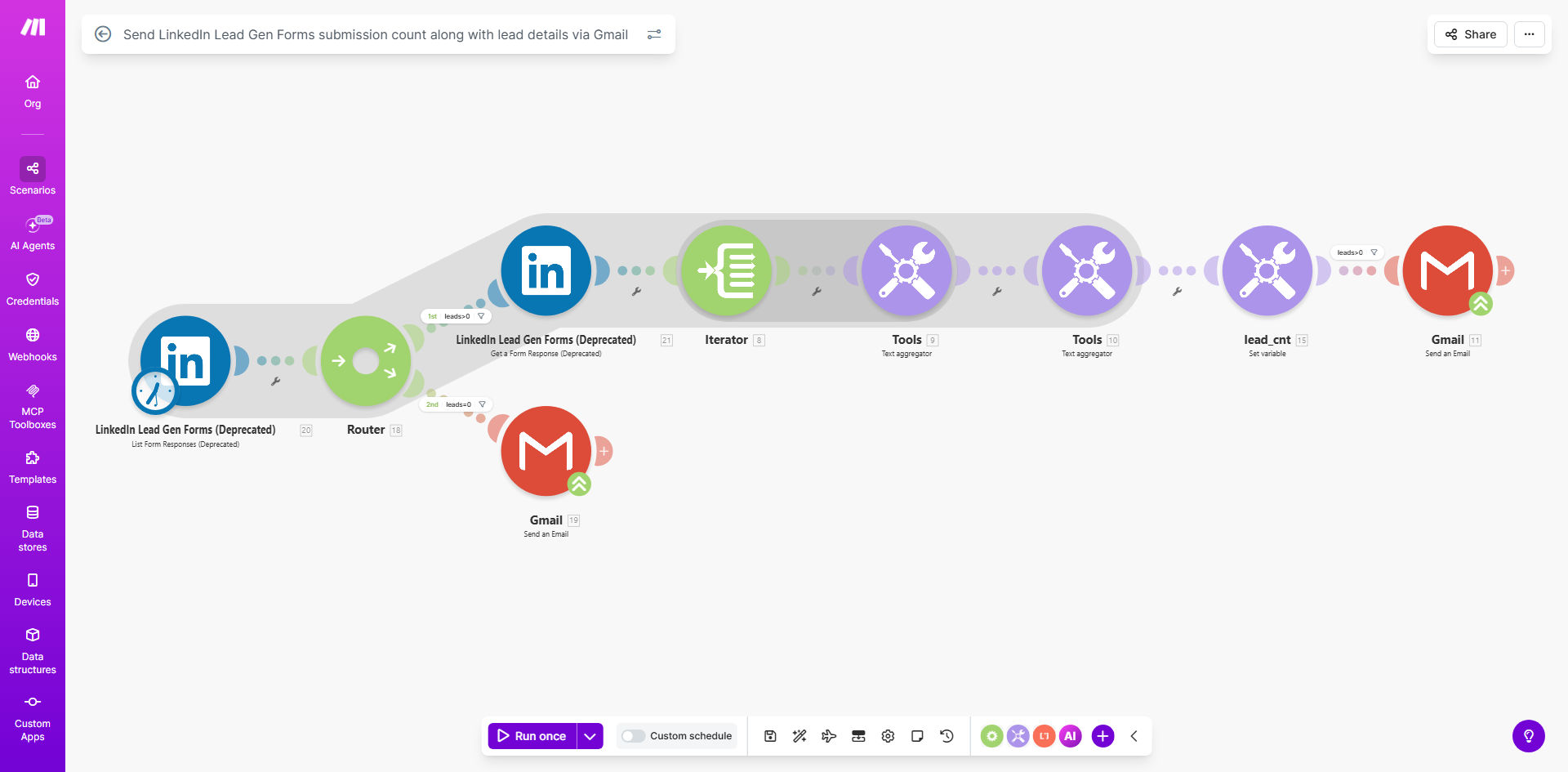
What This Workflow Does
Running LinkedIn lead generation campaigns is effective, but manually tracking results is a time-consuming hassle. Marketing and sales teams often waste hours each week logging into LinkedIn, exporting form data, compiling spreadsheets, and emailing summaries. This manual process is prone to delays and errors, causing missed follow-up opportunities and unclear campaign performance.
This automation solves that problem. It acts as your personal reporting assistant, connecting directly to your LinkedIn Lead Gen Forms. Every Monday morning, it automatically fetches all new submissions from the past seven days, counts them, compiles the lead details, and sends a clean, formatted report directly to your Gmail inbox. You get consistent, actionable data without ever having to lift a finger, freeing up your time for strategic work.
How It Works
The workflow runs on a scheduled timer, creating a reliable "set-and-forget" system for lead reporting.
Step 1: Scheduled Trigger
Every Monday at 9 AM, the workflow automatically activates. This scheduled trigger ensures you start your week with a fresh lead report, providing perfect timing for sales team meetings and weekly planning.
Step 2: Fetch LinkedIn Lead Data
The automation connects to the LinkedIn API using your credentials. It requests all submissions from your specified Lead Gen Form(s) that were collected in the last 7 days. This lookback window is configurable to match your reporting cycle.
Step 3: Process and Count Leads
The system processes the returned data, extracting key details for each lead like name, email, company, and job title. Simultaneously, it counts the total number of new submissions, giving you the crucial "lead count" metric at a glance.
Step 4: Format and Send Email via Gmail
All the compiled information is formatted into a clear, readable email. The subject line states the lead count and date range. The email body lists each new lead with their details. This report is then sent automatically from your connected Gmail account to your designated recipient(s).
Pro tip: Use this email report as a weekly agenda item for your sales huddle. The lead list provides immediate talking points for lead assignment and qualification discussions.
Who This Is For
This template is ideal for B2B marketing teams, sales operations managers, solopreneurs, and agencies that run LinkedIn advertising campaigns. If you use LinkedIn Lead Gen Forms to capture prospects and need a reliable way to get those leads to your team without manual work, this automation is for you. It's especially valuable for businesses that track weekly lead generation metrics or have a sales process that relies on prompt lead follow-up.
What You'll Need
- A Make.com account (free tier works for this workflow).
- A LinkedIn Ad Account with active Lead Gen Forms and the necessary API permissions (via LinkedIn Campaign Manager).
- A Gmail account to send the automated reports.
- The specific LinkedIn Lead Gen Form ID(s) you want to track.
- The email address(es) where the weekly report should be delivered.
Quick Setup Guide
You can have this automation running in under 15 minutes.
- Clone the Template: Click "Get This Workflow" and duplicate the scenario into your Make.com account.
- Connect LinkedIn: In the first module, authorize Make.com to access your LinkedIn Ad Account. Select the correct Ad Account and enter your Lead Gen Form ID.
- Configure the Schedule: The timer is set for Mondays at 9 AM. Adjust this in the Schedule module if you prefer a different day or time.
- Connect Gmail: Authorize the Gmail module with the account you want to send reports from.
- Set Email Details: Enter the recipient email address and customize the email subject/body if desired. The template includes placeholders for the lead count and details.
- Test & Activate: Run a single test cycle to ensure data flows from LinkedIn to your inbox correctly. Once confirmed, turn the scenario ON.
Key Benefits
Save 2-3 hours per week on manual reporting. Eliminate the repetitive task of logging in, downloading, and formatting LinkedIn lead data. This time can be reinvested into analyzing campaign performance or engaging with leads.
Ensure zero leads are missed or forgotten. With an automatic Monday morning report, your sales team is immediately aware of all new prospects from the previous week, drastically reducing follow-up lag and improving conversion rates.
Gain consistent, reliable campaign metrics. Receive a standardized lead count report every week, making it easy to track performance trends over time and measure the ROI of your LinkedIn ad spend accurately.
Improve team alignment and accountability. The shared email report creates a single source of truth for new leads, ensuring marketing and sales are on the same page and can quickly discuss lead distribution.
Create a foundation for advanced automation. This workflow is a perfect first step. Once running, you can easily extend it to add leads directly to your CRM, send personalized welcome emails, or trigger Slack notifications for hot leads.