What This Workflow Does
Managing Instagram comments manually is a time-consuming and error-prone task. Critical customer questions get buried, support requests go unanswered for hours, and valuable feedback is lost in the noise. This creates missed sales opportunities, frustrated customers, and an inconsistent brand presence.
This automation solves that by creating a seamless bridge between your Instagram presence and your business operations. It acts as a 24/7 social media assistant that instantly logs every comment to a centralized Google Sheet for record-keeping and analysis. More importantly, it scans each comment for predefined keywords—like "price," "how to buy," "support," or "demo"—and triggers a personalized, instant auto-reply. This transforms your comments section from a passive space into an active customer service and lead generation channel.
How It Works
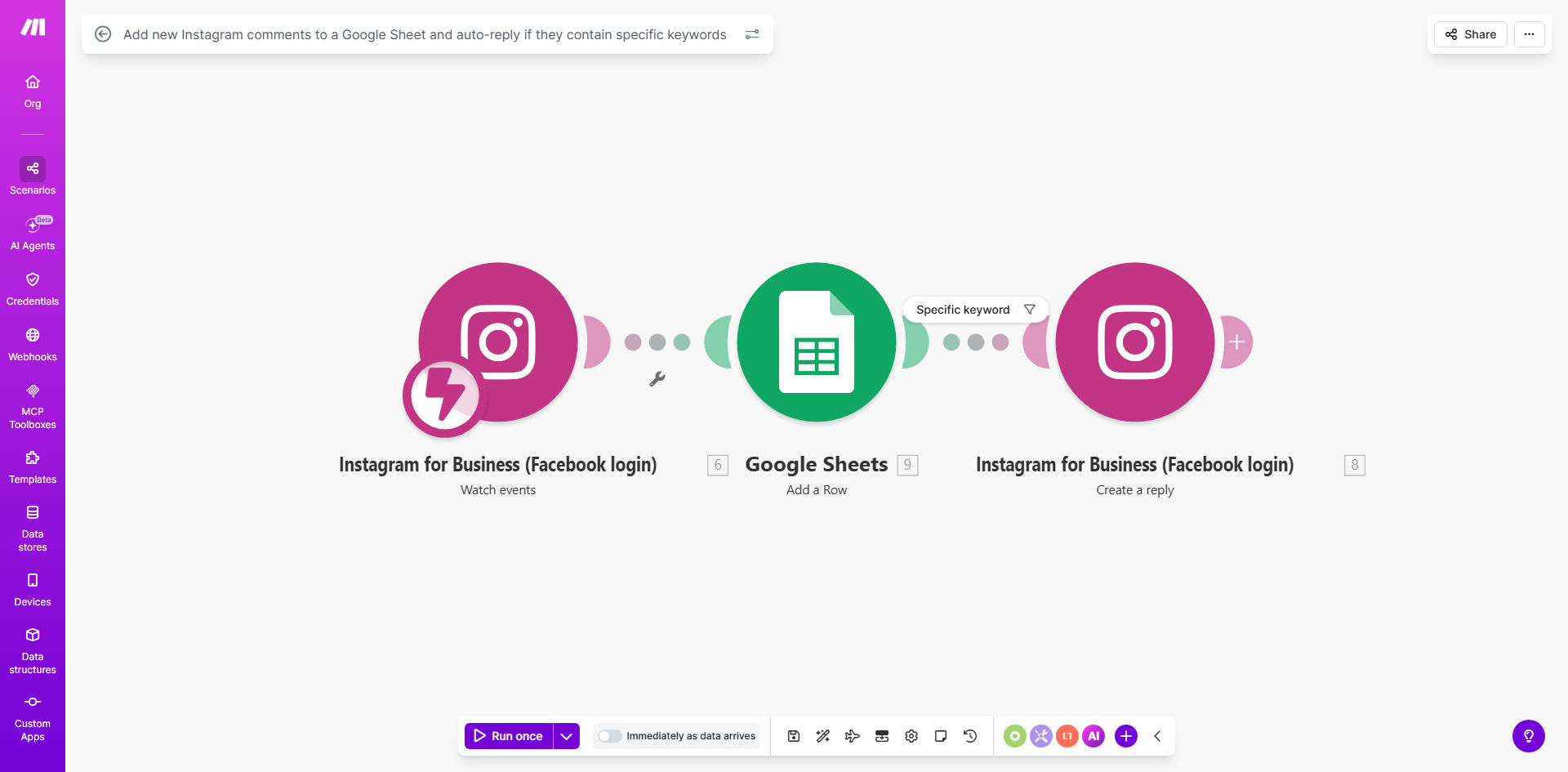
The workflow runs on a continuous watch cycle, connecting your Instagram account to Google Sheets and a reply engine.
Step 1: Instant Comment Detection
The scenario monitors your specified Instagram account for any new comment on your posts. As soon as a comment is published, the automation instantly captures all its details: the username, comment text, timestamp, post URL, and media ID.
Step 2: Secure Logging to Google Sheets
Every captured comment, without exception, is written as a new row in your designated Google Sheet. This creates a permanent, searchable database of all social interactions. Columns are automatically populated with the captured data, building a valuable asset for customer insight and campaign analysis.
Step 3: Smart Keyword Filtering
The system then analyzes the comment text against your list of target keywords. This list is fully customizable. You might have one set of keywords for sales inquiries ("price," "cost," "buy") and another for support ("help," "not working," "issue").
Step 4: Trigger Personalized Auto-Reply
If a match is found, the workflow immediately posts a reply to that specific comment. You craft the reply message template, which can include the user's name, links to specific pages, discount codes, or instructions. If no keyword match is found, the workflow simply ends, having already logged the comment for your review.
Pro tip: Use this log to identify common questions and then create keyword-response pairs for them. This creates a virtuous cycle where your automation gets smarter and handles more queries over time.
Who This Is For
This template is ideal for any business or creator using Instagram for growth and community building.
E-commerce brands can instantly answer product questions and direct users to product pages. Service-based businesses (coaches, consultants, agencies) can handle booking inquiries and qualify leads automatically. Content creators and influencers can manage high-volume comment sections during launches or giveaways. Marketing teams can capture user-generated content and campaign feedback in real-time. Essentially, if you receive more than a handful of comments daily and want to improve response time and data collection, this automation is for you.
What You'll Need
To implement this workflow, you'll need a few accounts and basic setup:
- A Make.com account (free tier is sufficient to start).
- An Instagram Business or Creator Account connected to a Facebook Page (required for the API).
- A Google account with access to Google Sheets (to create the log).
- A prepared list of keywords and corresponding reply messages you want to automate.
Quick Setup Guide
You can have this system live in under 30 minutes.
- Clone the Template: Click "Get This Workflow" to copy the scenario to your Make.com account.
- Connect Instagram: In the first module, authorize Make.com to access your Instagram account via the Facebook Graph API.
- Set Up Your Google Sheet: Create a new Sheet and note its ID. In the Google Sheets module, map the incoming comment data (username, text, date) to your desired column headers.
- Define Your Keywords: In the router or filter module, input the specific words or phrases you want to track (e.g., "cost," "how to," "tutorial").
- Craft Your Replies: In the final Instagram module, write the friendly, helpful reply that will be posted when a keyword is detected. You can personalize it using data from the comment.
- Activate & Test: Turn the scenario on and post a test comment containing one of your keywords to verify the log and reply work perfectly.
Key Benefits
Never miss a lead or customer question again. With instant detection and logging, every comment is captured and actionable, eliminating the risk of important interactions getting lost in your notifications.
Cut community management time by 80%. Automate the repetitive task of monitoring and responding to common queries, freeing up hours each week for strategic work instead of manual comment checking.
Improve customer satisfaction with lightning-fast responses. An instant, helpful auto-reply dramatically improves the user experience, making your brand appear more attentive and professional, which builds trust and loyalty.
Build a valuable marketing database at zero extra effort. The automatic Google Sheet log becomes a rich source of customer feedback, campaign sentiment, and FAQ trends that you can analyze to improve your products and messaging.
Scale your engagement without scaling your team. As your follower count and comment volume grow, this system handles the increased load effortlessly, ensuring consistent quality of interaction without requiring additional staff.