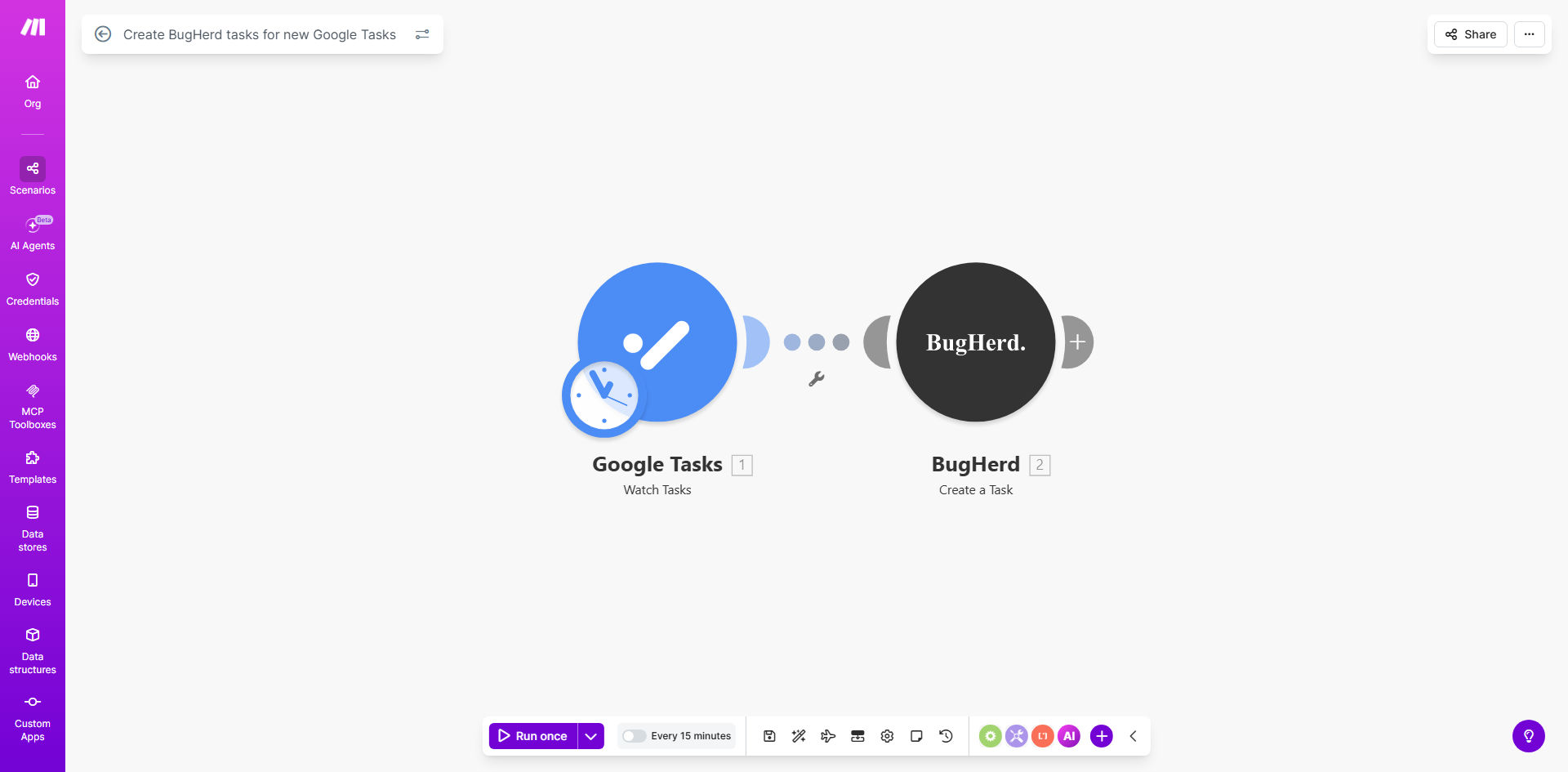
What This Workflow Does
Managing website feedback and development tasks across different teams is a common bottleneck. Designers, project managers, or clients often identify issues or request features using simple task lists like Google Tasks. Meanwhile, development teams use specialized tools like BugHerd to track visual bugs and implement fixes. The manual process of copying tasks from one system to another is slow, error-prone, and creates communication gaps.
This automation workflow solves that problem instantly. Whenever a new task is added to a designated Google Tasks list—whether it's a bug report, a feature request, or a general to-do—Make.com automatically creates a corresponding, detailed task in BugHerd. The workflow transfers the title, description, due date, and any other relevant details, ensuring the development team receives a clear, actionable item without any manual intervention.
The result is a seamless pipeline from feedback to action. Stakeholders can continue using the familiar, simple interface of Google Tasks, while developers get structured tasks directly in their professional bug-tracking environment. This eliminates duplicate data entry, reduces the time from issue discovery to ticket creation from hours to seconds, and ensures nothing gets lost in translation.
How It Works
The workflow is a straightforward, reliable automation built on Make.com. It acts as a bridge between Google Tasks and BugHerd, triggered by new entries and executing a single, powerful action.
Step 1: Monitoring Google Tasks
The scenario starts by watching a specific Google Tasks list. You configure the Make.com module to connect to your Google account and select the list you use for collecting feedback or project tasks (e.g., "Website Feedback", "Client Requests"). It polls this list at regular intervals, instantly detecting whenever a new task is created.
Step 2: Processing Task Data
When a new task is detected, Make.com captures all its data: the task title, notes (description), due date (if set), and any other custom fields. This information is parsed and prepared for the next step. You can add filters here—for example, only processing tasks marked as "High Priority" or containing specific keywords.
Pro tip: Use the notes field in Google Tasks to include crucial context like the webpage URL, screenshot links, or browser details. This rich information will be transferred to BugHerd, giving developers everything they need.
Step 3: Creating the BugHerd Task
Make.com then uses its BugHerd module to create a new task in your designated BugHerd project. It maps the Google Task data to BugHerd fields: the title becomes the task title, the notes become the task description, and the due date sets the deadline. The new BugHerd task is created with the status "Open," ready for your development team to assign and act upon.
The entire process runs automatically in the background. Your team no longer needs to act as a middleman, copying and pasting information between apps. The workflow ensures every piece of feedback logged in Google Tasks becomes a tracked, actionable item in BugHerd.
Who This Is For
This automation is ideal for any business or team that manages website development, design updates, or digital product feedback.
Web Development Agencies: Agencies receiving client feedback via email or shared documents can ask clients to add items to a shared Google Tasks list. Each client request automatically becomes a BugHerd task for the internal dev team, streamlining project management.
In-House Product Teams: Product managers, designers, and marketing staff often use Google Tasks for their own to-dos. When they identify a website issue or a new feature idea, this workflow ensures it instantly reaches the engineering team's official tracking system without requiring them to log into BugHerd.
Freelancers & Solo Developers: Even individual developers can benefit. They can use Google Tasks for personal task management and have critical website-related items automatically ported into BugHerd for proper tracking with screenshots and context, keeping their workflow organized.
What You'll Need
- A Make.com account with an active subscription plan to build and run the scenario.
- A Google account with Google Tasks enabled. You'll need to grant Make.com access to read tasks from your chosen list.
- A BugHerd account and at least one active project where tasks will be created. You'll need your BugHerd API key to connect Make.com.
- A designated Google Tasks list that will serve as the source for new tasks. This could be a new list created specifically for this workflow or an existing one.
- Basic understanding of the task data fields you want to transfer (e.g., title, notes, due date).
Quick Setup Guide
Setting up this automation is a quick process. Follow these steps to get it running in minutes.
- Clone the Template: Use the "Get This Workflow" button above to open the template on Make.com. Click "Copy this template" to add it to your own Make.com workspace.
- Connect Google Tasks: In the first module, add your Google account connection. Select the specific Tasks list you want to monitor for new tasks.
- Connect BugHerd: In the BugHerd module, add your BugHerd API key (found in your BugHerd account settings). Select the BugHerd project where new tasks should be created.
- Map the Data Fields: Ensure the data mapping is correct. Typically, the Google Task "Title" maps to BugHerd's "Task Title," and the "Notes" map to the "Description." Adjust if needed.
- Test the Flow: Turn the scenario on and create a test task in your Google Tasks list. Within moments, check your BugHerd project to confirm a new task appeared with the correct details.
- Deploy & Share: Once tested, the automation is live. Share the Google Tasks list with your team or clients, and explain that any added item will automatically become a BugHerd task.
Key Benefits
Save 2–5 hours per week on manual task entry. Eliminate the repetitive work of transferring feedback from emails, chats, or task lists into your bug-tracking system. This time savings directly increases your team's capacity for actual development work.
Reduce errors and miscommunication by 90%. Automated data transfer ensures every detail from the original task is preserved. There's no risk of forgetting a due date, omitting a key description, or mistyping a URL, leading to clearer, more accurate development tickets.
Speed up issue resolution from days to hours. The lag between someone reporting a bug and a developer starting work on it is dramatically reduced. Tasks appear in BugHerd instantly, allowing for immediate assignment and prioritization, accelerating your entire fix cycle.
Improve client and stakeholder satisfaction. When clients or internal stakeholders see their feedback turning into tracked tasks almost immediately, it builds trust and transparency. They feel heard and can see progress, improving the overall collaboration experience.
Centralize project management across tools. This integration creates a unified system without forcing everyone to use the same complex tool. Stakeholders use simple Google Tasks, developers use powerful BugHerd, and automation connects them perfectly.