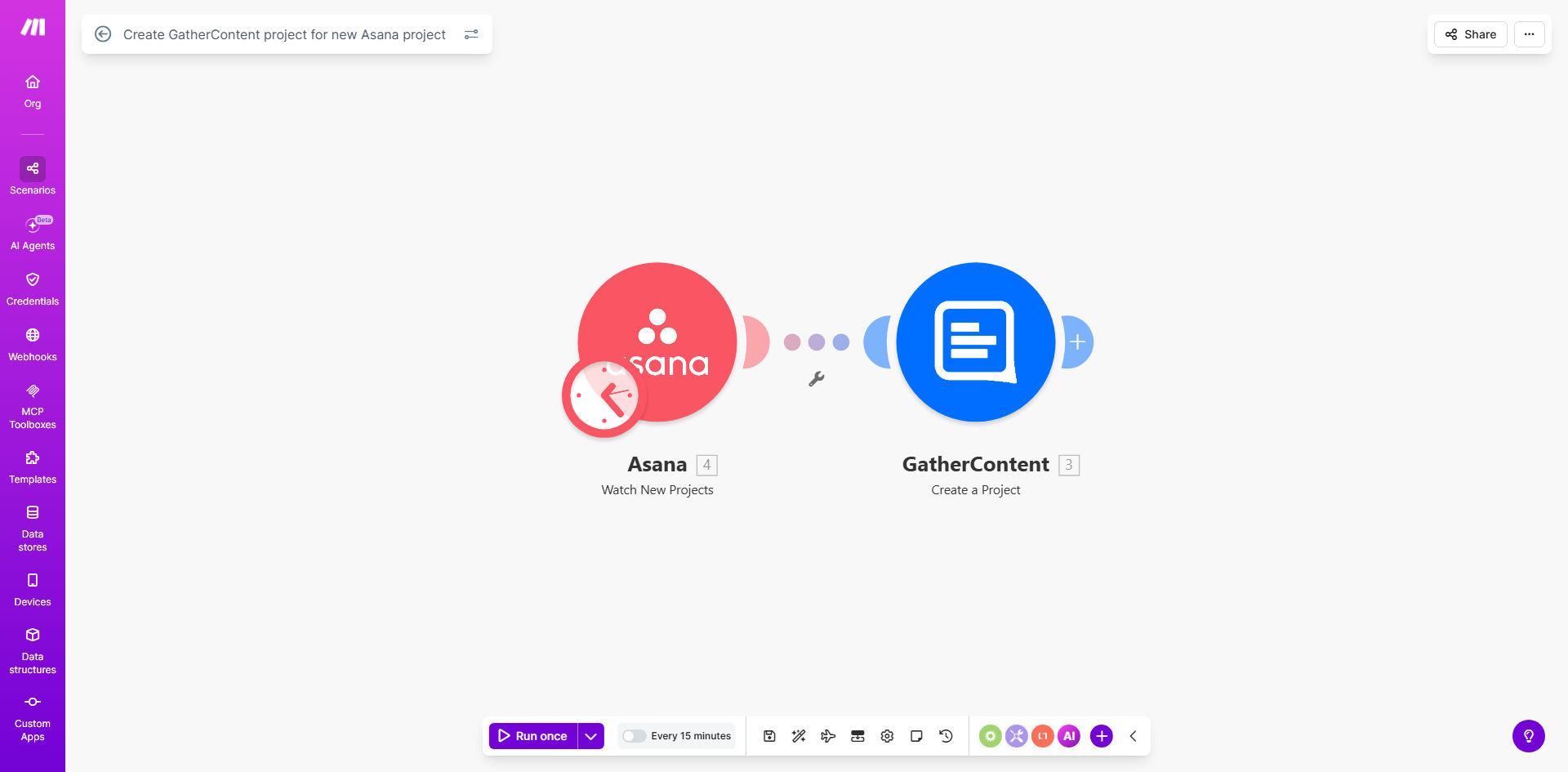
What This Workflow Does
For marketing, product, and content teams, launching a new project often involves a frustrating, manual handoff. A project manager defines scope and deadlines in Asana, then someone must duplicate that effort by manually creating a corresponding project in GatherContent for the content team. This process is slow, error-prone, and creates silos between planning and execution.
This automation solves that by creating a seamless bridge between Asana and GatherContent. The moment a new project is created in Asana—whether it's a new marketing campaign, product launch, or website redesign—this workflow automatically triggers and creates a fully configured project in GatherContent. It transfers key details like the project name, description, due date, and assignees, ensuring your content team has immediate access to a structured workspace with all the context they need to start producing.
The result is a unified workflow where project initiation in one tool automatically sets up the necessary environment in another, eliminating duplicate data entry, reducing setup time from 30 minutes to 30 seconds, and ensuring both teams are aligned from day one.
How It Works
The automation follows a simple but powerful sequence, acting as a digital project coordinator between your two essential platforms.
Step 1: Monitor New Asana Projects
The workflow uses Make.com's Asana module to watch a specific Asana workspace or team for newly created projects. You can filter this to trigger only for projects with certain tags, in specific portfolios, or created by particular team members, giving you precise control over which initiatives kick off the content process.
Step 2: Extract Project Details
Once a new project is detected, the automation captures all relevant data: the project name, notes/description, start and due dates, custom fields (like "Content Lead" or "Campaign Code"), and even the list of project members. This information forms the blueprint for the new GatherContent project.
Step 3: Create the GatherContent Project
Make.com then connects to your GatherContent account via API. It uses the data from Asana to create a new project in your designated GatherContent account. The Asana project name becomes the GatherContent project name, the description populates the project brief, and dates are carried over to set timelines.
Pro tip: Use Asana custom fields to specify the GatherContent project template or folder structure you want to use. This allows the automation to create not just a blank project, but one pre-organized with your standard content types and workflows.
Step 4: Invite Team Members & Set Status
Optionally, the workflow can go further. It can invite the Asana project members to the new GatherContent project, assigning them appropriate roles. It can also set the initial project status in GatherContent to "In Planning" or "Ready for Brief," providing a clear starting point for the content team.
Who This Is For
This automation is a game-changer for any organization that uses Asana for high-level project management and GatherContent for orchestrating the actual content creation. It's ideal for:
- Marketing Agencies: Automatically spin up a content hub for every new client campaign approved in Asana.
- In-house Marketing Teams: Ensure every product launch or brand initiative has an immediate, aligned content workspace.
- Product Teams: Link product development projects in Asana to the technical documentation or launch content projects in GatherContent.
- Content Managers & Operations Specialists: Eliminate the manual grunt work of project setup and focus on strategy and quality.
What You'll Need
- An active Make.com account (free or paid plan) to build and run the automation.
- An Asana account with admin or member access to the projects you want to monitor.
- A GatherContent account with API access enabled (typically available in all paid plans).
- API credentials for both Asana and GatherContent to connect them to Make.com. This usually involves generating a personal access token or OAuth connection in each platform.
- A clear understanding of which Asana projects should trigger content creation and what the desired structure in GatherContent should be.
Quick Setup Guide
Follow these steps to deploy this automation in your own environment:
- Clone the Template: Click "Get This Workflow" to open the template in your Make.com account and create a copy (scenario).
- Connect Your Apps: In the Make.com scenario editor, establish connections to your specific Asana and GatherContent accounts using the API credentials.
- Configure the Asana Trigger: Set the module to watch the correct Asana workspace, team, or project section. Apply any filters (e.g., only projects with a "Content Required" tag) to avoid unnecessary triggers.
- Map the Data Fields: In the GatherContent "Create a Project" module, map the Asana data (project name, description, etc.) to the corresponding fields in GatherContent. Define your default account, project type, and status.
- Test with a Dummy Project: Run the scenario once manually and create a test project in Asana to verify a project is correctly created in GatherContent.
- Activate & Monitor: Turn on the scenario's scheduler. It will now run automatically in the background. Monitor the operations history for the first few days to ensure it's working smoothly.
Key Benefits
Save 5–10 hours per month on administrative setup. Eliminate the repetitive task of manually creating and configuring content projects, allowing managers and coordinators to focus on higher-value strategic work.
Ensure 100% consistency and eliminate human error. Every GatherContent project is created with the same structure and contains all the critical information from Asana, preventing missed details or miscommunication between teams.
Accelerate project kick-offs by 90%. Content teams can begin work immediately in a ready-made environment instead of waiting days for a project brief to be manually transferred and a workspace to be set up.
Improve visibility and alignment. Creates a direct, traceable link between the high-level project plan and the content production hub, making it easier for stakeholders to see the connection between planning and execution.
Scale your operations effortlessly. As your team grows and manages more concurrent projects, this automation handles the increased volume without any additional effort or risk of bottlenecks.