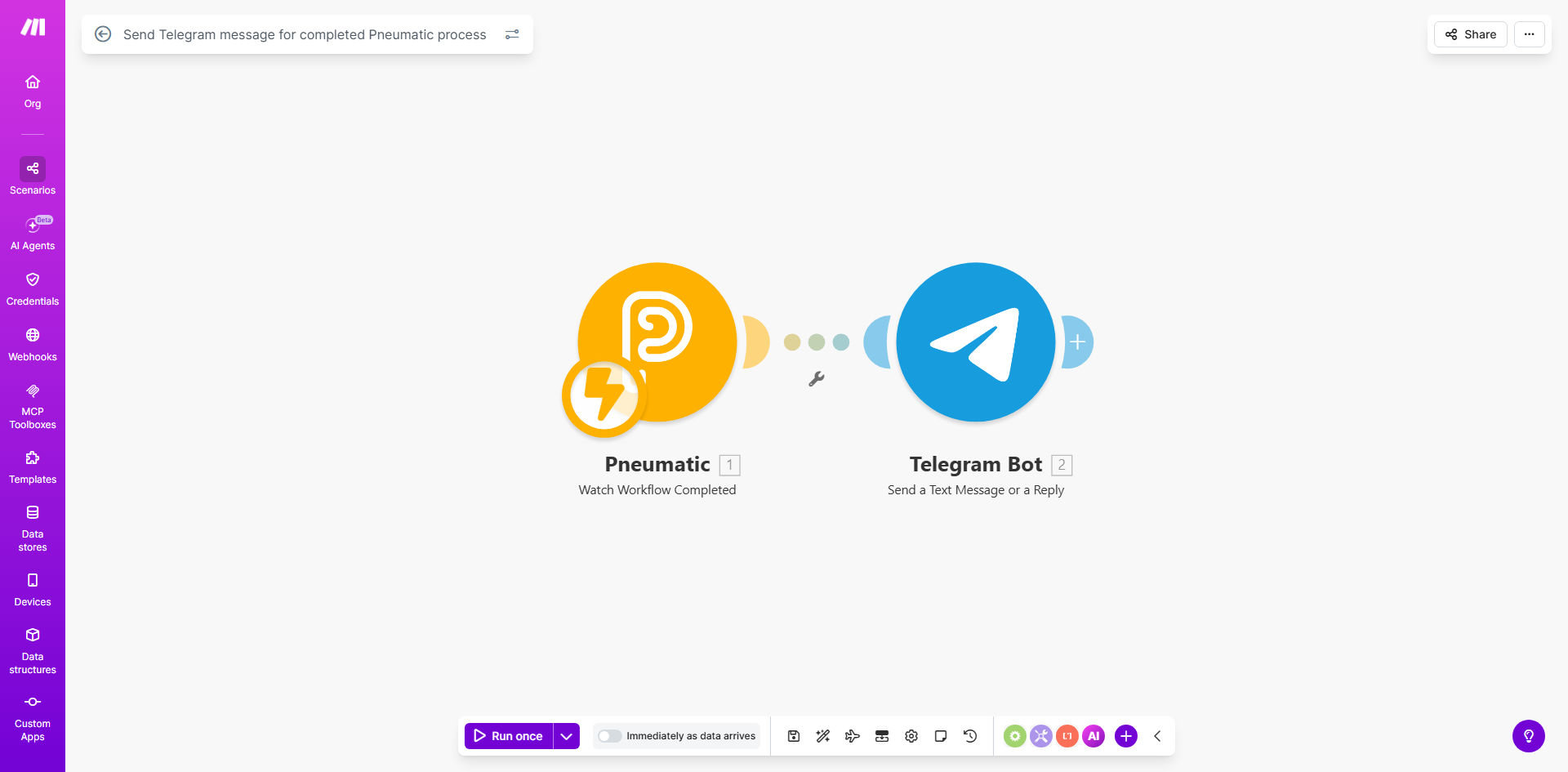
What This Workflow Does
In modern operations, processes run in the background—data pipelines, manufacturing sequences, quality checks, or automated reports. Pneumatic is often at the heart of these critical workflows. The problem is visibility: when a process completes, fails, or produces results, key team members are often the last to know, leading to delays, missed handoffs, and reactive firefighting.
This automation solves that by creating a real-time communication bridge. Every time a designated Pneumatic process finishes its run, this Make.com workflow automatically captures the event and sends a formatted notification directly to a specified Telegram channel or group. It turns silent completions into loud, actionable alerts, ensuring your team operates from a position of immediate awareness rather than periodic checking.
The business value is profound: reduced operational lag, eliminated manual monitoring overhead, and faster response times. Whether it's a batch production job, a nightly data sync, or a customer onboarding sequence, this workflow ensures the right people are informed the moment work is done, enabling seamless continuity and proactive management.
How It Works
The workflow is an elegant, reliable chain that connects process completion to team communication.
Step 1: Monitor Pneumatic for Completion
The scenario starts with a Make.com module (like a webhook or a specific trigger) that watches for a "process completed" signal from Pneumatic. This could be based on an API call, a status change in a connected database, or a webhook sent by Pneumatic itself upon finishing a task.
Step 2: Gather Process Data
Once triggered, the workflow collects relevant data from the completed process. This might include the process name, a unique ID, completion timestamp, status (success/error), and any key output metrics or logs. This data is structured for the notification.
Step 3: Format & Send Telegram Message
Make.com then uses the Telegram Bot API to send a message to your pre-configured channel or group. The message is crafted to be immediately useful, clearly stating what finished, when, and including any critical details or links for follow-up. The entire flow executes in seconds.
Pro tip: Use Telegram's formatting options in your message template. You can use bold for the process name, include a direct link to the Pneumatic log dashboard, and add relevant hashtags like #Completed or #Alert for easy filtering within your team's chat.
Who This Is For
This template is ideal for operations teams, manufacturing supervisors, IT administrators, data engineers, and project managers who rely on Pneumatic for automated processes and need to keep distributed teams in the loop. It's perfect for businesses where process completion triggers the next step in a workflow, such as:
- Manufacturing & Logistics: Notifying floor managers when a production batch or packing line cycle is complete.
- Data & IT Ops: Alerting engineers when a data pipeline, backup, or system deployment job finishes.
- Marketing & Sales Ops: Informing teams when a lead scoring, email campaign, or CRM sync process has run.
- Quality Assurance: Sending immediate alerts when a automated test suite or compliance check completes.
What You'll Need
- A Make.com account (free tier available) to build and run the automation scenario.
- A Pneumatic account or platform where your processes are running, with the ability to trigger an event (like a webhook) upon completion.
- A Telegram account and a Telegram Bot created via @BotFather. You'll need the bot token.
- The Chat ID of the Telegram channel or group where you want notifications sent (the bot must be added as an admin to channels).
- Basic information about the Pneumatic process you want to monitor (name, unique identifiers).
Quick Setup Guide
You can have this automation live in under 15 minutes.
- Clone the Template: Click "Get This Workflow" above to open the template in your Make.com account and create a copy.
- Configure the Pneumatic Trigger: In the first module, set up the connection to Pneumatic. This typically involves adding an API key or webhook URL provided by Pneumatic to signal process completion.
- Set Up Your Telegram Bot: In the Telegram module, paste the bot token you got from @BotFather and enter the Chat ID of your target channel or group.
- Customize the Message: Edit the message template. Insert data from the Pneumatic trigger (like `Process Name`, `Completion Time`) to make the alert informative.
- Test & Activate: Run a test by completing a dummy process in Pneumatic. Check if the message appears correctly in Telegram. Once verified, turn the scenario ON.
Key Benefits
Eliminate Manual Monitoring & Reduce Response Time: Free your team from constantly checking dashboards. Get notified instantly, cutting the time between process completion and team awareness from hours or minutes down to seconds. This can accelerate downstream actions and problem resolution by over 80%.
Improve Operational Transparency & Accountability: Every completion is logged visibly in a shared Telegram channel, creating an audit trail and ensuring everyone is on the same page. This reduces confusion about process status and clarifies handoff responsibilities.
Centralize Alerts in a Tool Teams Already Use: Leverage Telegram's simplicity and accessibility. Team members get alerts in a familiar, mobile-friendly app without needing to log into a separate monitoring system, boosting adoption and ensuring critical alerts aren't missed.
Enable Proactive Management Instead of Reactive Firefighting: With real-time alerts, supervisors can proactively manage workloads, allocate resources for the next task, or investigate issues immediately upon failure, shifting your operational culture from reactive to proactive.
Scale Your Operations Without Adding Overhead: As you add more Pneumatic processes, this same automation pattern can be replicated effortlessly. The system scales with your business, providing consistent notification logic without proportional increases in manual oversight.