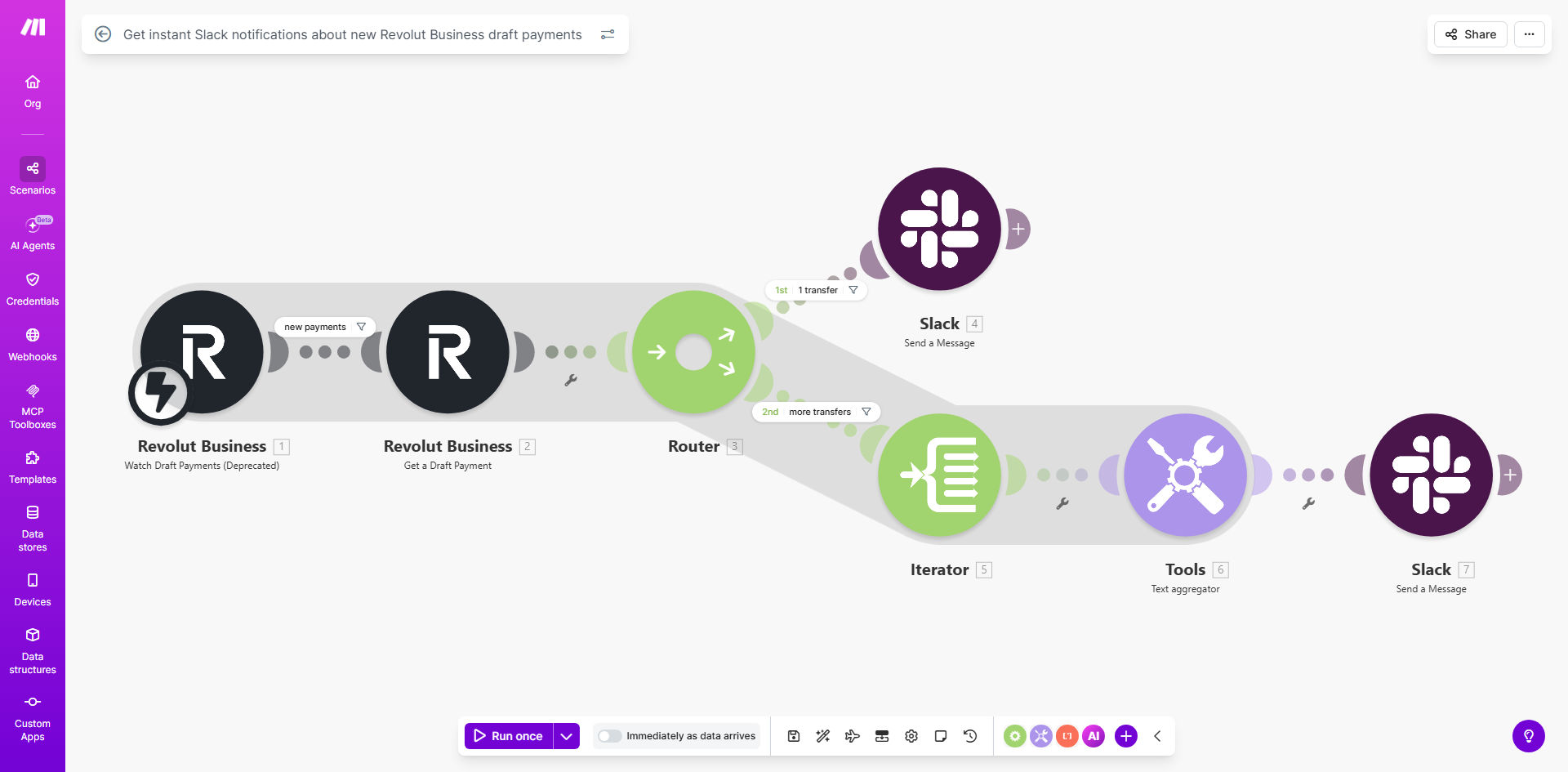
What This Workflow Does
For businesses using Revolut Business, keeping track of draft payments is a manual, time-consuming task. Finance teams or founders must constantly log into the Revolut dashboard to check for new payment requests, leading to delays in approvals, potential missed payments, and poor cash flow visibility. This creates friction, especially in remote or fast-paced environments where instant communication is key.
This automation solves that by creating a real-time bridge between your Revolut Business account and your team's communication hub, Slack. Every time a new draft payment is initiated—whether for a supplier invoice, a contractor fee, or any other outgoing transaction—the workflow instantly captures that event and posts a detailed notification to a designated Slack channel or direct message. This eliminates manual checking, puts critical financial information directly where your team works, and accelerates the entire payment approval process.
How It Works
The workflow operates on a simple but powerful trigger-action principle, ensuring zero latency between a payment being drafted and your team being informed.
Step 1: Monitoring Revolut Business
The automation is triggered at regular intervals, checking the Revolut Business API for any newly created "draft" payments. It acts as a vigilant watchtower, scanning for transactions that require attention without you needing to lift a finger.
Step 2: Capturing Payment Details
When a new draft is detected, the workflow pulls all relevant details: the payment amount, currency, recipient name, reference, and the unique payment ID. This data is structured and prepared for the notification.
Pro tip: You can filter notifications based on amount thresholds (e.g., only alert for payments over $1,000) or specific counterparties to reduce noise for your team.
Step 3: Crafting & Sending the Slack Alert
The workflow then formats the payment information into a clear, actionable Slack message. It can tag specific users or user groups, include a direct link to the payment in Revolut for quick access, and use Slack's formatting to highlight urgent items. The message is posted instantly to your chosen channel.
Who This Is For
This automation is invaluable for startups, SMEs, remote teams, and finance departments that use Revolut Business for their banking. It's perfect for founders who need visibility on cash flow without daily logins, finance managers overseeing multiple approvals, and operational teams where speed is critical. Agencies paying freelancers, e-commerce businesses managing supplier payments, and tech companies with distributed teams will see immediate benefits.
What You'll Need
- A Revolut Business account with admin access to generate API credentials.
- A Slack workspace where you have permission to create incoming webhooks or install apps.
- A Make.com account (free tier is sufficient to run this workflow).
- Basic information like the specific Slack channel ID or user ID you want to notify.
Quick Setup Guide
- Get the Template: Click "Get This Workflow" to duplicate the template into your Make.com account.
- Connect Revolut Business: In the first module, authenticate your Revolut Business account using OAuth. Ensure you grant the necessary read-only permissions for transactions.
- Configure Slack: In the Slack module, connect your workspace and specify the exact channel (e.g., #finance-alerts) or person you want to receive the notifications.
- Customize the Message: Edit the message template to include the payment details most relevant to your team, such as amount, counterparty, and a link.
- Activate & Test: Turn the scenario on and create a test draft payment in Revolut Business. Within minutes, you should see the alert pop up in Slack.
Key Benefits
Eliminate Manual Payment Checks: Save 30–60 minutes per day previously spent logging into Revolut to monitor for new transactions. This time can be redirected to higher-value financial analysis or strategic work.
Accelerate Payment Approvals by 80%: With instant alerts in Slack, authorized team members can review and approve draft payments within minutes instead of hours or days, improving supplier relationships and avoiding late fees.
Improve Cash Flow Visibility in Real-Time: Every potential outgoing payment is immediately visible to stakeholders, providing a real-time pulse on cash flow and helping with more accurate financial forecasting.
Reduce Risk of Human Error: Automating the alert process removes the chance of a draft payment being forgotten or missed due to an oversight in manual checking routines.
Enhance Team Collaboration: Centralizing payment alerts in Slack allows for instant discussion, delegation, and action. Team members can comment, assign, or react to notifications within the same thread where they manage other projects.