What This Workflow Does
For businesses using Revolut Business, draft payments are pending transactions that require review and approval before funds are sent. Manually logging into the Revolut dashboard to check for new drafts is inefficient and prone to delays, which can stall payments to suppliers, delay payroll, or cause missed financial oversight.
This automated workflow solves that problem by acting as your 24/7 financial sentry. Every time a new draft payment is created in your Revolut Business account, Make.com detects the event instantly and automatically sends a detailed email notification to you or your team. This transforms a manual, reactive process into a proactive, streamlined system, ensuring you're always the first to know about pending financial actions.
The business value is clear: improved cash flow visibility, faster payment approvals, and eliminated manual checking. It provides an audit trail of notifications and ensures that critical financial tasks never fall through the cracks because someone forgot to check the app.
How It Works
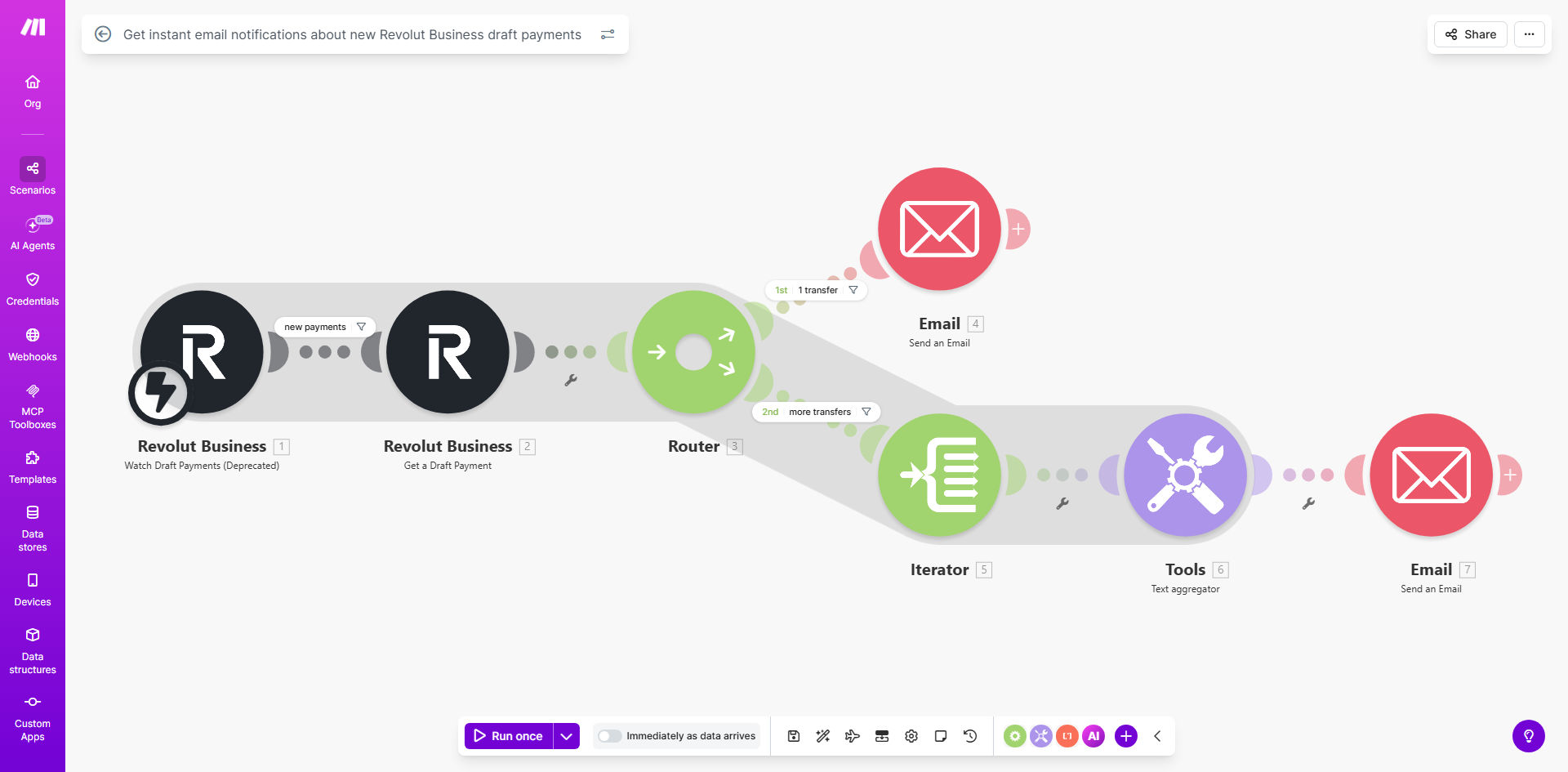
The automation is built on a simple but powerful trigger-action sequence in Make.com, connecting your Revolut Business account to your email.
Step 1: Monitoring Revolut Business
The workflow starts with the Revolut Business module in Make.com set to watch for a specific event: "Draft Payment Created." This connection uses Revolut's secure API to monitor your account in real-time without requiring manual login.
Step 2: Capturing Payment Details
When a new draft is detected, Make.com captures all relevant data from the event: the payment amount, currency, recipient details, creation timestamp, and any internal reference or note. This data is structured and prepared for the notification.
Step 3: Sending the Instant Email Alert
The captured data is then passed to an email module (like Gmail or SMTP). Make.com composes a clear, actionable email with the draft payment details and sends it immediately to your predefined email address or distribution list.
Pro tip: Customize the email subject line to include the amount and recipient (e.g., "Action Required: £1,250 Draft Payment to Supplier XYZ"). This allows you to prioritize alerts directly from your inbox.
Who This Is For
This automation is ideal for finance managers, business owners, operations teams, and startups who use Revolut Business for daily transactions. It's particularly valuable for:
- Small Business Owners wearing multiple hats who need to track cash flow without constant manual oversight.
- Finance Teams that require immediate visibility into pending payments for approval workflows and reconciliation.
- Remote or Distributed Teams where multiple people need to be notified about financial actions.
- E-commerce & Freelancers who use Revolut to pay suppliers and need to ensure timely payments to maintain relationships.
What You'll Need
- A Revolut Business account with draft payment activity.
- A Make.com account (free tier is sufficient to run this workflow).
- Access to an email service (Gmail, Outlook, SMTP, etc.) that can be connected to Make.com to send notifications.
- Permissions to set up the API connection between Make.com and your Revolut Business account (typically requires admin access).
Quick Setup Guide
- Get the Template: Click "Get This Workflow" to copy the template into your Make.com account.
- Connect Revolut Business: In the first module, authorize Make.com to access your Revolut Business account. This uses a secure OAuth process.
- Configure the Trigger: Ensure the trigger is set to watch for "Draft Payment Created" events.
- Set Up Your Email: In the email module, connect your email service (e.g., Gmail) and specify the recipient email address. You can customize the email body template using the data from Revolut.
- Test & Activate: Create a test draft payment in your Revolut account. The workflow should run and send you an email within moments. Once confirmed, turn the scenario on.
Key Benefits
Eliminate Manual Dashboard Checking: Save 30-60 minutes per week previously spent logging into Revolut to review pending transactions. The automation does the monitoring for you.
Prevent Payment Delays: Get notified the moment a draft is created, shaving hours or even days off your payment approval cycle. This keeps suppliers happy and operations smooth.
Improve Financial Oversight & Audit Trail: Every draft payment generates an immediate email record. This creates a timestamped log outside of Revolut, perfect for internal audits and financial reporting.
Enhance Team Collaboration: Easily modify the workflow to send alerts to multiple team members or a shared inbox, ensuring the right people are informed simultaneously without extra effort.
Scale Your Financial Operations: This automation provides a foundation. As your business grows, you can build upon it to route alerts to Slack, create approval tickets in your project tool, or log data directly to accounting software.