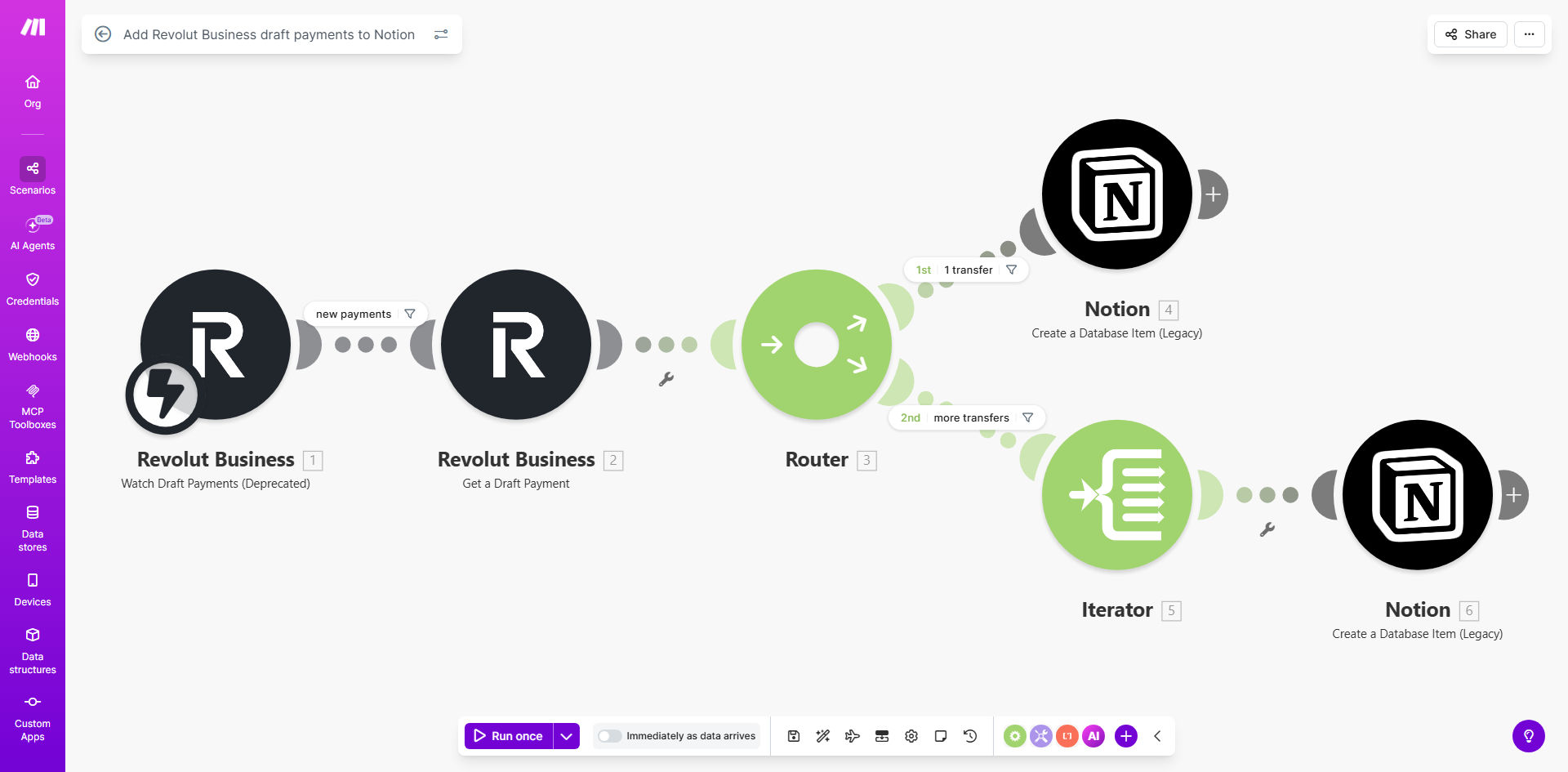
What This Workflow Does
For businesses using Revolut Business for banking and Notion for project management and finance tracking, manually transferring payment information is a tedious, error-prone task. This workflow solves that by creating a seamless, automatic bridge between the two platforms.
Every time you create a new draft payment in Revolut Business—whether it's for a supplier invoice, a contractor, or any scheduled expense—this Make.com automation instantly captures that transaction and creates a corresponding, detailed entry in your designated Notion database. This transforms your Notion workspace into a live financial command center, giving you immediate insight into future cash outflows without ever opening your banking app.
Pro tip: Pair this template with its companion workflow that updates the Notion entry once the payment is processed. This gives you a complete lifecycle view of each transaction, from draft to completed, all within Notion.
How It Works
The automation operates on a simple but powerful trigger-action principle, ensuring no draft payment goes unrecorded.
Step 1: Monitoring Revolut Business
The workflow starts with a Make.com module that watches your Revolut Business account for new "draft payment" events. It uses Revolut's secure API to check for new entries at regular intervals you define (e.g., every hour or every 15 minutes).
Step 2: Extracting Payment Details
When a new draft is detected, the automation pulls all relevant data: the payment amount, currency, beneficiary name, your internal reference, the scheduled payment date, and the current status. This data is structured and prepared for the next step.
Step 3: Creating a Notion Database Item
Make.com then connects to your Notion workspace and creates a new item in your pre-configured database. Each piece of Revolut data is mapped to a specific property in Notion (like "Amount," "Payee," "Due Date," "Status"), creating a clean, searchable record.
Step 4: Completion & Logging
The workflow confirms the record was created successfully. Optionally, it can send you a confirmation notification via email or Slack, or log the action for audit purposes, ensuring full transparency of the automated process.
Who This Is For
This automation is a game-changer for freelancers, small to medium-sized businesses, digital agencies, and startups that value streamlined operations. It's perfect for business owners who manage their own finances, operations managers handling supplier payments, or finance teams that use Notion as a lightweight CRM or project hub. If you're tired of switching between tabs to log expenses or often wonder about upcoming cash commitments, this workflow is for you.
What You'll Need
- A Revolut Business account with draft payments enabled.
- A Notion account and a workspace where you have permission to create and edit databases.
- A Make.com account (free tier is sufficient to run this template).
- A pre-configured Notion database with properties (columns) to receive the payment data (e.g., Title, Amount, Date, Payee, Status).
- Your Revolut Business API credentials and a Notion integration token to securely connect the services in Make.com.
Quick Setup Guide
You can be up and running in under 15 minutes by following these steps:
- Get the Template: Click "Get This Workflow" to copy the template into your Make.com account.
- Connect Revolut Business: In the first module, authorize Make.com to access your Revolut Business account using OAuth. This creates a secure, read-only connection for draft payments.
- Connect Notion: In the second module, authorize Make.com to access your Notion workspace. You'll need to create an "integration" in Notion and share your target database with it.
- Map Your Database: Point the Notion module to your specific database and map the Revolut data fields (like 'amount', 'beneficiary') to the correct Notion property names.
- Set the Schedule: Configure how often the workflow checks for new draft payments (e.g., every hour).
- Test & Activate: Create a test draft payment in Revolut Business and run the scenario once to verify a new item appears in your Notion database. Then, activate the workflow to run automatically.
Key Benefits
Save 3+ hours per week on manual data entry. Eliminate the repetitive task of copying payment details from your bank to your tracking system, freeing up time for core business activities.
Achieve 100% accuracy in your financial records. Automated data transfer removes the risk of typos, missed payments, or incorrect amounts that are common with manual entry.
Gain real-time cash flow visibility. See all your upcoming scheduled payments in Notion alongside projects and client data, enabling better financial forecasting and budgeting decisions.
Create a single source of truth. Consolidate financial data with operational data in Notion, making it easier to generate reports, track expenses by project, and prepare for tax season.
Scale your finance operations effortlessly. As your business grows and the number of transactions increases, this automation scales with you, handling hundreds of payments as easily as one.