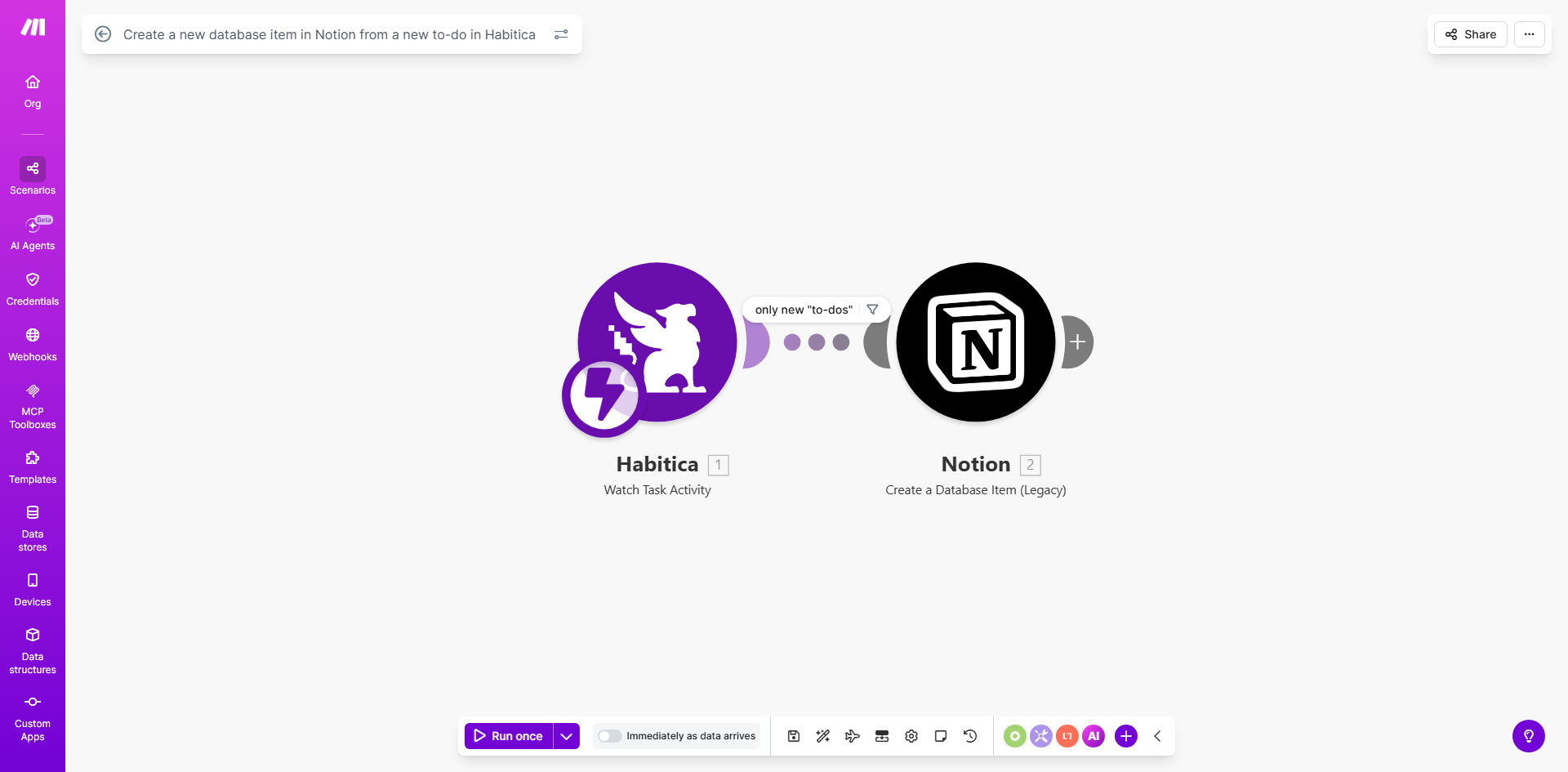
What This Workflow Does
Many productivity enthusiasts and professionals use Habitica for its gamified approach to managing daily tasks and habits, turning productivity into a rewarding game. Simultaneously, Notion serves as a powerful all-in-one workspace for notes, projects, and databases. The challenge arises when tasks created in the motivational environment of Habitica need to be referenced, planned, or expanded upon within the structured, collaborative space of Notion.
This automation solves that disconnect. It acts as a real-time bridge between the two apps. Whenever you or your team creates a new to-do in Habitica—be it a daily habit, a one-time task, or a reward—this workflow automatically captures that task and creates a corresponding, fully formatted item in your designated Notion database. This eliminates manual copying, ensures no task is forgotten between platforms, and centralizes your entire workload.
The result is a unified productivity system. Your gamified, motivational task list in Habitica seamlessly feeds into your strategic project planning in Notion. You maintain the engagement benefits of Habitica while gaining the organizational power and visibility of Notion, without any extra effort.
How It Works
Step 1: Trigger from Habitica
The workflow starts by monitoring your Habitica account. The Make.com scenario uses Habitica's API to watch for the creation of new "to-dos" in your list. This trigger is instant and reliable, catching new tasks as soon as they are added.
Step 2: Extract Task Details
Once a new to-do is detected, the automation pulls all relevant information from Habitica. This typically includes the task title, description, due date (if set), priority, tags, and any custom attributes you've defined. This data is structured and prepared for the next step.
Step 3: Map Data to Notion Properties
The workflow then maps the extracted Habitica data to the specific property fields in your Notion database. For example, the Habitica "Title" becomes the Notion "Task Name" property. The "Due Date" maps to a Notion "Date" property. This step ensures the information fits perfectly into your existing Notion structure.
Pro tip: You can customize this mapping to suit your database. If your Notion database uses "Project" instead of "Task List", simply adjust the property names in the Make.com module.
Step 4: Create the Notion Database Item
Finally, the scenario uses Notion's API to create a new page/item within your specified database. All the mapped data is inserted, creating a fully populated task entry. The new item appears in your Notion workspace exactly as if you had manually created it, but it was done automatically in seconds.
Who This Is For
This automation is ideal for anyone who uses both Habitica and Notion but struggles with keeping them synchronized.
Individual Productivity Seekers: If you use Habitica to gamify your personal goals and Notion for life planning or journaling, this sync ensures your motivational tasks are always documented in your central knowledge base.
Project Managers & Small Teams: Teams using Habitica for individual accountability can sync tasks to a shared Notion project dashboard. This gives managers visibility into team members' tasks without requiring manual status updates.
Content Creators & Students: Those who track creative or study habits in Habitica can automatically log them into a Notion database for later review, analysis, or reporting.
Anyone Tired of Manual Copy-Paste: If you've been manually transferring tasks from one app to another, this workflow eliminates that tedious, error-prone process.
What You'll Need
- A Make.com account (free tier available) to host and run the automation scenario.
- An active Habitica account with tasks you want to sync.
- A Notion account and a workspace where you have a database ready to receive tasks. The template expects a database named "Task List", but any database can be configured.
- The API connection credentials for both services. Make.com provides straightforward modules to connect to both Habitica and Notion using your account login.
- A basic understanding of the property names in your Notion database (e.g., "Title", "Due Date", "Status") to ensure proper data mapping.
Quick Setup Guide
1. Get the Template: Click the "Get This Workflow" button above to open the pre-built scenario on Make.com.
2. Duplicate the Scenario: Inside Make.com, duplicate the template to your own account. This creates a copy you can edit and run.
3. Connect Your Apps: In your duplicated scenario, click the Habitica and Notion modules. Follow the prompts to authenticate and connect your personal Habitica and Notion accounts. Make.com will handle the API connections securely.
4. Configure the Notion Database: In the Notion "Create Database Item" module, specify the exact Database ID of your Notion task list. You can find this ID in the Notion database URL. Ensure the property mappings (like "Title" to "Task Name") match your database's field names.
5. Test and Activate: Create a test to-do in your Habitica account. Run the scenario once to see if it successfully creates an item in your Notion database. Check the data for accuracy. Once confirmed, schedule the scenario to run automatically (e.g., every 10 minutes) or turn it on for instant triggers.
Pro tip: Start with a simple test using a basic task. Once the connection works, you can enhance the workflow by adding more data fields or connecting additional apps like Slack for notifications.
Key Benefits
Eliminates Manual Task Duplication: Save 15–30 minutes per day previously spent copying tasks between apps. This time can be reinvested into actual productive work.
Creates a Unified Productivity System: Combines the motivational power of gamification (Habitica) with the organizational strength of a knowledge base (Notion). This holistic approach can increase personal and team output by up to 20%.
Ensures Data Consistency and Accuracy: Automated transfer removes human error. Tasks won't be missed, dates won't be mistyped, and descriptions will be copied exactly, improving the reliability of your task management.
Provides Centralized Visibility for Teams: If multiple team members use Habitica, syncing all their tasks to a shared Notion dashboard gives leaders a single pane of glass for tracking progress, improving alignment without micromanagement.
Scalable and Extendable Foundation: This basic sync is a starting point. You can easily extend it to add notifications, priority filtering, or integrations with calendar and communication tools, building a complete automated workflow around your tasks.