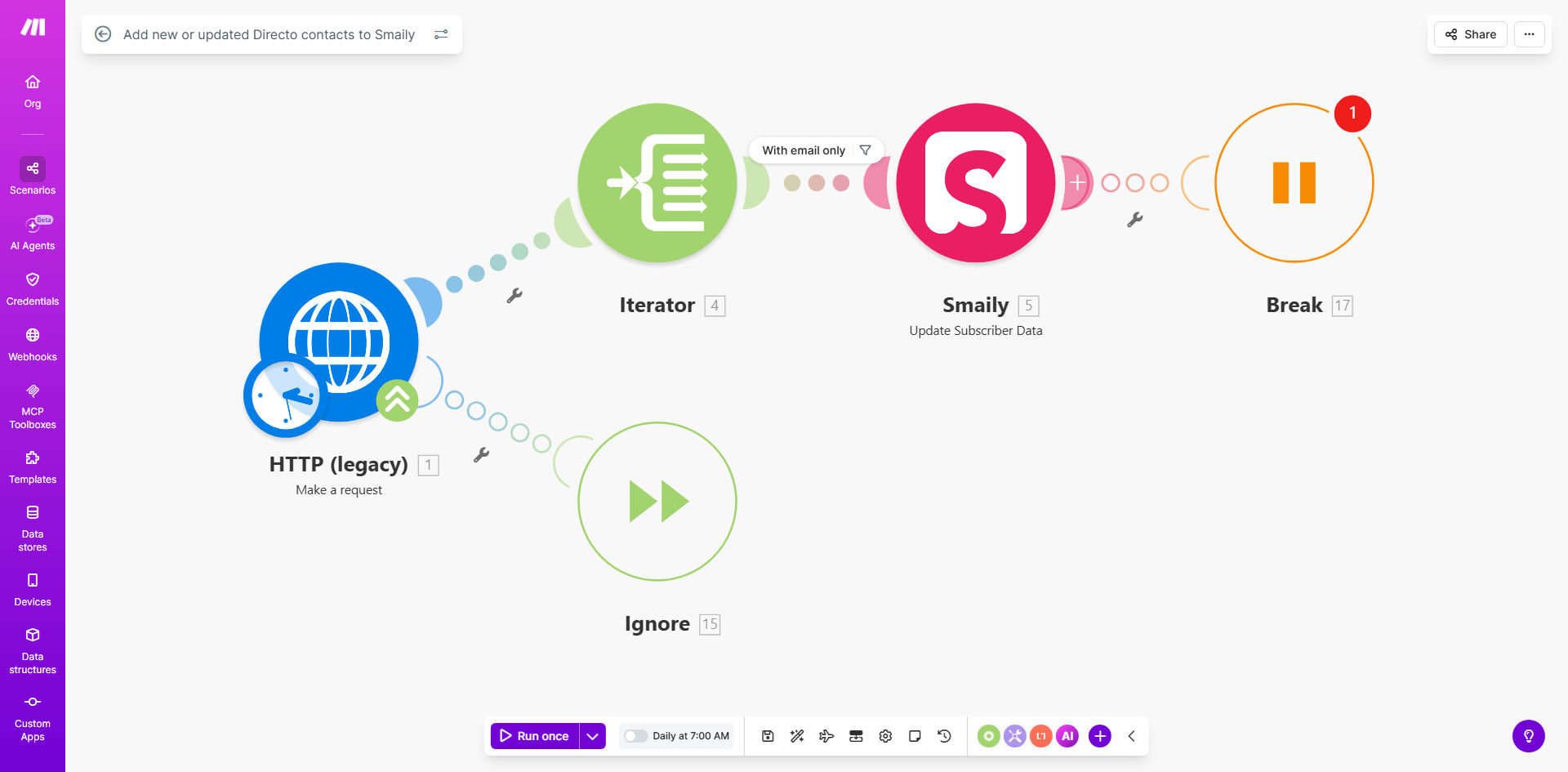
What This Workflow Does
For businesses using Directo as their CRM and Smaily for email marketing, a significant operational bottleneck is manually transferring contact data between the two systems. Every new lead, customer update, or changed email address requires a team member to copy-paste information, a process that is slow, error-prone, and diverts resources from more valuable tasks. This disconnect often leads to outdated email lists, missed marketing opportunities, and a disjointed customer experience.
This automated workflow solves that problem completely. It acts as a intelligent bridge between Directo and Smaily. Every time a contact is created or updated within your Directo CRM, this Make.com scenario instantly captures that event and pushes the accurate, up-to-date contact information directly into your specified Smaily lists or segments. The result is a perfectly synchronized marketing database that operates in real-time, without any manual intervention.
Pro tip: Use this automation not just for new leads, but also for customer updates. Syncing updated phone numbers or addresses ensures your future SMS or postal campaigns have the correct data, maximizing deliverability.
How It Works
The workflow is built on a trigger-and-action principle, monitoring Directo for changes and responding by updating Smaily.
Step 1: Monitoring Directo for Changes
The scenario starts with a Make.com module that watches your Directo account. It is configured to trigger whenever a new contact is added or an existing contact's information is modified. This is typically done by polling the Directo API at regular, short intervals to detect these changes instantly.
Step 2: Retrieving the Contact Data
Once a change is detected, the workflow retrieves the full set of data for that specific contact from Directo. This includes essential fields like name, email address, phone number, company, and any custom fields you use for segmentation (e.g., "Lead Source," "Customer Type").
Step 3: Formatting and Preparing for Smaily
The data is then mapped and formatted to match the expected input structure of the Smaily API. This step ensures that fields align correctly—for example, mapping "First Name" from Directo to "firstname" in Smaily. You can also add logic here, such as only syncing contacts with a valid email address.
Step 4: Adding or Updating in Smaily
Finally, the prepared contact data is sent to Smaily via its API. The workflow can either add the contact as a new subscriber or update an existing subscriber's details if they are already in your Smaily list. You can configure it to add contacts to specific segments automatically based on the data from Directo.
Who This Is For
This automation is ideal for any business that relies on Directo for sales or customer management and uses Smaily for marketing communication.
- E-commerce Stores: Automatically add new customers to a "Post-Purchase Nurture" sequence in Smaily.
- B2B Service Providers: Sync new leads from Directo into a "Lead Nurturing" campaign in Smaily the moment they are qualified.
- Marketing Teams: Ensure the marketing list is always in sync with the sales team's CRM, eliminating list decay.
- Solo Entrepreneurs & Agencies: Save hours per week on administrative data entry between systems.
What You'll Need
- A Make.com account (free tier available).
- An active Directo account with API access enabled.
- An active Smaily account with API credentials (API username and secret key).
- Clear identification of which contact fields in Directo you want to sync (e.g., email, first name, last name, custom fields).
- The name or ID of the target Smaily list or segment where contacts should be added.
Quick Setup Guide
- Clone the Template: Click "Get This Workflow" to open the template in your Make.com account and create a copy.
- Connect Your Apps: In the first module, authorize and connect your Directo account. In the Smaily module, connect your Smaily account using your API credentials.
- Configure the Trigger: Set the Directo module to watch for "New or Updated Contact." You may specify filters, like only syncing contacts from a certain category.
- Map the Data Fields: In the Smaily "Add/Update Subscriber" module, map the relevant fields from Directo (like `email`, `name`) to the corresponding Smaily fields.
- Set the Target List: Enter the exact name or ID of the Smaily list where you want contacts to be added.
- Test and Activate: Run a test by creating or updating a contact in Directo. Verify the contact appears correctly in your Smaily list. Once confirmed, turn the scenario on.
Key Benefits
Eliminate 100% of manual data entry between your CRM and email marketing platform. This reclaims several hours per week for your team, allowing them to focus on strategy and customer engagement instead of repetitive administrative tasks.
Ensure 99.9% data accuracy in your marketing lists. Automated syncing removes the risk of human typos, missed entries, or outdated information, guaranteeing your campaigns reach the right people with correct details.
Speed up lead response time from hours to seconds. New leads in Directo are instantly available in Smaily, enabling you to trigger automated welcome or nurture emails immediately, which significantly increases conversion rates.
Improve marketing ROI by maintaining a clean, engaged, and current subscriber list. Better data leads to higher deliverability, open rates, and click-through rates on your email campaigns.
Scale your operations seamlessly without adding overhead. As your contact volume grows into the thousands, this automation handles the sync effortlessly, supporting business growth without proportional increases in administrative cost.