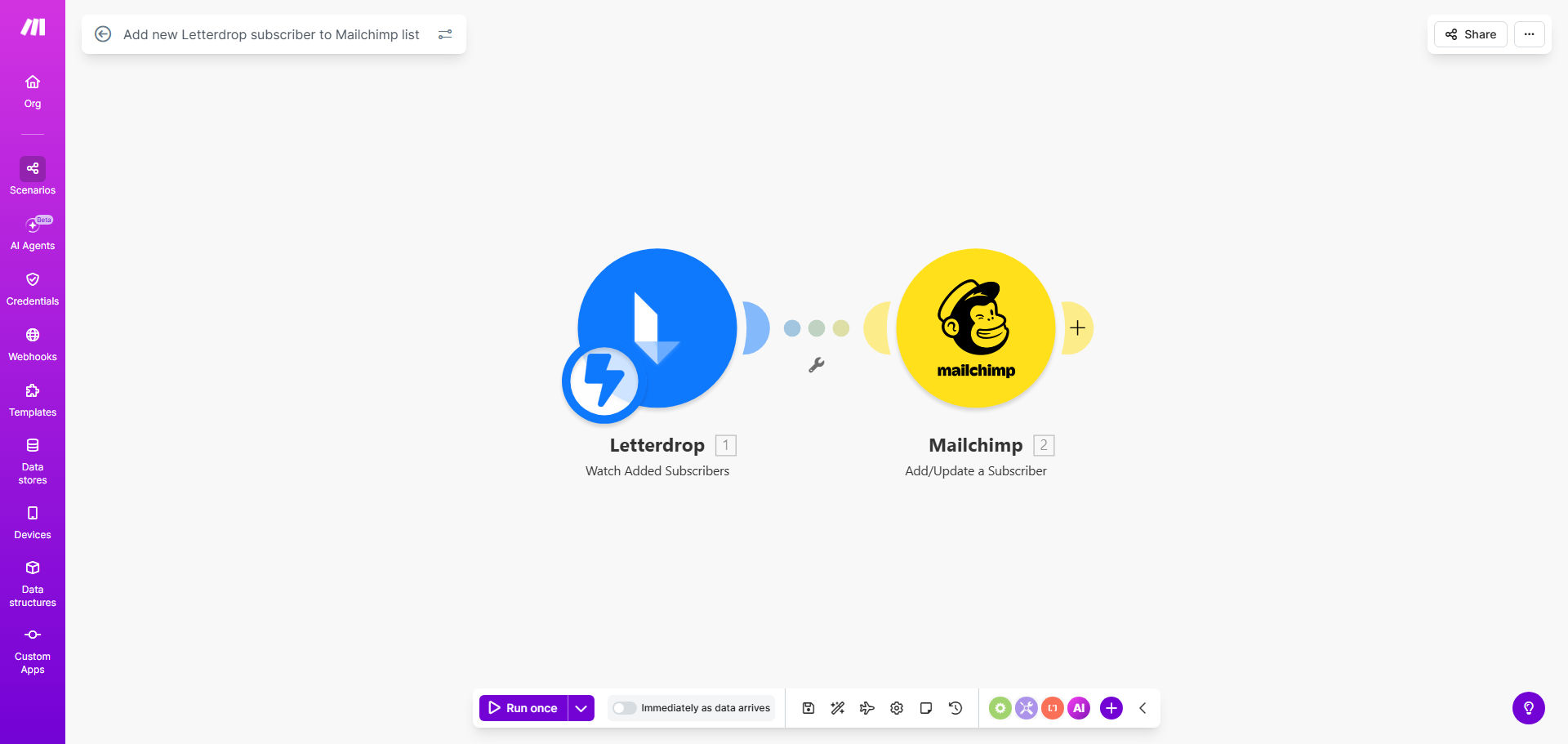
What This Workflow Does
For content creators and marketers using Letterdrop to publish and grow their audience, managing subscriber lists across different platforms is a tedious, error-prone task. Every time a new reader subscribes to your Letterdrop content, you must manually copy their email and details into your Mailchimp audience to start email marketing campaigns. This manual process wastes valuable time, introduces data errors, and delays your ability to engage new subscribers with timely follow-up emails.
This Make.com workflow template solves that problem completely. It acts as a real-time bridge between Letterdrop and Mailchimp. Whenever a new subscriber is added in Letterdrop, the workflow automatically captures their information—email, name, and any custom fields—and adds them to a specified list in your Mailchimp account. The process is instant, accurate, and runs 24/7, ensuring your marketing lists are always synchronized without any manual intervention.
The business value is clear: you reclaim hours each week, eliminate missed subscribers, and create a seamless experience where your content audience instantly becomes your email marketing audience. This enables faster nurturing cycles, better segmentation, and ultimately, higher conversion rates from reader to customer.
How It Works
The automation follows a simple, reliable sequence of events triggered by a new subscriber action.
Step 1: Letterdrop Triggers the Workflow
The workflow is set to watch for the "New Subscriber" event in your Letterdrop account. As soon as someone subscribes to your publication, Letterdrop sends a webhook containing the subscriber's data to Make.com, initiating the automation.
Step 2: Make.com Processes the Subscriber Data
Make.com receives the payload—typically including email address, first name, last name, and subscription source. The workflow can map and transform this data if needed, ensuring it matches the format required by Mailchimp.
Pro tip: You can add a filter module to only sync subscribers from specific Letterdrop publications or campaigns, allowing for precise audience segmentation from the start.
Step 3: Subscriber Added to Mailchimp List
Make.com then uses the Mailchimp module to add the processed subscriber data as a new contact to your chosen Mailchimp audience or list. The workflow can set the subscriber's status (e.g., subscribed) and assign them to specific tags or groups based on the Letterdrop source.
Step 4: Optional Follow-up Actions
After the subscriber is successfully added, the workflow can trigger additional actions, such as sending a confirmation notification to you, logging the event to a spreadsheet, or even initiating a Mailchimp automation email sequence directly.
Who This Is For
This automation is ideal for any business or individual that uses Letterdrop for content publishing and Mailchimp for email marketing. Specifically, it benefits:
- Content Marketers & Bloggers: Who publish on Letterdrop and want to automatically grow their email list for newsletters and promotions.
- Small Business Owners: Who use content to attract leads and need those leads instantly available for email follow-up campaigns.
- Marketing Agencies: Managing multiple clients' content and email marketing, needing efficient, error-free data sync between platforms.
- SaaS Companies & Educators: Offering valuable content via Letterdrop and wanting to convert subscribers into customers through automated email sequences.
If you spend more than 30 minutes a week manually copying subscriber emails, this workflow will save you time and improve your marketing results.
What You'll Need
To set up and run this automation, you'll need the following prerequisites:
- A Letterdrop account with active publications and subscribers.
- A Mailchimp account with at least one audience/list set up.
- A Make.com account (free or paid plan) to build and host the workflow.
- API access or webhook permissions enabled in both Letterdrop and Mailchimp (typically available in standard accounts).
- Basic understanding of the subscriber data fields you want to transfer (e.g., email, name, custom fields).
Pro tip: Before connecting, ensure your Mailchimp list settings accept new subscribers from automated sources and that you comply with email marketing consent regulations.
Quick Setup Guide
Follow these steps to deploy the template in your Make.com account:
- Clone the Template: Click the "Get This Workflow" button above to open the template on Make.com. Click "Copy scenario" to clone it into your own Make workspace.
- Connect Letterdrop: In the cloned scenario, update the Letterdrop module with your account credentials. Set the trigger to watch for "New Subscriber" events.
- Connect Mailchimp: Update the Mailchimp module with your API key and select the specific Audience ID (list) where new subscribers should be added.
- Map Data Fields: Review the data mapping between Letterdrop's output and Mailchimp's required fields. Adjust if you want to transfer additional custom fields like tags or notes.
- Test the Flow: Use Make's testing feature or manually add a test subscriber in Letterdrop to verify the automation adds a contact to Mailchimp correctly.
- Activate & Monitor: Turn the scenario on. Monitor the operations history for a few days to ensure it runs smoothly. Set up error notifications if needed.
Key Benefits
Save 2–5 hours per week on manual data entry. Eliminate the repetitive task of copying emails from one platform to another. This time can be reinvested in creating better content or analyzing campaign performance.
Ensure 100% real-time list accuracy. Every subscriber is added instantly, reducing the risk of missed leads or outdated lists. Your email campaigns target the freshest, most engaged audience possible.
Reduce human error and duplicate entries. Automated data transfer follows precise rules, avoiding typos, duplicate additions, or incorrect field mappings that plague manual processes.
Create a seamless subscriber journey. Readers who engage with your content become email contacts immediately, allowing you to trigger welcome sequences, content updates, or offers without delay, increasing conversion likelihood.
Scale your marketing without extra overhead. As your Letterdrop audience grows, your Mailchimp list grows automatically. You can handle thousands of new subscribers without increasing administrative workload.