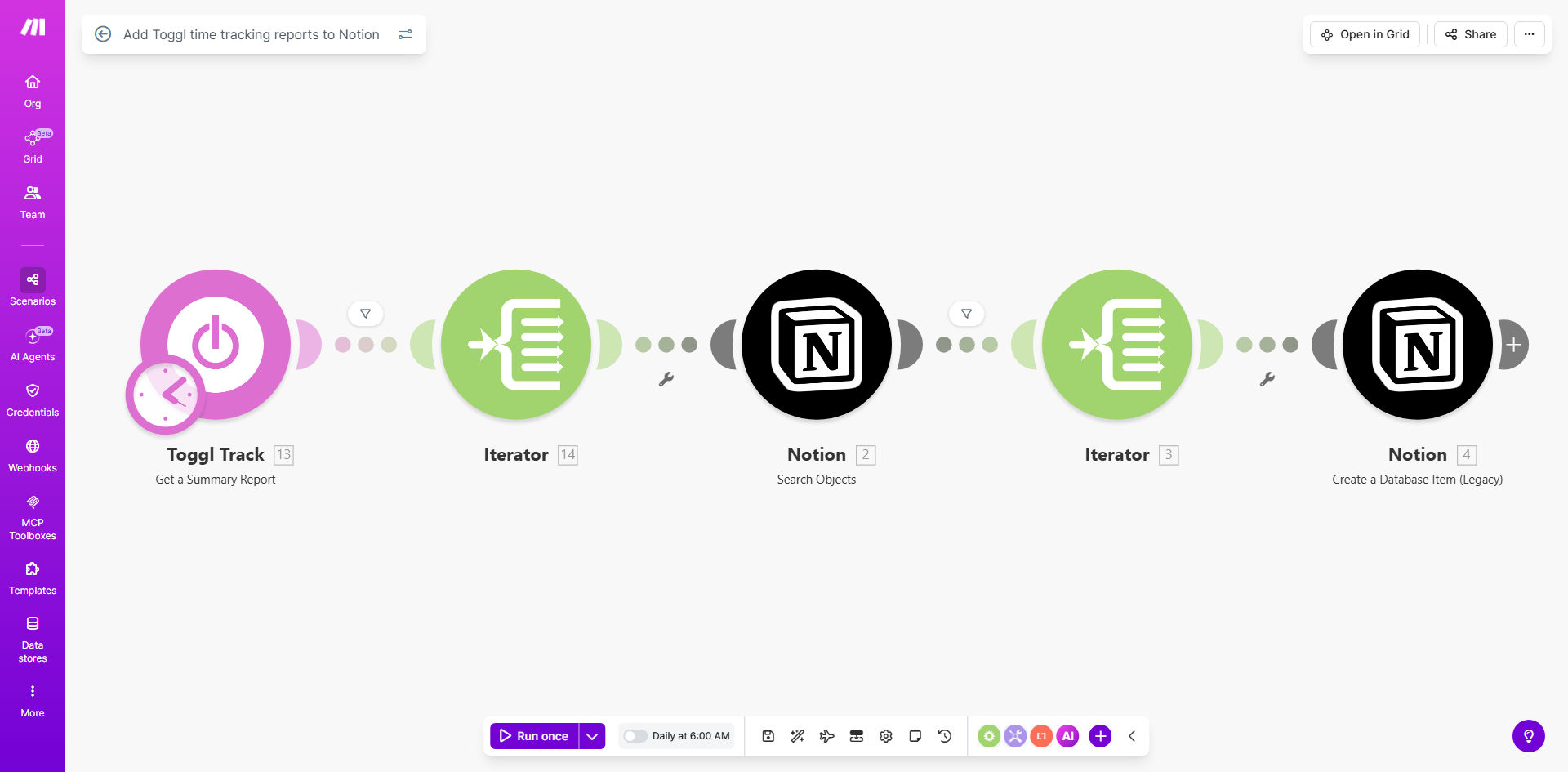
What This Workflow Does
For agencies, consultants, and remote teams, manually transferring time tracking data from Toggl to project management tools like Notion is a weekly headache. This process is error-prone, time-consuming, and creates a lag between work done and insights gained. Without automation, you're left with spreadsheets, copy-pasting, and frustrated team members who just want to focus on their actual work.
This automated workflow solves that by creating a seamless bridge between Toggl and Notion. Every morning, it retrieves the previous day's time tracking data—including which team member worked on which project, for how long, and with what description—and adds it as structured entries in your designated Notion databases. This turns Notion into a live command center for project profitability and team productivity, updated automatically while you sleep.
How It Works
The workflow runs on a daily schedule, acting as a reliable data courier between your time tracking and project management systems.
Step 1: Scheduled Trigger & Data Retrieval
Every morning at 6:00 AM (configurable), the scenario activates. It connects to your Toggl account via API and fetches a detailed report of all time entries logged during the previous business day.
Step 2: Data Processing & Routing
The raw data from Toggl is processed. The workflow identifies the project associated with each time entry, matches it to the corresponding Notion database you've set up, and structures the information (user, duration, description, date).
Pro tip: For the workflow to match projects correctly, ensure your Notion database names include the exact project names used in Toggl. Consistency is key for seamless automation.
Step 3: Database Update in Notion
Finally, the workflow uses the Notion API to create a new database entry for each time record. Each entry populates properties in your Notion database, such as "Team Member," "Hours Logged," "Project," and "Task Description," creating a perfect historical record.
Who This Is For
This automation is a game-changer for any knowledge-based business that bills for time or needs to measure internal project costs.
Digital Agencies & Consultancies: Track time spent per client project automatically to streamline invoicing and monitor budget burn rates.
Freelancers & Solopreneurs: Keep a meticulous, automated log of billable hours linked directly to your project notes in Notion.
Software Development & Remote Teams: Provide managers and stakeholders with self-updating dashboards in Notion that show real progress against estimates.
Businesses Using Notion as a Project Hub: If Notion is your central workspace, this workflow enriches it with actionable time data without breaking your workflow.
What You'll Need
- A Make.com account (free tier is sufficient to run this workflow).
- A Toggl Track account with existing time entries and projects set up.
- A Notion account with edit permissions for the workspace where you'll create databases.
- API connections for both Toggl and Notion, which you'll authorize once within Make.com.
- Notion Databases created for each project you wish to track. The database should have properties to capture: Date, Person, Duration (in hours), and Description.
Quick Setup Guide
You can have this automation running in under 15 minutes by following these steps.
Pro tip: Before you start, create a test project in both Toggl and a corresponding test database in Notion. Use this to verify the connection works before rolling it out to all projects.
1. Clone the Template: Click "Get This Workflow" to copy the scenario to your Make.com account.
2. Connect Your Apps: In the Make.com scenario editor, click on the Toggl and Notion modules to authorize and connect your accounts. This is a one-time setup.
3. Configure Databases: In each Notion module within the workflow, select the specific Notion database that corresponds to the Toggl project name the module is processing.
4. Map the Data: Ensure the data from Toggl (like "description," "user," and "duration") is correctly mapped to the property types in your Notion database (e.g., "Title," "Person," "Number").
5. Set the Schedule: The trigger is set to 6:00 AM daily. Click the clock icon on the Schedule module to change this to a time that suits your business rhythm.
6. Test & Activate: Run a single test execution to see data flow into your Notion database. Once confirmed, turn the scenario on. It will now run automatically every day.
Key Benefits
Eliminate 5+ Hours of Manual Work Per Week: No more end-of-week scrambling to compile timesheets from Toggl and copy them into reports. This automation does it instantly and accurately, freeing up significant administrative time.
Real-Time Project Budget Visibility: See exactly how many hours have been invested in a project at any moment directly within Notion. This allows for proactive budget management and prevents costly overruns before they happen.
Improved Billing Accuracy & Client Trust: Automated, detailed time logs provide indisputable records for client invoices. This transparency builds trust and reduces disputes over billed hours.
Data-Driven Team Insights: Spot productivity trends, identify projects that take more time than estimated, and understand team capacity—all from the aggregated data now living in your Notion workspace.
Seamless Historical Record: Build a perfect, searchable archive of all project work in Notion. This is invaluable for planning future projects, creating case studies, and performing annual reviews.