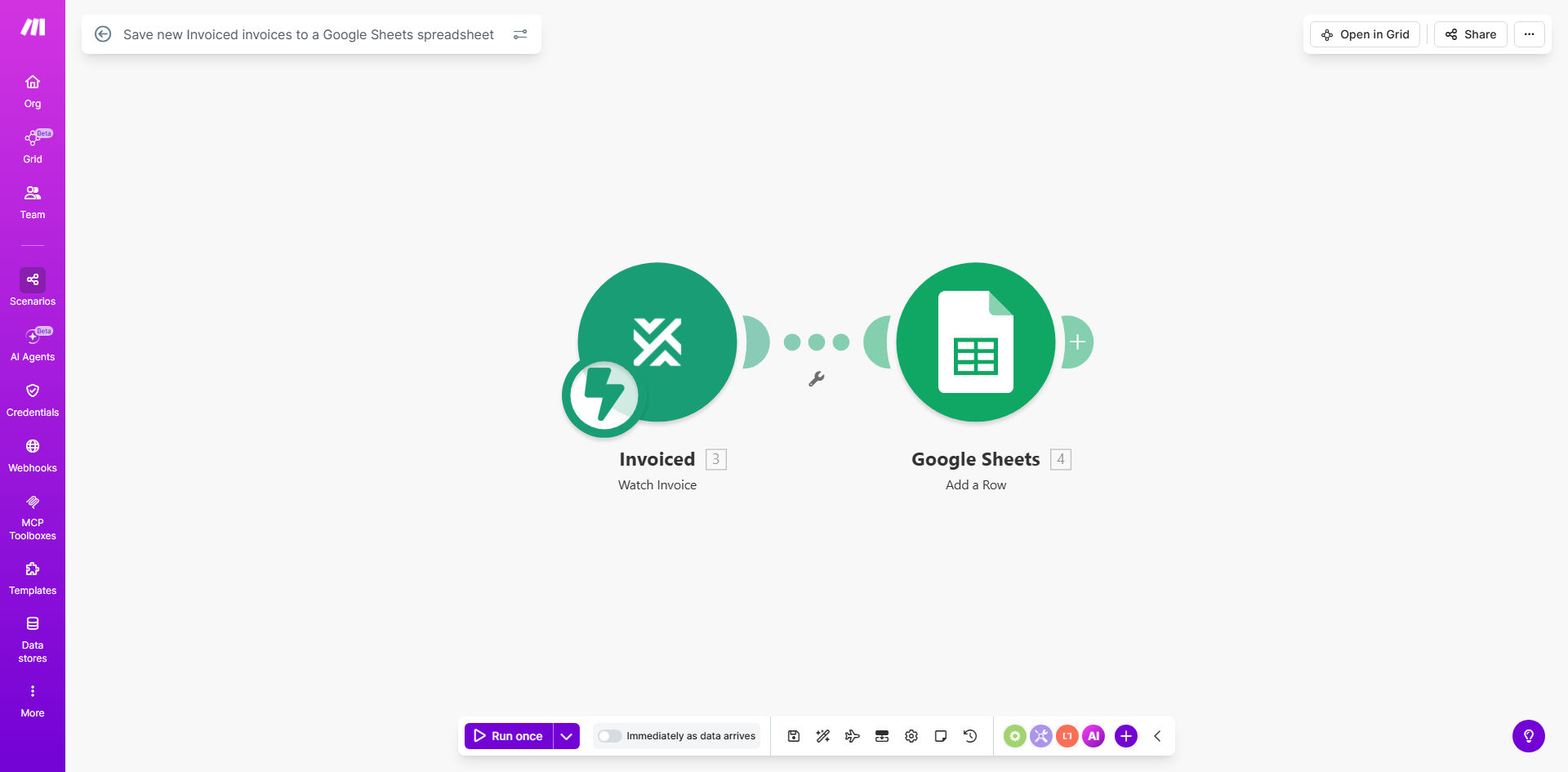
What This Workflow Does
For businesses using Invoiced for billing, manually copying invoice details into a spreadsheet is a repetitive, error-prone task. This process wastes valuable time that could be spent on growth-focused activities and creates risk of data discrepancies between your billing system and your records.
This automation solves that problem by creating a seamless bridge between Invoiced and Google Sheets. Every time a new invoice is created—whether for a new client, a recurring subscription, or a project milestone—the workflow instantly captures its key details and appends them as a new row in your designated spreadsheet. This ensures your financial log is always complete, accurate, and instantly available for analysis or sharing.
How It Works
The workflow operates on a simple trigger-action principle, running reliably in the background on Make.com.
Step 1: Monitor Invoiced for New Invoices
The scenario starts by watching your Invoiced account for the "Invoice Created" event. This trigger is instant and does not require polling; it activates as soon as the invoice is finalized in your Invoiced dashboard.
Step 2: Extract Key Invoice Data
Once triggered, the workflow collects essential data from the new invoice. This typically includes the invoice number, client name and email, issue date, due date, total amount, tax, status, and any custom notes or line items you want to track.
Step 3: Format and Add to Google Sheets
The collected data is then structured into a clean row format and sent to your pre-configured Google Sheets spreadsheet. The workflow finds the last empty row and inserts the new invoice record, keeping your log perfectly organized in chronological order.
Pro tip: Use a dedicated "Invoice Log" spreadsheet with separate tabs for different years or statuses (e.g., Paid, Pending). This makes historical analysis and tax preparation much simpler.
Who This Is For
This template is ideal for freelancers, small to medium-sized businesses, agencies, and consultants who use Invoiced for billing and need a straightforward, centralized record of their invoices outside of the Invoiced platform itself. It's perfect for:
- Business owners who want to share a read-only invoice log with their accountant.
- Teams that need to perform custom revenue analysis using Google Sheets' charting and pivot table tools.
- Companies preparing for audits, requiring an immutable, timestamped record of all billing activity.
- Anyone tired of manually exporting CSV reports from Invoiced and copying data.
What You'll Need
- A Make.com account (free tier available).
- An active Invoiced account with admin or API access.
- A Google Sheets spreadsheet set up with column headers matching the data you wish to capture (e.g., Invoice ID, Date, Client, Amount).
- API connection credentials for both Invoiced and Google Sheets (Make.com will guide you through this secure setup).
Quick Setup Guide
- Clone the Template: Click "Get This Workflow" to open the template on Make.com and create a copy in your own account.
- Connect Your Apps: In the Make.com scenario editor, authorize the connections to your Invoiced account and your Google Drive/Sheets account.
- Configure the Spreadsheet: Point the "Add Row to Spreadsheet" module to your specific Google Sheets file and worksheet. Ensure the column order in the module matches your sheet's headers.
- Map the Data: Review the data being pulled from Invoiced. You can add or remove fields (like line items or custom fields) to match your tracking needs.
- Test and Activate: Create a test invoice in Invoiced. Run the scenario once to verify the data appears correctly in your sheet. Then, turn on the schedule to run automatically.
Key Benefits
Eliminate Manual Data Entry: Save 2–5 hours per month previously spent on copying and pasting invoice details, freeing up time for core business tasks.
Guarantee Data Accuracy: Remove the risk of human error in transcribing numbers, dates, or client information, ensuring your financial records are always reliable.
Real-Time Financial Visibility: Your Google Sheets log updates within seconds of an invoice being created, giving you an immediate, centralized view of all billing activity.
Simplify Reporting and Analysis: With all invoice data in one spreadsheet, you can easily build charts, calculate monthly totals, track overdue payments, and share data with stakeholders.
Scalable and Reliable: The automation handles one invoice or one thousand with the same accuracy, growing seamlessly with your business without additional administrative overhead.