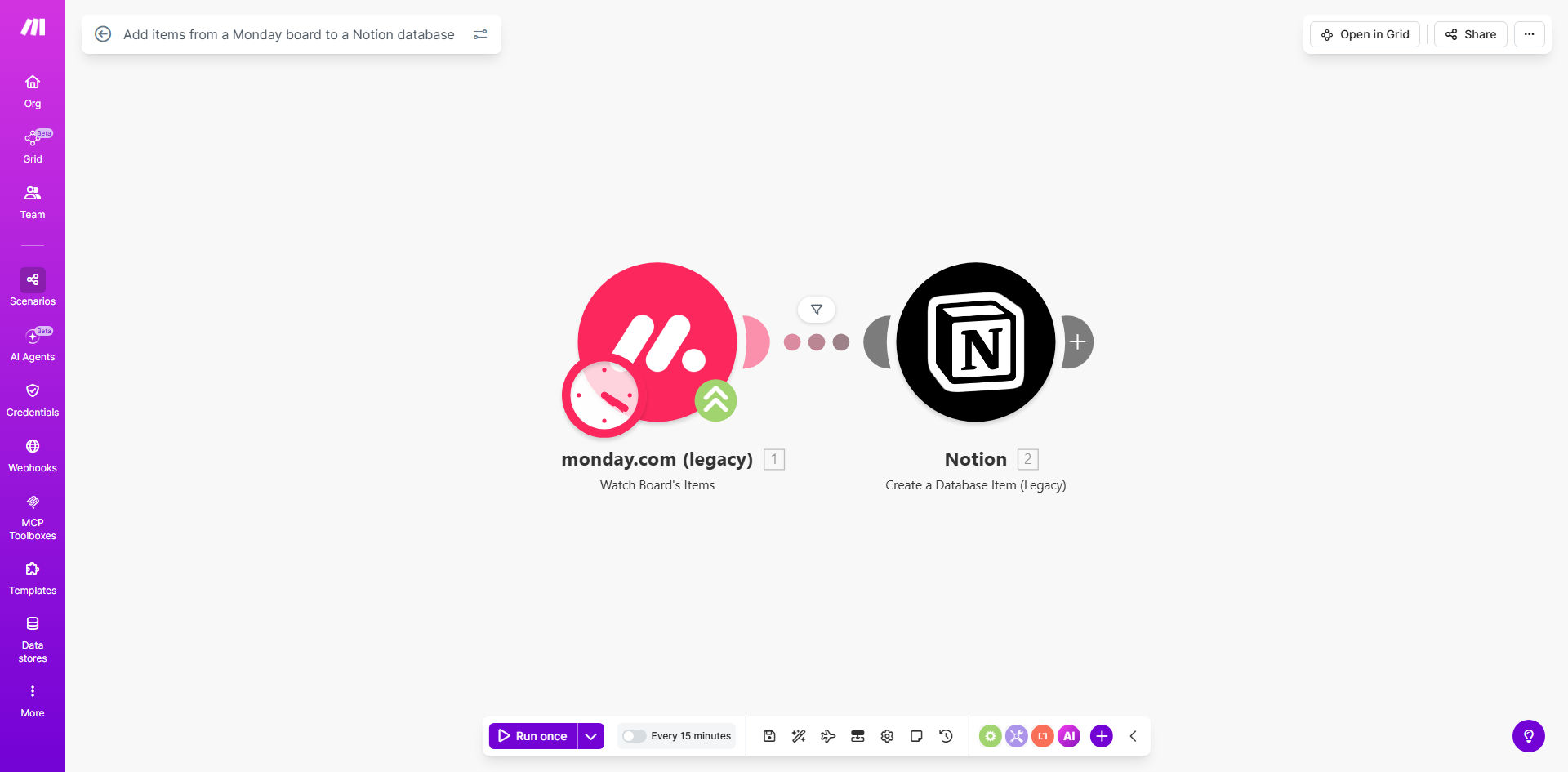
What This Workflow Does
Teams often struggle with information silos. You manage active projects and tasks in Monday.com, but your documentation, client reports, or knowledge bases live in Notion. Manually copying item details from one platform to another is a tedious, error-prone process that wastes valuable time and leads to outdated information.
This automation solves that by creating a seamless, one-way bridge from Monday.com to Notion. Whenever a new item is created on your designated Monday board—be it a new project, task, client request, or bug report—this workflow automatically captures all its details and creates a corresponding, richly formatted page in your chosen Notion database. This ensures your Notion workspace always reflects the current state of work in Monday, without any manual intervention.
How It Works
The workflow is triggered by an event in Monday.com and executes a series of actions in Make.com to transform and place the data into Notion.
Step 1: Monitoring the Monday Board
The automation starts with a "Watch Items" trigger in Monday.com. It continuously monitors your specified board for any new items that are created. As soon as one appears, the workflow instantly captures the entire item, including its name, status, assignee, dates, and all custom column values.
Step 2: Processing and Mapping Data
Make.com acts as the integration engine. It receives the raw data from Monday and routes it through a "Router" module. This step is crucial for filtering or directing data if you have complex rules (e.g., only syncing items from a specific group or with a certain status). The data is then formatted to match the property types expected by your Notion database.
Step 3: Creating the Notion Page
The final step is the "Create a Database Item" action in Notion. The workflow sends the transformed data to your pre-defined Notion database, creating a new page. It maps each Monday column to a corresponding Notion property—text to text, status to select, people to person, dates to date—resulting in a perfectly structured new entry in your Notion knowledge base, client portal, or project archive.
Pro tip: For a true two-way sync, pair this template with its counterpart that pushes Notion entries to Monday. To prevent infinite loops, always add a custom property (like "Monday ID") to track the source of each item.
Who This Is For
This automation is a game-changer for any team or business that uses Monday.com for execution and Notion for documentation or planning. It's perfect for project managers who need to maintain client-facing reports in Notion, product teams that want their Monday roadmap to populate a public changelog, agencies that track client work in Monday but deliver specs in Notion, and HR teams that manage onboarding checklists in Monday but store final documentation in a Notion wiki.
What You'll Need
- A Make.com account (free tier available).
- Admin or member access to the specific Monday.com board you want to sync from.
- Edit access to the Notion database you want to sync to, and the database must already be created with the desired property structure.
- API connections between Make.com and both Monday.com and Notion (easily set up within Make).
- A clear understanding of which Monday columns map to which Notion properties.
Quick Setup Guide
- Clone the Template: Click "Get This Workflow" to copy the template into your Make.com account.
- Connect Your Apps: In the Make.com scenario, authorize the Monday.com and Notion modules by logging into your accounts when prompted.
- Configure the Trigger: Select the specific Monday.com board and, optionally, the group or column that should trigger the sync.
- Map Your Data: In the Notion module, select your target database. Then, map each Monday.com field (like "Item Name," "Status," "Assignee") to the correct Notion database property. Ensure data types align (e.g., a Monday text field to a Notion "Text" property).
- Test and Activate: Run a single test by creating a new item in your Monday board. Verify that a correctly formatted page appears in your Notion database. Once confirmed, turn the scenario "ON" to run automatically.
Key Benefits
Eliminate 5-10 hours of manual data entry per month. By automating the transfer of information, your team reclaims time spent on copy-pasting and can focus on strategic work, directly boosting productivity and morale.
Ensure 100% data accuracy and real-time updates. Remove the risk of human error from manual transcription. The moment a task is added or updated in Monday, its corresponding Notion page is created or can be configured to update, guaranteeing your documentation is always current.
Create a single source of truth across platforms. Bridge the gap between your dynamic project management tool (Monday) and your static documentation hub (Notion). This integration provides a holistic view of projects, from active tasks to archived knowledge, improving cross-team visibility and collaboration.
Scale your processes without adding overhead. As your business grows and the number of projects, tasks, or clients multiplies, this automation scales effortlessly. It handles one item or one thousand with the same reliability, preventing process bottlenecks.
Enhance client and stakeholder reporting. Automatically populate client-facing Notion dashboards or internal reports with live data from Monday. This professionalizes your communication and provides transparent, up-to-date insights without extra preparation work.