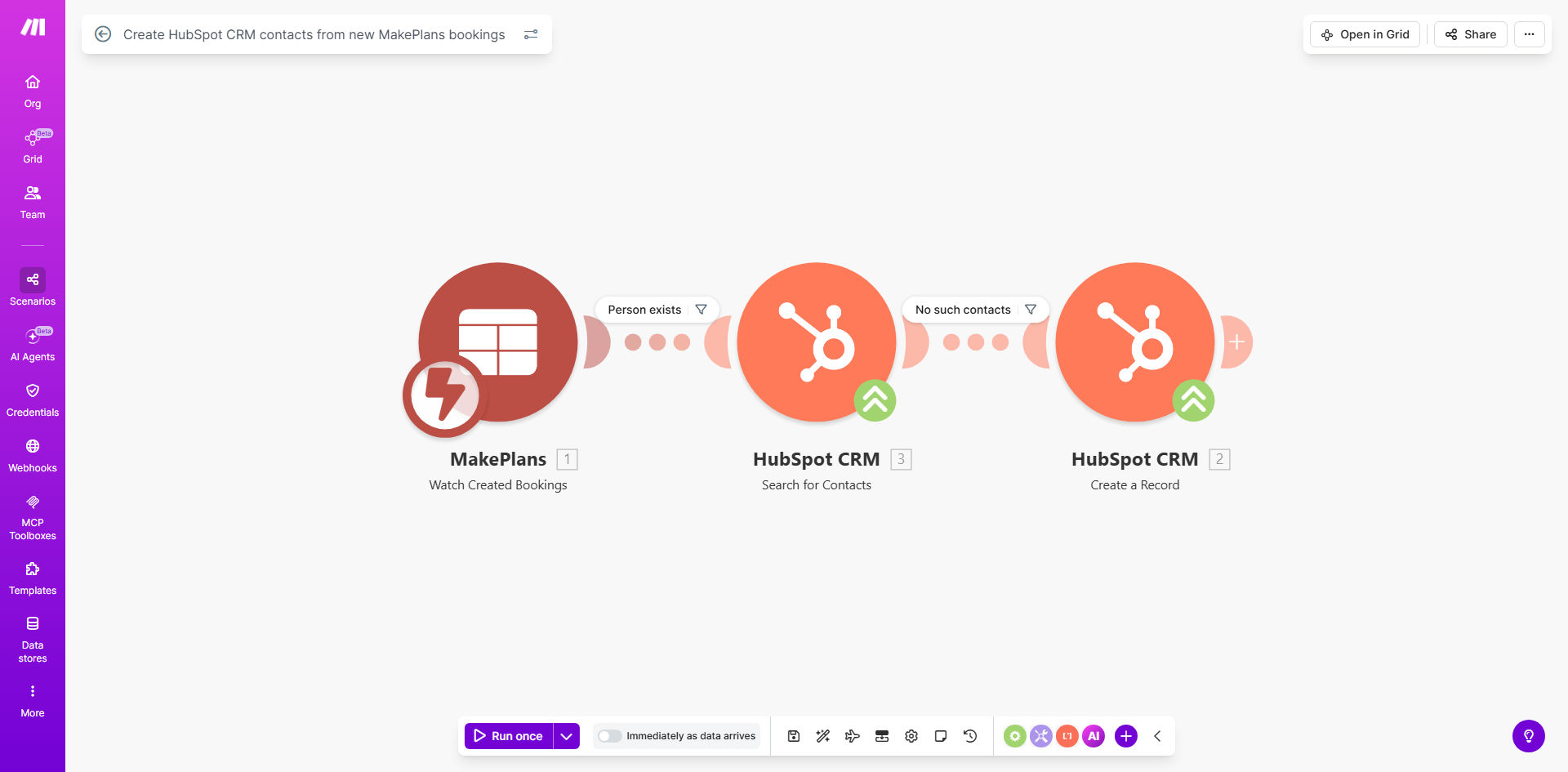
What This Workflow Does
For service-based businesses, consultants, clinics, and agencies, every new booking represents a potential customer. But that potential is often lost when booking details are trapped in a scheduling tool, forcing your sales or admin team to manually copy-paste information into your Customer Relationship Management (CRM) system. This process is slow, prone to errors, and delays critical follow-up.
This automated workflow solves that problem completely. It acts as a real-time bridge between your MakePlans booking calendar and your HubSpot CRM. The moment a client books an appointment, consultation, or service, their details are instantly and accurately transformed into a new contact record in HubSpot. This ensures your sales pipeline is always up-to-date, enabling immediate, personalized follow-up that dramatically increases conversion rates.
The business value is clear: you turn a manual, administrative task into a seamless, zero-effort process. This not only saves significant time and reduces data errors but also ensures no lead falls through the cracks because someone forgot to transfer the information. Your team can focus on selling and serving, not on data entry.
How It Works
The automation follows a simple, reliable sequence to capture and transfer data without any human intervention.
Step 1: Trigger on New MakePlans Booking
The workflow is activated the instant a new booking is created in your MakePlans account. The Make.com scenario watches for this event, capturing the entire booking payload—including customer name, email, phone, service type, date, time, and any custom form fields.
Step 2: Format and Prepare the Data
Before sending data to HubSpot, the workflow often includes a data formatting step. This might involve combining first and last names, parsing the service type into a category, or converting the booking time into your local timezone. This ensures the data lands in HubSpot in a clean, usable format.
Step 3: Create or Update Contact in HubSpot
The core action: the workflow sends the prepared data to HubSpot's API to create a new contact. It maps the MakePlans fields to corresponding HubSpot contact properties (e.g., email, phone, company name). A smart setup can also check if a contact with that email already exists to avoid duplicates, updating their record instead with the new booking information.
Step 4: Log Success and Handle Errors
Finally, the workflow confirms the contact was created successfully and can log the action for your records. If an error occurs (like a network issue), the scenario is designed to retry or send a notification to an admin, ensuring reliability.
Pro tip: Enhance this workflow by adding a step to automatically create a follow-up task for your sales rep in HubSpot or send a personalized welcome email sequence based on the booked service. This creates a full-circle automation from lead capture to first touchpoint.
Who This Is For
This automation is a game-changer for any business that uses MakePlans for client scheduling and HubSpot to manage customer relationships. It's ideal for:
- Consulting Firms & Coaches: Automatically capture leads from discovery call bookings and move them directly into your sales pipeline.
- Healthcare Practices & Clinics: Instantly create patient profiles in your CRM from new appointment bookings, streamlining intake.
- Service Agencies (Marketing, Legal, Design): Ensure every new project inquiry booked for a consultation becomes a tracked lead.
- Educational Institutions & Trainers: Sync student registrations for workshops or classes into HubSpot for nurturing and communication.
- Sales & Operations Managers: Anyone tired of manual data transfer between systems and wants to guarantee 100% lead capture.
What You'll Need
To implement this template, you will need the following accounts and access:
- A Make.com account with an available scenario.
- An active MakePlans account where bookings are received.
- A HubSpot CRM account (Sales Hub or Marketing Hub).
- API access credentials (API keys or OAuth) for both MakePlans and HubSpot. These are typically found in the settings or developer sections of each platform.
- Basic understanding of the data fields you collect in your MakePlans booking form (e.g., custom questions).
Quick Setup Guide
You can have this automation running in under 30 minutes by following these steps:
- Get the Template: Click "Get This Workflow" to copy the pre-built scenario into your Make.com account.
- Connect Your Apps: In the Make.com scenario editor, authorize the connections to your specific MakePlans and HubSpot accounts.
- Map Your Data Fields: Configure the "Create Contact" module in HubSpot by mapping the incoming MakePlans data (like `customer_email` to HubSpot's `email` property).
- Set Up Duplicate Handling: Decide if you want the workflow to search for an existing contact by email before creating a new one to maintain a clean database.
- Test and Activate: Use the "Run once" feature in Make.com to test with a recent or test booking. Verify the contact appears correctly in HubSpot, then turn the scenario to "ON" to run automatically.
Key Benefits
Eliminate Manual Data Entry & Errors: Save 5-10 minutes per booking previously spent copying information. More importantly, achieve 100% data accuracy by removing human error from the transfer process.
Accelerate Sales Follow-Up Time from Hours to Minutes: Contacts are created in HubSpot instantly, allowing your sales team to send a personalized follow-up email or make a call while the client's interest is highest, significantly boosting conversion rates.
Guarantee 100% Lead Capture: No booking ever gets forgotten or lost in a spreadsheet. Every person who books with you is automatically entered into your CRM and sales funnel.
Enrich Customer Profiles Automatically: Each new booking adds context (service type, booking date) to the contact's profile in HubSpot, enabling better segmentation and more personalized marketing campaigns over time.
Improve Team Efficiency & Morale: Free your staff from repetitive, low-value administrative tasks. This allows them to focus on high-impact activities like customer service and sales, improving both productivity and job satisfaction.