What This Workflow Does
For service-based businesses using MakePlans for appointments and Pipedrive for sales, a critical gap often exists between booking and business development. Every time a new customer books an appointment, their information is trapped in the booking system. Your sales or account management team must manually check for new bookings, copy-paste details, and create CRM records—a slow, error-prone process that delays follow-up and loses potential upsell opportunities.
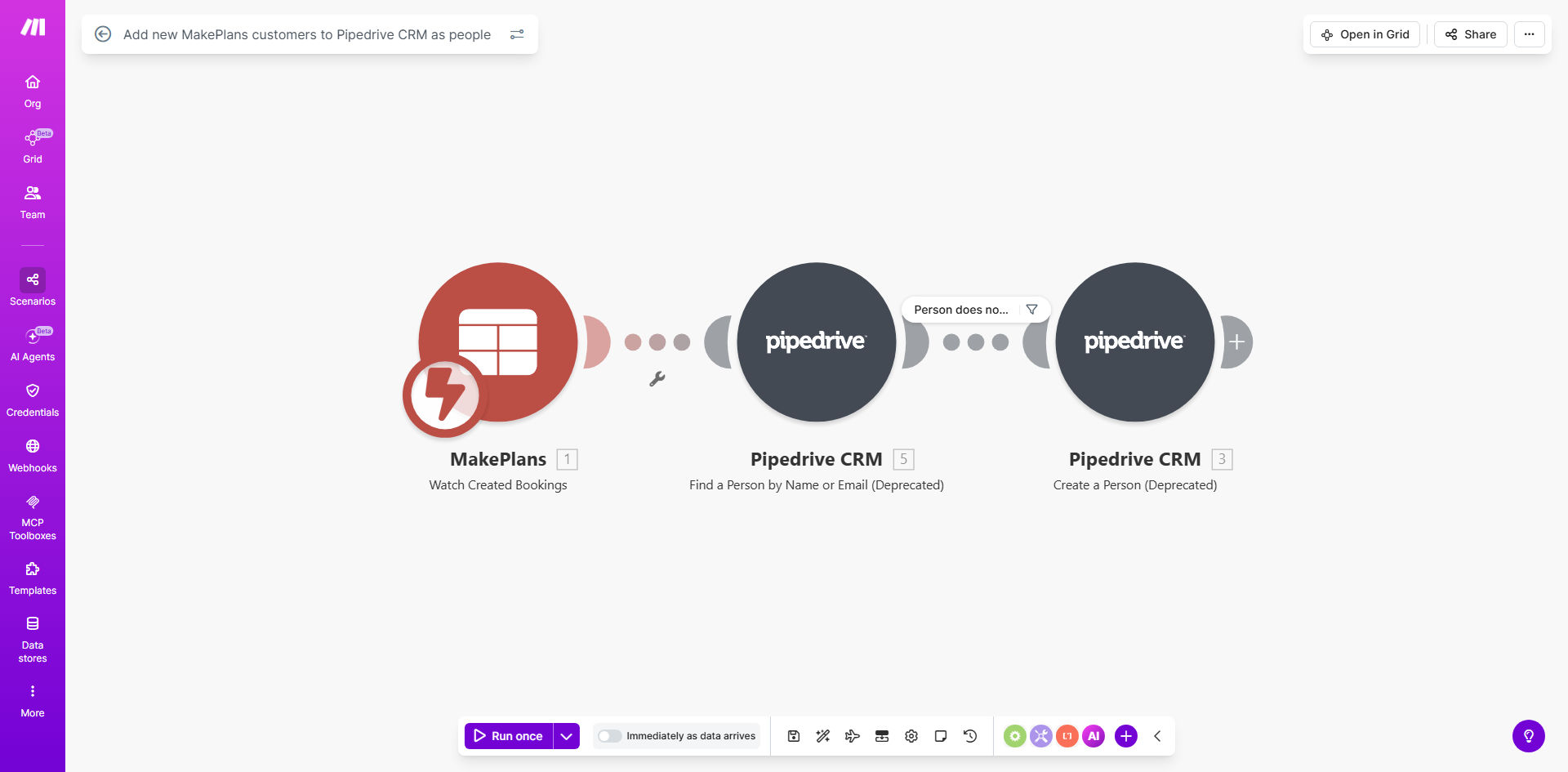
This automation workflow solves that problem completely. It acts as a real-time bridge between MakePlans and Pipedrive. The moment a new customer completes a booking or is added to MakePlans, the workflow is triggered. It automatically collects the customer's name, email, phone number, and booking details, then creates a corresponding "Person" record in your designated Pipedrive pipeline. This ensures your sales team has instant, actionable visibility into every new lead, right within their primary sales tool.
The business value is clear: reduced administrative overhead, elimination of data entry mistakes, and a significantly faster sales response time. Instead of chasing spreadsheets or checking multiple platforms, your team can focus on converting new customers into loyal, repeat clients.
How It Works
The workflow follows a simple, reliable sequence to transfer data securely and accurately.
Step 1: Trigger on New MakePlans Customer
The automation is initiated by the "Watch Customers" module in Make.com. It continuously monitors your MakePlans account for any new customer records. This could be from a new online booking, a manually added client by your staff, or an import. The trigger captures the event in real-time.
Step 2: Extract and Map Customer Data
Once triggered, the workflow parses the incoming data from MakePlans. It extracts key fields like first name, last name, email address, phone number, and any relevant notes or custom fields associated with the booking. This data is structured and prepared for the next step.
Pro tip: Use this step to filter or enrich data. You can add logic to only sync customers from specific services or locations, or to append a tag like "From Online Booking" to the Pipedrive record for better segmentation.
Step 3: Create Person in Pipedrive
The prepared data is then sent to Pipedrive via its API. The workflow uses the "Create a Person" module, mapping the extracted MakePlans fields to the correct Pipedrive fields. You can specify which pipeline or organization to associate the new person with, ensuring they are placed in the correct stage of your sales process immediately.
Step 4: (Optional) Log and Notify
For reliability and oversight, the workflow can include additional steps. It can log each successful sync to a Google Sheet for audit purposes, or send a notification via Slack or email to your sales manager alerting them of a new high-value lead that just landed in the CRM.
Who This Is For
This automation is ideal for any business that takes bookings or appointments and needs to manage customer relationships in a CRM. This includes:
- Service Providers: Consultants, coaches, therapists, salons, and clinics using MakePlans for scheduling.
- Sales-Driven Teams: Businesses where timely follow-up after a booking or inquiry is crucial for conversion and customer success.
- Growing Businesses: Companies scaling their operations where manual data transfer between systems is becoming a bottleneck and source of errors.
- Marketing & Sales Alignment: Organizations that want to tightly connect lead generation (bookings) with sales execution (CRM management).
What You'll Need
- A Make.com account (free or paid plan) to build and run the automation.
- An active MakePlans account with customers/appointments data.
- A Pipedrive CRM account with admin access to generate API keys.
- The API credentials (keys) for both MakePlans and Pipedrive to authorize the connection in Make.com.
- Basic understanding of your customer data fields in both systems to ensure proper mapping.
Quick Setup Guide
You can have this workflow running in under 30 minutes by following these steps:
- Clone the Template: Click "Get This Workflow" and duplicate the provided template into your own Make.com scenario.
- Authorize Connections: In the Make.com scenario, connect your MakePlans and Pipedrive accounts by entering your API keys when prompted.
- Configure the Trigger: Point the "Watch Customers" module to your specific MakePlans account. Test it by creating a dummy customer to ensure it fires.
- Map the Data Fields: In the "Create a Person" module for Pipedrive, map the incoming MakePlans variables (like `firstName`, `email`) to the corresponding Pipedrive person fields.
- Set the Destination: Choose the Pipedrive pipeline and organization where new people should be added. You can also set custom owner assignments here.
- Test & Activate: Run a single test execution with a real customer record. Verify the person appears correctly in Pipedrive. Once confirmed, turn the scenario to "ON" to run continuously.
Key Benefits
Save 5–10 hours per week on manual data entry. Eliminate the tedious task of transferring customer information between systems, freeing your team to focus on high-value sales activities and customer service.
Improve lead response time from hours/days to minutes. By having new customers instantly appear in Pipedrive, your sales team can initiate welcome sequences or follow-up calls while the interaction is still fresh, dramatically increasing conversion rates.
Ensure 100% data accuracy and eliminate missed leads. Automated sync removes human error from copy-pasting and guarantees that no customer booking is ever overlooked or lost between systems.
Gain a unified customer view for better service. By centralizing booking history and contact details in Pipedrive, your team has full context for every interaction, enabling more personalized and effective communication.
Scale your operations seamlessly. As booking volume grows, this automation handles the increased data flow effortlessly without requiring additional administrative staff, supporting sustainable business growth.