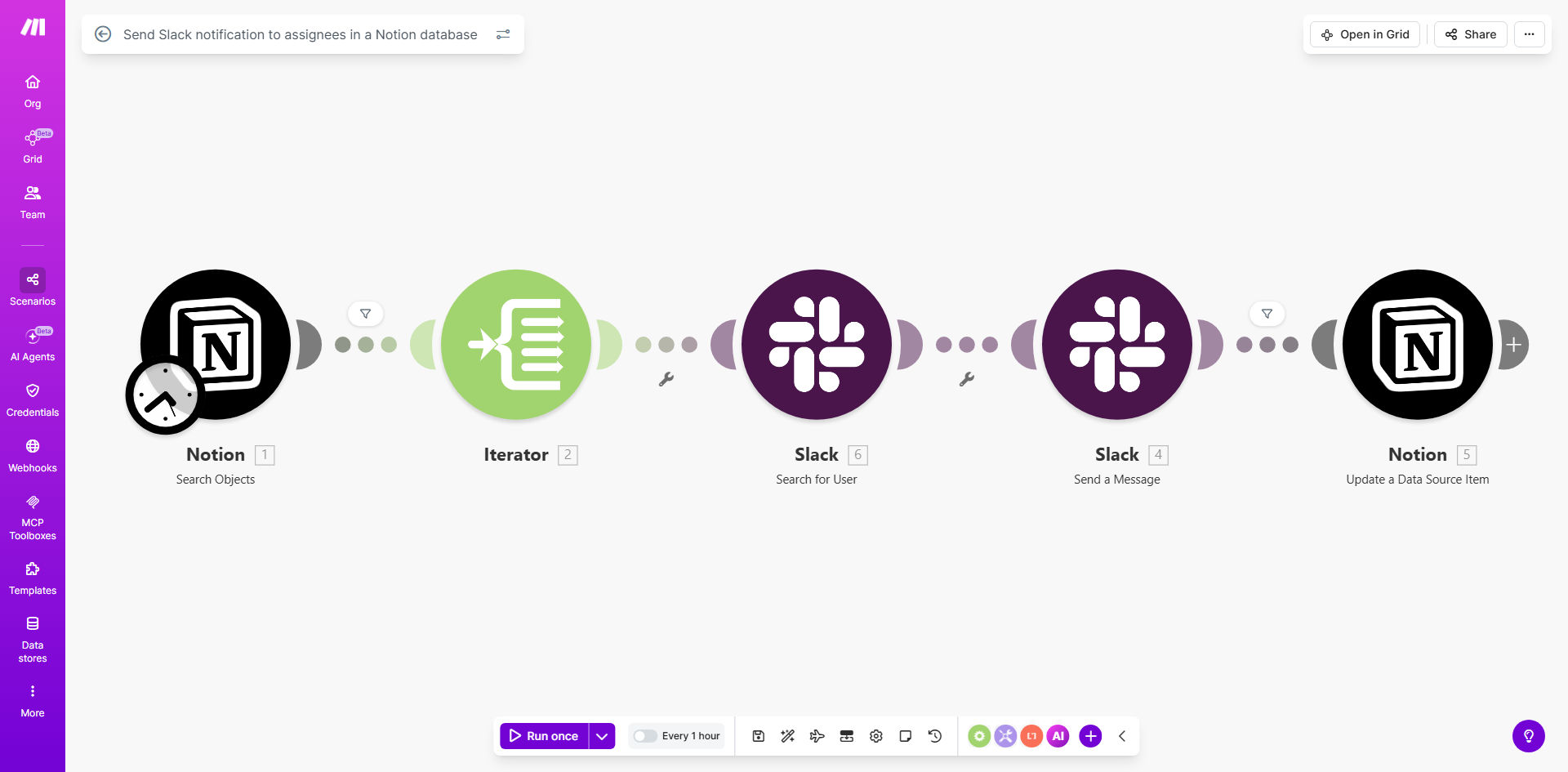
What This Workflow Does
In today's hybrid work environment, critical information often gets trapped in siloed tools. A project manager adds a task to a Notion database, but the assigned team member might not check Notion for hours—or even days. This delay creates bottlenecks, missed deadlines, and unnecessary friction in team collaboration.
This automated workflow solves that problem by creating a seamless bridge between your planning hub (Notion) and your communication hub (Slack). It monitors a specified Notion database for new items or updates, identifies the assignee, and sends a tailored, actionable notification directly to them on Slack. This ensures that the moment a task is created or assigned, the right person is informed with all the context they need to begin work immediately.
The result is a significant reduction in task start time, improved accountability, and a smoother operational flow. Teams spend less time chasing updates and more time executing, transforming your Notion database from a static repository into a dynamic engine that proactively drives team action.
How It Works
The automation runs on a reliable schedule, acting as a diligent assistant that never misses an update.
Step 1: Scheduled Database Check
The workflow is triggered at regular intervals (e.g., every 15 minutes) using Make.com's scheduler module. It connects to your specified Notion database and queries for items that meet your criteria, such as items created since the last check or items where the "Status" property has changed.
Step 2: Data Retrieval & Filtering
For each new or updated database item (page), the workflow retrieves key properties: the task title, description, due date, priority, and most importantly, the assignee. It can filter out items that don't require a notification, such as completed tasks or items with no assignee.
Step 3: Assignee Lookup & Message Formatting
The system maps the assignee name or email from Notion to the corresponding Slack user ID. It then constructs a clear, helpful Slack message. This message can include a direct link to the Notion page, the due date, and custom instructions, all formatted for easy reading.
Step 4: Smart Notification Delivery
Finally, the workflow sends the formatted message. It can send a direct message (DM) to the assignee, post in a dedicated team channel and tag them, or even message a group of people. The assignee receives a prompt, contextual alert right where they are already working—in Slack.
Pro tip: Use a "Last Checked" timestamp filter in your workflow to avoid sending duplicate notifications for the same task. This ensures efficiency and prevents notification fatigue for your team.
Who This Is For
This automation is a game-changer for any team that uses Notion for planning and Slack for day-to-day communication.
Project Managers & Team Leads: Keep your team aligned without micromanaging. Ensure tasks are seen and acted upon the moment they are assigned.
Marketing & Content Teams: Automate alerts for new content assignments, editorial calendar updates, or campaign tasks, ensuring writers and designers are immediately in the loop.
Software Development & IT Teams: Notify developers when new bugs are logged in a Notion tracker or when feature requests are prioritized, streamlining the sprint workflow.
Client Services & Operations: Alert account managers or support agents when a new client request or project ticket is created in your Notion CRM or request database.
Remote & Hybrid Teams: Bridge the gap between asynchronous planning (Notion) and real-time communication (Slack), ensuring no one is left behind due to time zones or different tool-checking habits.
What You'll Need
- A Make.com account (free tier is sufficient to start).
- A Notion account with a database that contains items you want to monitor. The database must have a property field for an assignee (like a "Person" property).
- A Slack workspace where you have permission to create apps and send messages.
- The Notion API integration connected in Make.com, requiring an internal integration token created in your Notion settings.
- The Slack API integration connected in Make.com, requiring a Slack app with appropriate OAuth permissions (chat:write, users:read) installed to your workspace.
Quick Setup Guide
Follow these steps to deploy this automation in under 30 minutes:
- Clone the Template: Click "Get This Workflow" to copy the template into your Make.com account.
- Connect Your Apps: In the Make.com scenario, authorize the Notion and Slack modules by logging into your accounts and granting the necessary permissions.
- Configure the Notion Trigger: Select the specific Notion database you want to monitor. Set up your filter—for example, "Created time" is after the last run time.
- Map the Data: Ensure the module correctly identifies the property that holds the assignee's information (usually a "Person" property).
- Customize the Slack Message: Edit the "Send a Direct Message" or "Post to Channel" module. Use the data from Notion (like {Task Name} and {Due Date}) to build an informative message. Include the link to the Notion page.
- Test and Activate: Run the scenario once to test. Check if a test task in Notion correctly sends a message to your Slack. Once confirmed, schedule the scenario to run automatically (e.g., every 15 minutes) and turn it on.
Key Benefits
Cut task initiation time by over 80%. Assignees are notified in seconds via Slack instead of discovering tasks hours later during a manual Notion check. This accelerates project momentum from the very start.
Eliminate 2-3 hours of weekly manual follow-up work per manager. Project leaders no longer need to send "Did you see the new task?" messages. The automation handles communication, freeing managers for strategic planning and coaching.
Reduce missed assignments and deadline slips by creating a fail-safe notification layer. Even if someone forgets to check Notion, the Slack alert ensures critical tasks are never overlooked, improving overall team reliability and client satisfaction.
Improve cross-tool visibility and create a single source of truth for action items. This workflow turns your Notion database into an active command center. Team members can trust that important updates will come to them, reducing context-switching and tool fatigue.
Scale your processes without adding overhead. As your team grows and your Notion database becomes more complex, this automation ensures the notification system remains consistent and reliable, supporting scalable collaboration.