What This Workflow Does
Every website visitor who engages with your chatbot represents a potential opportunity, but manually researching each one is a massive time sink for sales and marketing teams. This automation solves that problem by creating a seamless, real-time lead qualification pipeline.
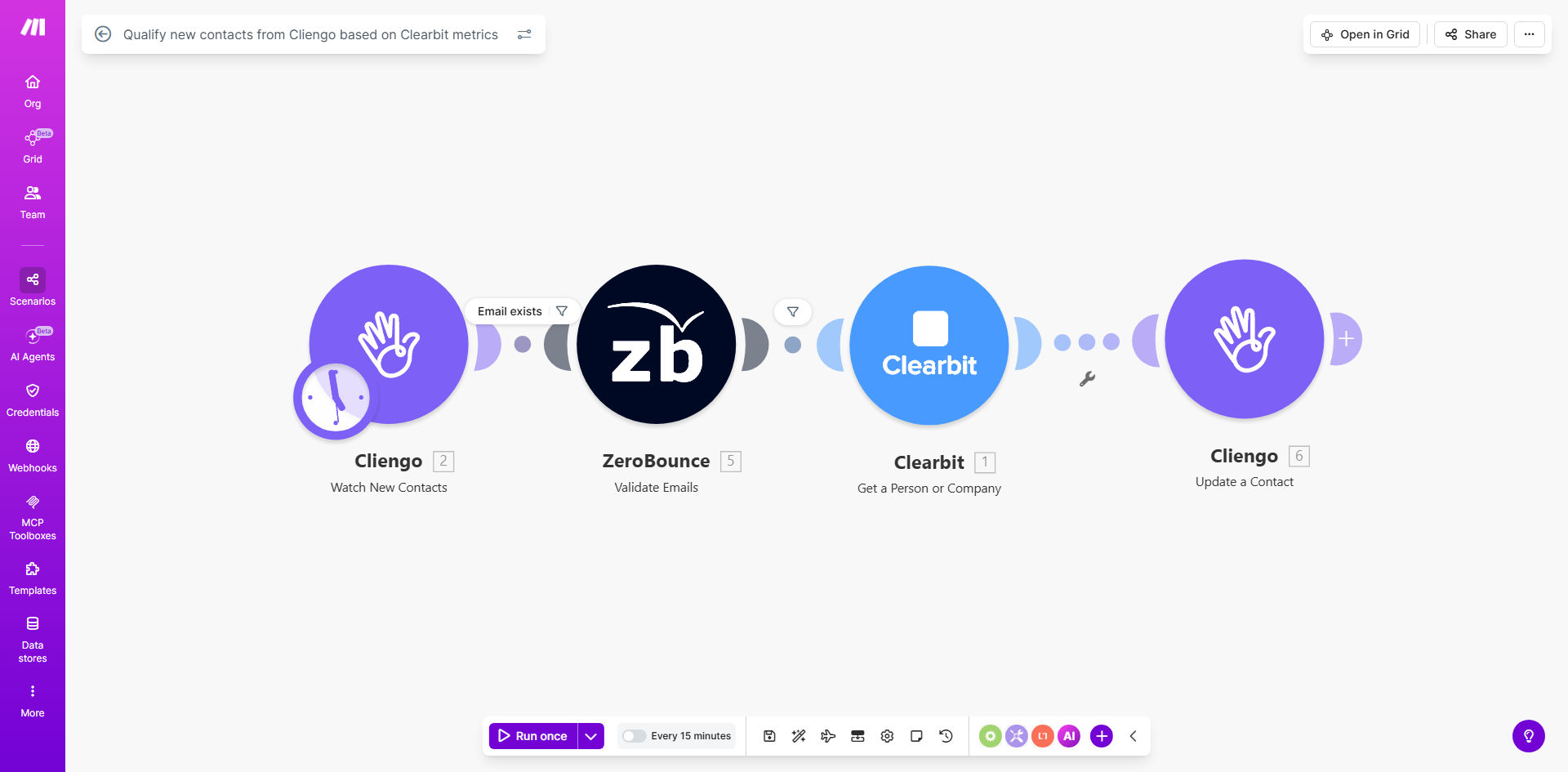
The workflow triggers the moment a new contact is captured through your Cliengo website chatbot. It automatically verifies the email address for deliverability, then enriches the lead with valuable firmographic and demographic data from Clearbit—such as company size, industry, funding, and the contact's seniority level. Finally, it creates a fully-formed, scored contact record in your preferred database, ready for your sales team to pursue.
The business value is clear: you eliminate hours of tedious manual research per week, ensure your sales team only spends time on verified, high-potential leads, and dramatically speed up your response time to hot prospects, increasing conversion rates.
How It Works
Step 1: Capture from Cliengo
The workflow is initiated when a visitor on your website provides their contact information through the Cliengo chatbot. Make.com watches for new "user created" events in your Cliengo account, capturing the prospect's name, email, and any other details from the chat conversation.
Pro tip: Configure your Cliengo bot to ask for the company name during the conversation. This simple addition gives the enrichment tools a head start, resulting in even more accurate data.
Step 2: Verify & Enrich the Email
The captured email address is first sent to Hunter (or a similar service) for real-time verification. This step confirms the email is valid and deliverable, filtering out typos or fake addresses before you invest further. Once verified, the email is sent to Clearbit's powerful APIs.
Step 3: Enrich with Clearbit Company & Person Data
Clearbit uses the email domain and address to pull a wealth of data. It identifies the company, providing details like industry, employee count, estimated revenue, and technology stack. It also enriches the person's profile with their likely job title, seniority, and social profiles.
Step 4: Score the Lead & Create a Contact
Based on the enriched data, the workflow applies a simple scoring logic. For example, a lead from a tech company with 50-500 employees might get a high score. It then formats all this information—original chat data, verification status, and enrichment insights—into a complete contact record and creates it in your connected app, such as a CRM, Airtable, or Google Sheets.
Who This Is For
This automation is ideal for B2B companies that generate leads through their website and have a sales team. It's perfect for SaaS businesses, marketing agencies, tech consultancies, and any organization where understanding a prospect's company context is key to sales conversations.
Marketing teams drowning in unqualified leads will benefit from the automatic segmentation. Sales development representatives (SDRs) can prioritize their outreach based on lead score instead of guessing. Founders and small business owners who wear multiple hats will save precious hours every week by automating this critical but repetitive research task.
What You'll Need
- A Make.com account (free or paid plan) to build and run the automation.
- A Cliengo account with your chatbot installed on your website, capturing visitor information.
- API keys for Clearbit (for company/person enrichment) and Hunter (for email verification). Both offer free tiers suitable for testing.
- A destination for the qualified contacts, such as a CRM (HubSpot, Salesforce), a spreadsheet (Google Sheets), or a database (Airtable, MySQL).
Quick Setup Guide
- Clone the Template: Click "Get This Workflow" to open the template in your Make.com account and create a copy.
- Connect Your Apps: In the Make.com scenario, authorize the connections to your Cliengo, Hunter, Clearbit, and your destination app (e.g., CRM).
- Configure the Trigger: Set the Cliengo module to watch for "New User" events. Test it by submitting a form on your website to ensure it captures data.
- Set API Keys: Enter your Hunter and Clearbit API keys in their respective modules within the workflow.
- Map Data Fields: In the final "Create Contact" module, map the enriched data fields (company name, industry, job title, etc.) to the corresponding fields in your CRM or database.
- Activate & Test: Turn on the scenario and perform a live test by engaging with your own website chatbot. Verify that a complete, enriched contact appears in your destination system within minutes.
Key Benefits
Save 5–10 hours per week on manual lead research. Your team no longer needs to jump between LinkedIn, company websites, and CRM to build a prospect profile. The automation does it instantly and consistently.
Increase lead response time from hours to seconds. By having a fully qualified lead record created automatically, your sales team can make a personalized, informed outreach within minutes of a website visit, dramatically improving engagement rates.
Improve sales conversion by focusing on high-intent, qualified leads. Automatic scoring based on firmographic data ensures your sales efforts are directed at prospects that match your ideal customer profile, leading to more efficient pipelines and higher win rates.
Eliminate data entry errors and maintain a clean database. Automated processes remove human error from manual copying and pasting. Email verification also ensures your contact list stays free of invalid addresses, protecting your email sender reputation.
Gain valuable market intelligence automatically. As leads come in, you automatically build a database of companies interacting with your site, providing insights into which industries, company sizes, and technologies are most interested in your offering.