What This Workflow Does
For SaaS businesses using ProfitWell for subscription analytics, sharing customer lists with internal teams is a common but time-consuming task. A finance manager might email asking for the latest active subscriber list for a report. A support agent might need customer details for an escalation. Each request requires someone to manually log into ProfitWell, export the data, and email it back—a process that can take 15–30 minutes and interrupts workflow.
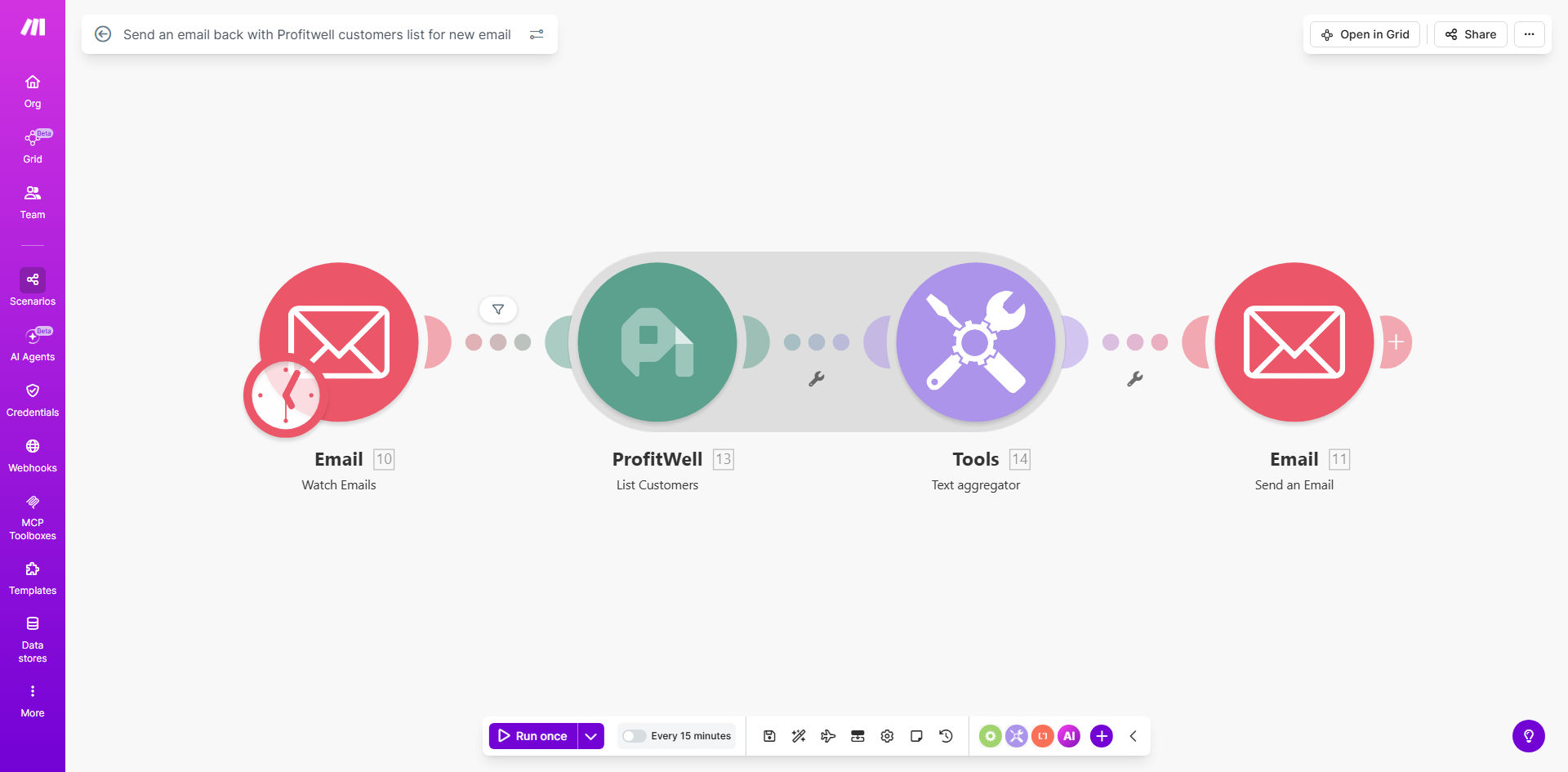
This Make.com automation template solves that problem entirely. It watches your connected email inbox for specific trigger emails—like those containing the phrase “customer list” from an authorized internal address. When such an email arrives, the workflow automatically connects to your ProfitWell account, fetches the current list of customers (with their subscription details, MRR, churn status, etc.), formats the data, and sends it back as a reply to the requester. The entire process happens in seconds, without any human intervention.
The result is a self-service data portal via email. Team members get the accurate, real-time information they need instantly, while your operations staff is freed from repetitive data-pulling tasks. This turns a manual, error-prone process into a reliable, automated system that enhances productivity and data accessibility across your organization.
How It Works
Step 1: Email Trigger
The workflow starts by monitoring a designated email account (like a shared company inbox or a specific user’s Gmail/Outlook) connected to Make.com. It looks for new emails that match your configured criteria: a specific keyword in the subject or body (e.g., “ProfitWell list”) and a sender address from your approved list (e.g., your finance team’s email). When a matching email arrives, it triggers the automation.
Step 2: Fetch ProfitWell Data
Once triggered, the workflow uses the ProfitWell module in Make.com to authenticate with your ProfitWell API credentials. It then executes a request to retrieve your customer list. You can configure the data scope—for example, fetching only active customers, filtering by subscription plan, or including specific metrics like monthly recurring revenue (MRR) or churn date.
Step 3: Format and Send Response
The raw customer data from ProfitWell is processed and formatted into a clear, readable structure. Make.com can arrange it into a simple table, a CSV attachment, or a summarized text list. The workflow then composes a reply email addressed to the original requester, attaches or includes the formatted customer list, and sends it automatically. The entire cycle from trigger to reply typically completes in under a minute.
Pro tip: You can enhance this workflow by adding a Slack notification step. After sending the email, post a message to a Slack channel (e.g., #data-requests) logging that the list was provided, keeping the team informed.
Who This Is For
This automation is ideal for SaaS companies, startups, and subscription-based businesses that use ProfitWell for revenue analytics and have internal teams that frequently request customer data. Key beneficiaries include:
- Finance & Operations Teams: Who need regular customer metrics for reporting, forecasting, and audits.
- Customer Support & Success Managers: Who require up-to-date customer information to resolve issues or conduct outreach.
- Sales & Marketing Departments: Who might request lists of active customers for campaign targeting or performance analysis.
- Executives & Founders: Who want quick, ad-hoc access to subscriber numbers without asking an analyst to manually pull data.
If your team spends more than a few hours per month manually exporting and emailing customer data from ProfitWell, this template will save you significant time and reduce friction.
What You'll Need
- A Make.com account (free or paid) to build and run the automation.
- A ProfitWell account with API access enabled. You’ll need your API key from ProfitWell’s settings.
- An email service (Gmail, Outlook, SMTP, etc.) connected to Make.com to monitor inboxes and send replies.
- A clear definition of the trigger criteria: the keyword/phrase to look for in emails and the list of authorized sender email addresses.
- Basic understanding of your data requirements: which ProfitWell customer fields (name, email, plan, MRR, status, etc.) you want included in the response.
Quick Setup Guide
- Clone the Template: Use the “Get This Workflow” button above to open the template in your Make.com account and create a copy.
- Connect Your Email: In the first module, set up the email watch connection. Specify the inbox to monitor, the trigger keyword (e.g., “send customer list”), and the allowed sender addresses.
- Configure ProfitWell: In the ProfitWell module, add your API key and set the parameters for the customer list request (e.g., limit, filters, fields to retrieve).
- Design the Response: In the email reply module, craft the response message. You can insert the ProfitWell data dynamically into the body or attach it as a file.
- Test the Flow: Send a test email from an authorized address containing the trigger word. Verify that the workflow runs and returns a correct customer list email.
- Activate & Monitor: Turn on the scenario and let it run. Monitor the logs initially to ensure it’s working as expected for real requests.
Key Benefits
Save 2–5 hours per month per team member on manual data requests. Instead of logging into ProfitWell, exporting CSV files, and composing emails, the automation does it instantly. This reclaimed time can be invested in analysis rather than data collection.
Ensure data accuracy and consistency. Automated pulls fetch live data directly from ProfitWell, eliminating human errors like selecting wrong date ranges, missing filters, or copying incorrect columns. Every response contains the current, accurate snapshot.
Improve response time from hours to seconds. Team members get the customer information they need almost immediately after sending the request email, accelerating decision-making and customer support resolutions.
Create a scalable self-service system. As your team grows, the number of data requests increases. This automation scales effortlessly, handling multiple requests per day without additional workload for your operations staff.
Enhance security and control. You restrict the automation to respond only to authorized internal emails, ensuring sensitive customer data isn’t accidentally sent outside the organization. The workflow logs every request for audit purposes.