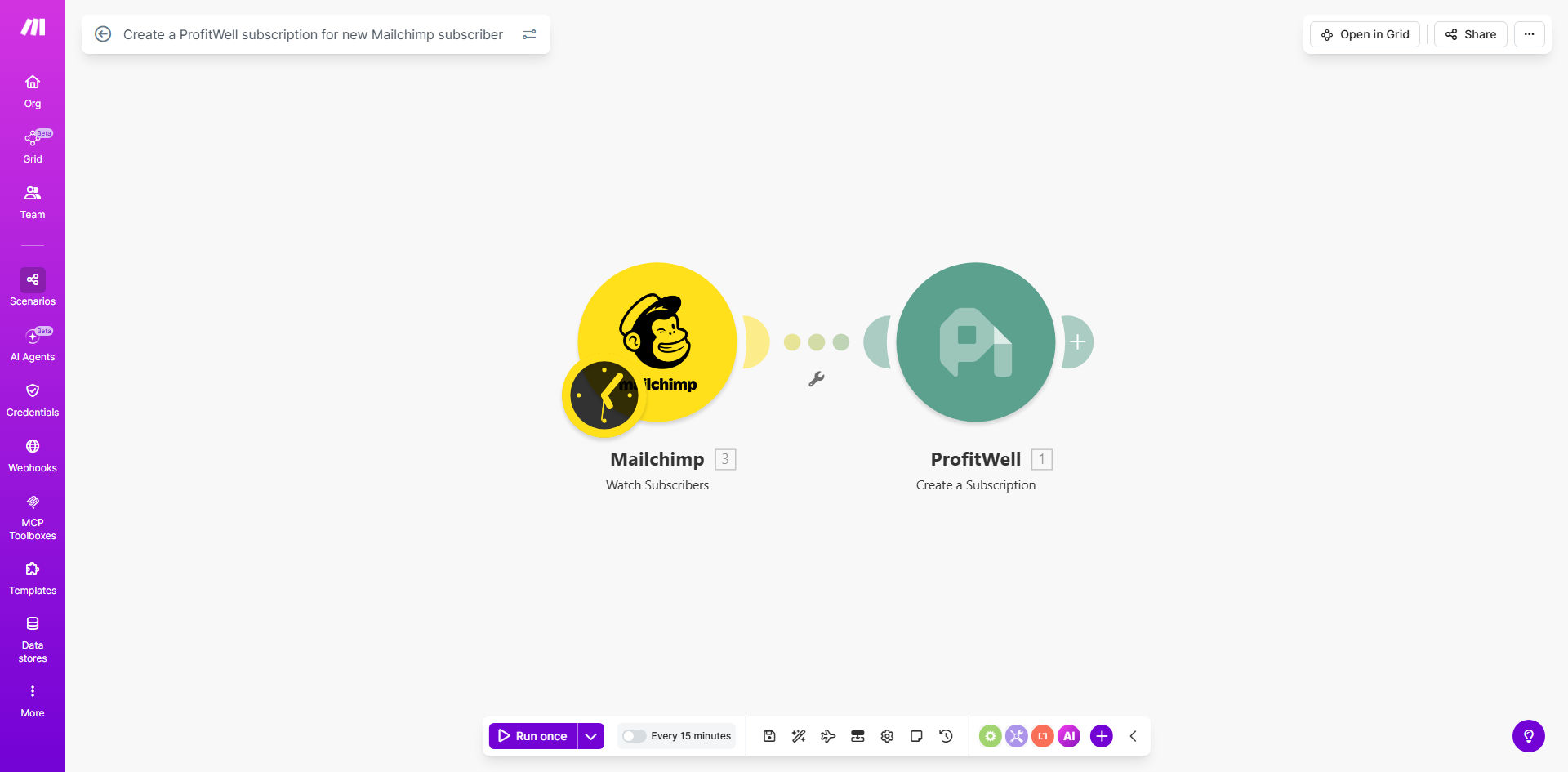
What This Workflow Does
For subscription businesses, a critical gap often exists between marketing efforts and revenue analytics. You might capture hundreds of leads through Mailchimp email campaigns, but if those leads aren't tracked in your subscription analytics platform like ProfitWell, you're flying blind. You can't accurately calculate marketing ROI, track cohort performance, or forecast revenue from specific campaigns.
This automation workflow solves that disconnect. Every time a new subscriber joins your Mailchimp list, this Make.com scenario instantly creates a corresponding subscription record in ProfitWell. It bridges your email marketing funnel with your financial metrics, ensuring your Monthly Recurring Revenue (MRR), churn, and customer lifetime value calculations are complete and accurate.
The result is a unified system where a lead's journey from initial sign-up to becoming a paying customer is seamlessly tracked. This eliminates manual spreadsheet updates, reduces data errors, and gives leadership a real-time, holistic view of how marketing activities directly influence the bottom line.
How It Works
The workflow is a straightforward, two-step automation that acts as a real-time bridge between your marketing and finance stacks.
Step 1: Monitor New Mailchimp Subscribers
The workflow starts with a Mailchimp module set to watch for the "Subscriber Added" event. This trigger activates instantly whenever a new contact is added to your specified Mailchimp audience, whether via a signup form, manual import, or API. It captures key data like the subscriber's email address, first name, last name, and the timestamp of their signup.
Pro tip: Use Mailchimp's audience segmentation or tags to filter which subscribers trigger the ProfitWell creation. For example, you might only sync subscribers from a "Product Waitlist" segment to track them as potential customers.
Step 2: Create a Subscription in ProfitWell
Immediately after the trigger, the workflow takes the subscriber data and uses the ProfitWell "Create a Subscription" API action. It maps the Mailchimp contact's email as the unique customer identifier in ProfitWell. You can configure the subscription with a $0 plan (for leads) or assign your actual starter plan, and set the subscription status accordingly. This creates a record that feeds into all of ProfitWell's retention and revenue analytics dashboards.
Who This Is For
This automation is essential for any SaaS, subscription box, or membership business that uses Mailchimp for lead generation and ProfitWell (or its parent company, Paddle) for revenue analytics. It's particularly valuable for:
- Marketing Teams: Who need to prove the revenue impact of their email campaigns and lead magnets.
- Founders & Operations Managers: Who require accurate, real-time MRR and churn reports that include the entire funnel.
- Finance & RevOps: Professionals tired of manually reconciling marketing leads with subscription data.
- Growing Startups: Where automating data syncs saves precious time and prevents scaling bottlenecks.
What You'll Need
- A Make.com account (free tier available).
- An active Mailchimp account with an audience/list where you collect subscribers.
- A ProfitWell account with API access enabled (available in your account settings).
- Your ProfitWell Public Key and Secret Key for authenticating the API connection in Make.
- Basic understanding of which Mailchimp audience and which ProfitWell plan ID you want to use for new leads.
Quick Setup Guide
You can have this automation running in under 10 minutes.
- Clone the Template: Click "Get This Workflow" to open the template in your Make.com account and create a copy.
- Connect Mailchimp: In the first module, authorize Make.com to access your Mailchimp account and select the specific audience you want to monitor.
- Connect ProfitWell: In the second module, add your ProfitWell Public and Secret API keys. Then, specify the Plan ID you want to assign to new subscribers (this could be a free/lead plan).
- Map the Data: Ensure the subscriber's email from Mailchimp is mapped to the 'customer_id' field in ProfitWell. You can also map first/last name to the subscription notes or custom properties.
- Test & Activate: Turn on the scenario and test it by adding a new test contact to your Mailchimp list. Verify that a subscription appears in your ProfitWell dashboard shortly after.
Key Benefits
Eliminate Manual Data Entry & Human Error: Save 2-5 hours per week previously spent copying emails from Mailchimp to spreadsheets or ProfitWell. Automation ensures 100% accuracy and completeness in your subscription records.
Accurate Marketing Attribution: Directly tie revenue and customer lifetime value back to the specific Mailchimp campaign or lead source that acquired the subscriber. This turns your analytics from guesswork into a precise ROI measurement tool.
Real-Time Funnel Visibility: See your entire customer journey in one place. From the moment someone signs up for your newsletter, they are tracked as a potential revenue source, allowing for better forecasting and cohort analysis.
Improved Financial Forecasting: With a complete dataset that includes all leads, your MRR projections and churn calculations become significantly more reliable, leading to better business decisions and investor reporting.
Scalable Operations Foundation: This automation creates a clean, automated pipeline between marketing and finance. As you scale and add more leads, the system handles the data sync effortlessly, preventing a growing administrative burden.