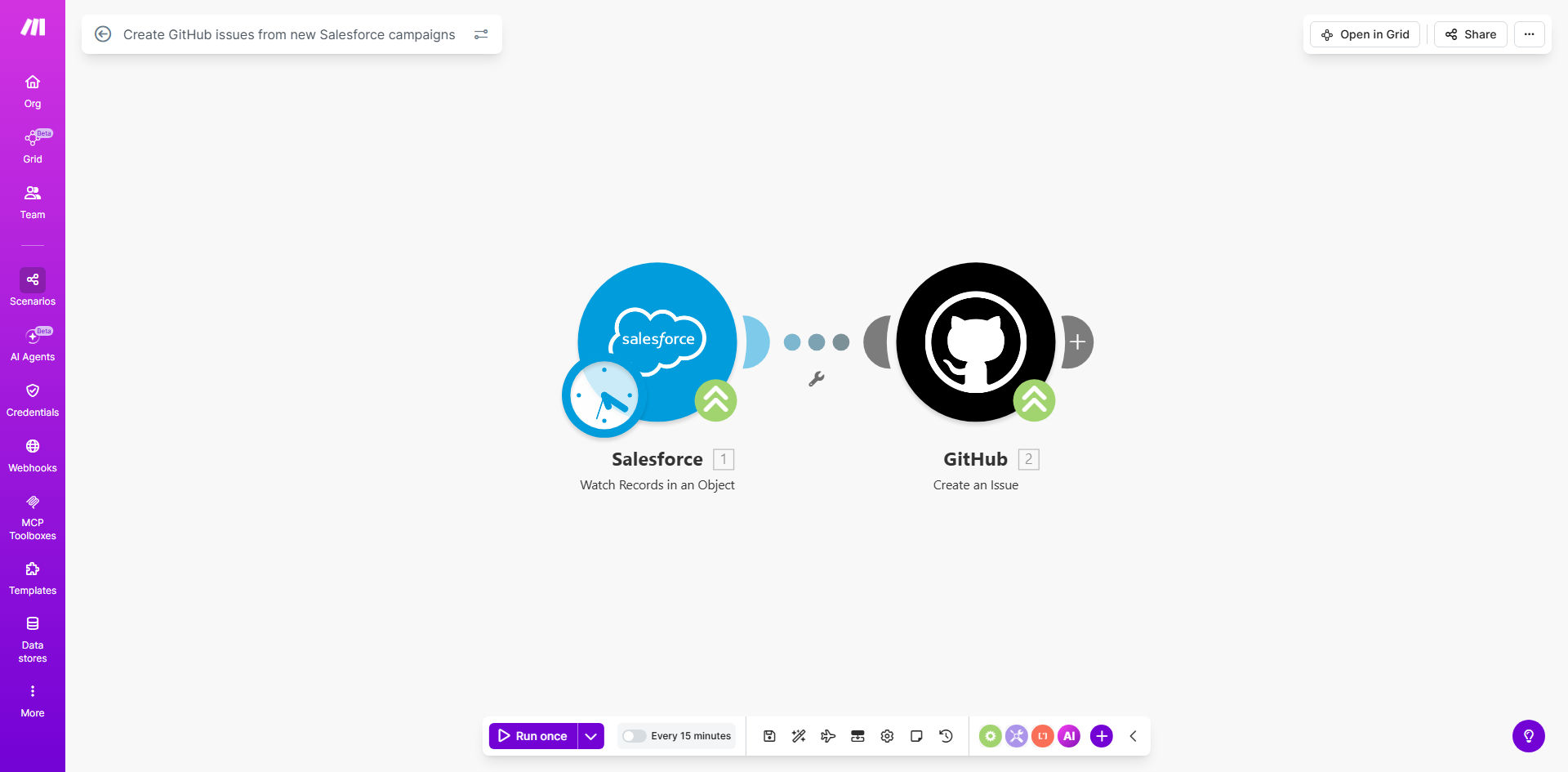
What This Workflow Does
Marketing teams plan campaigns in Salesforce, but turning those plans into actionable development work often involves messy spreadsheets, endless Slack threads, and critical details getting lost in translation. This disconnect creates delays, misaligned priorities, and frustration between departments.
This automation solves that by creating a direct, real-time link between Salesforce and GitHub. Every time a new campaign is created and marked as ready for development in Salesforce, this workflow instantly creates a corresponding, well-defined issue in your designated GitHub repository. It transfers key campaign details—like objectives, timelines, and assets—directly into the developer's backlog, ensuring nothing falls through the cracks.
The result is a synchronized workflow where marketing initiatives automatically become engineering tasks. This eliminates manual ticket creation, reduces campaign kick-off time from days to minutes, and gives everyone a single source of truth for project status.
How It Works
The workflow acts as a intelligent bridge, listening for new campaigns and formatting their data for your development team.
Step 1: Monitor Salesforce for New Campaigns
The automation starts by watching your Salesforce instance for newly created Campaign records. You can configure it to trigger only on specific campaign types (like "Product Launch" or "Webinar") or when a custom "Ready for Dev" checkbox is checked, giving you control over what gets turned into a ticket.
Step 2: Extract and Format Campaign Data
Once a new campaign is detected, the workflow pulls out the relevant information. This typically includes the campaign name, description, start/end dates, budget, owner, and any custom fields that define technical requirements. This data is then structured into a clear title and body for the GitHub issue.
Step 3: Create the Issue in GitHub
The formatted data is sent to your specified GitHub repository to create a new issue. The automation can assign labels (like "marketing," "high-priority"), set milestones based on campaign dates, and even assign the issue to a specific team or individual based on campaign attributes.
Pro tip: Use GitHub issue templates in conjunction with this automation. Map Salesforce fields to specific sections of your template (like "Business Objective," "Success Metrics," "Required Assets") to create incredibly detailed and standardized tickets every time.
Step 4: Confirm and Log
After the issue is created, the workflow can capture the new GitHub issue number and URL. This information can be sent back to Salesforce as a comment on the campaign record or posted to a team channel in Slack, creating a perfect audit trail and keeping stakeholders informed.
Who This Is For
This automation is ideal for any organization where marketing initiatives require support from software development, product, or IT teams.
- Tech Companies & SaaS Businesses: Where product launches, feature announcements, and growth experiments require coordinated work from marketing and engineering.
- Marketing Agencies with Development Partners: To seamlessly hand off campaign specs for landing page builds, microsites, or custom tools.
- Product-Led Growth Teams: To ensure in-app messaging campaigns, onboarding flows, and lifecycle emails are tracked as development work alongside product roadmaps.
- Project Managers & Operations Leads: Who are tired of manually translating marketing briefs into Jira or GitHub tickets and want to eliminate that bottleneck.
What You'll Need
- A Make.com account (free tier sufficient to start).
- Admin access to your Salesforce organization to set up a connected app or API connection.
- Admin or write access to the GitHub repository where issues should be created.
- A clear understanding of which Salesforce Campaign fields contain the essential information for your developers (e.g., Description, Start Date, Custom "Tech Specs" field).
- (Recommended) A defined GitHub issue template for marketing-related work to ensure consistency.
Quick Setup Guide
- Clone the Template: Click "Get This Workflow" and duplicate the scenario into your Make.com account.
- Connect Salesforce: In the first module, authorize Make.com to access your Salesforce instance. You may need to create a secure Connected App in Salesforce Setup.
- Connect GitHub: Authorize Make.com with your GitHub account, granting access to the specific repository for issue creation.
- Map the Data: Configure the "Create Issue" module. Map Salesforce fields (Campaign Name, Description, etc.) to the GitHub issue title, body, and properties like labels and assignees.
- Set Your Trigger: Decide if the workflow runs for every new campaign or add a filter (e.g., only when Campaign Type = "Product Launch").
- Test & Activate: Create a test campaign in Salesforce with "Test" in the name. Run the scenario once to ensure an issue is created correctly in your GitHub repo. Then, schedule the scenario to run automatically.
Key Benefits
Eliminate Manual Handoffs & Save 5+ Hours per Campaign: No more copying data from Salesforce to a ticket system. This automation does it instantly, freeing up marketing ops and project managers for strategic work.
Improve Development Accuracy & Reduce Rework: By automatically pulling data directly from the source of truth (Salesforce), you ensure developers receive complete, accurate, and up-to-date requirements, minimizing misunderstandings and scope changes.
Accelerate Time-to-Market: The moment a campaign is approved, the development ticket is already in the backlog. This can shave days off your planning-to-execution cycle, helping you launch faster.
Enhance Cross-Functional Visibility: Marketing can see the GitHub issue status, and developers can see the full campaign context. This transparency builds alignment and allows for proactive problem-solving.
Create a Scalable Process: As your marketing volume grows, this automated bridge scales effortlessly. Every new campaign, regardless of who creates it, follows the same standardized process for engaging the development team.