What This Workflow Does
For businesses that rely on signed documents—contracts, proposals, NDAs—the gap between getting a signature and taking the next action is where deals stall and tasks fall through the cracks. Manually checking Signority for status updates and then creating corresponding tasks in Trello is repetitive, error-prone, and invisible to your team.
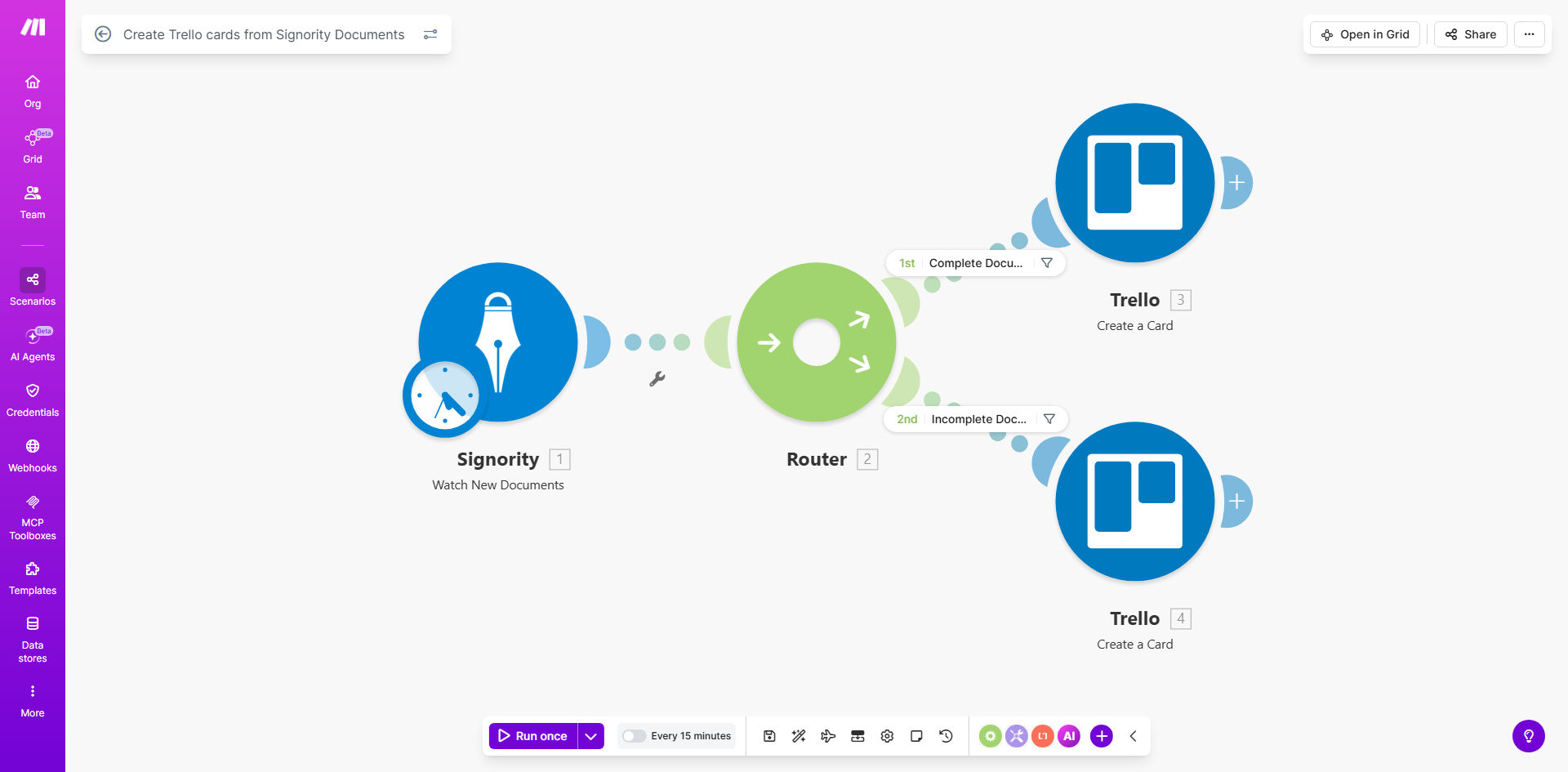
This automation solves that by creating a live bridge between your e-signature platform and your project management tool. Every time a new document is created or its status changes in Signority, this Make.com workflow intelligently filters it and creates a new, detailed card in the appropriate Trello list. A document "Awaiting Signature" goes to a "To-Sign" list, while a "Completed" document moves to a "Signed & Action" list, automatically notifying the responsible team member.
The result is a self-updating project pipeline. Your sales, legal, and operations teams have instant, visual clarity on every document's status without leaving Trello, enabling faster follow-ups, better client service, and seamless internal handoffs.
How It Works
The workflow is a precise, conditional automation that mirrors your document lifecycle in Trello.
Step 1: Monitor New Signority Documents
The scenario starts by watching your Signority account for new documents. It can be triggered instantly when a document is created or set to run on a schedule to check for updates.
Step 2: Filter by Signature Status
This is the brain of the operation. A router module examines each document's status. Key statuses like "Sent," "Viewed," "Signed," or "Completed" are identified. This allows the workflow to decide the document's next destination in your process.
Step 3: Create & Populate Trello Cards
Based on the status, the workflow creates a new card in a specific Trello list. It maps crucial data from Signority into the Trello card: document title, signer details, dates, and a direct link back to the document in Signority for quick access. You can even assign the card to a team member automatically.
Pro tip: Use Trello's custom fields to add metadata like "Contract Value" or "Client Tier" directly from Signority's custom fields. This turns your Trello board into a powerful reporting dashboard.
Step 4: Trigger Follow-up Actions
Once the card is created, the workflow can initiate further automations. For example, when a document moves to a "Signed" list, it can send a confirmation email to the client via Gmail or post a celebratory note in a Slack channel to notify the sales team.
Who This Is For
This template is ideal for any professional or team that manages a flow of documents requiring signatures and subsequent actions.
- Sales Teams: To track proposals and contracts, ensuring quick follow-up after signing.
- Legal & HR Departments: To manage NDAs, employment agreements, and compliance documents with clear audit trails.
- Freelancers & Consultants: To automate project onboarding by turning signed service agreements into immediate project task cards.
- Real Estate Agencies: To manage offer letters, lease agreements, and disclosure forms through the signing process.
- Small Business Owners: Who wear multiple hats and need a fail-safe system to ensure signed documents trigger the next step in their workflow.
What You'll Need
- A Make.com account (free tier available).
- A Signority account with admin or API access.
- A Trello account with a board set up for document management (suggested lists: "Awaiting Signature," "In Progress," "Signed," "Archived").
- The API keys or OAuth credentials to connect Make.com to both Signority and Trello (Make guides you through this simple process).
Quick Setup Guide
- Clone the Template: Click "Get This Workflow" to copy the scenario into your Make.com account.
- Connect Your Apps: In the Make scenario, authorize the connections to your Signority and Trello accounts when prompted.
- Configure the Trigger: Select the specific Signority folder or document type you want to monitor for new activity.
- Map Your Trello Board: Point the workflow to your chosen Trello board and specify which list names correspond to which Signority statuses (e.g., "Completed" → "Signed Contracts" list).
- Customize Card Data: Choose which Signority fields (title, signers, date, link) you want to appear on the Trello cards.
- Test & Activate: Run a test with an existing document to ensure a card is created correctly. Then, turn the scenario on to automate in real-time.
Key Benefits
Eliminate Manual Tracking & Reduce Errors: Automating this process saves 2-5 hours per week per team member previously spent on manual updates and eliminates the risk of forgetting to create a task or misplacing a signed document.
Accelerate Deal & Project Cycles: By instantly notifying the right person the moment a document is signed, you can kick off onboarding, invoicing, or delivery processes hours or days faster, directly improving cash flow and client satisfaction.
Create Full Visibility & Accountability: The entire team sees the real-time status of every document in the shared Trello board. There's no need for status update emails or meetings, fostering transparency and clear ownership.
Build a Reliable Audit Trail: Every action—from document creation to card assignment—is logged in Make.com and reflected in Trello's activity history. This is invaluable for compliance, reporting, and resolving any process disputes.
Scale Your Operations Seamlessly: This workflow handles 10 documents or 10,000 with the same reliability. It's a foundational automation that supports business growth without requiring additional administrative overhead.