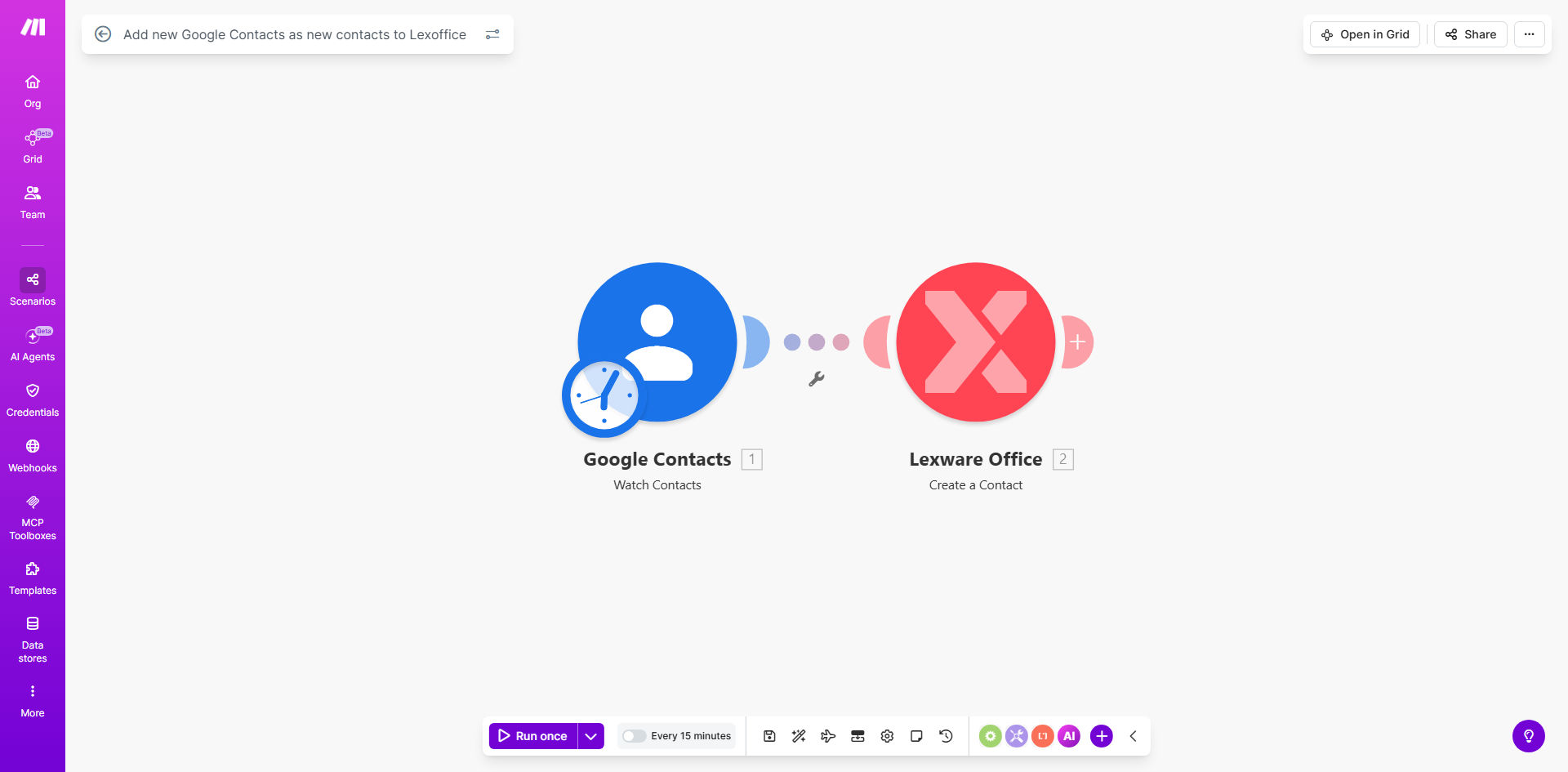
What This Workflow Does
For freelancers, consultants, and small businesses, managing contacts across different platforms is a constant, time-consuming chore. You add a new client's details to Google Contacts after a meeting, but then you must manually re-enter that same information into Lexoffice to create an invoice. This duplication is not just tedious; it's error-prone. Misspelled names, wrong email addresses, or incorrect tax IDs can lead to payment delays and unprofessional communication.
This automation solves that problem by creating a seamless bridge between your contact management and accounting systems. It acts as a diligent assistant that works in the background. Once set up, it periodically checks your Google Contacts for new additions and automatically creates corresponding contact entries in your Lexoffice account. This ensures your financial records are always populated with the latest, most accurate client information, the moment you need to issue an invoice or record a transaction.
The workflow is designed to run on a schedule you control (daily at 8 AM by default), providing a reliable, hands-off solution. It transforms a fragmented, manual process into a streamlined, automated data flow, freeing you to focus on billable work instead of administrative data entry.
How It Works
The automation follows a logical, step-by-step process to ensure data is transferred accurately and efficiently.
Step 1: Scheduled Trigger
The workflow is initiated by a schedule module. By default, it's set to run once a day at 8:00 AM, checking for any new contacts added in the last 24 hours. You can easily adjust this frequency to hourly, weekly, or trigger it based on other events.
Step 2: Fetch New Contacts from Google
The automation connects to your Google Contacts via a secure OAuth connection. It searches for contacts created since the last successful run, filtering out any previously processed entries to avoid duplicates.
Step 3: Map and Format Contact Data
Each new contact's information—like name, email address, phone number, and company—is extracted. The workflow then maps these Google Contact fields to the correct corresponding fields in Lexoffice's contact structure, ensuring data lands in the right place.
Pro tip: You can customize this mapping to include custom fields from Google Contacts, such as "Job Title" or "Notes," and have them populate specific fields in Lexoffice for better client segmentation.
Step 4: Create Contact in Lexoffice
The formatted contact data is sent to Lexoffice via its API. The automation instructs Lexoffice to create a new contact record, populating it with all the provided details. A successful creation is logged, and the process moves to the next contact.
Step 5: Error Handling & Logging
If an error occurs (e.g., a required field is missing, or the API is unavailable), the workflow can be configured to send you a notification via email or Slack. This allows for manual intervention if needed, ensuring no contact slips through the cracks.
Who This Is For
This automation is a game-changer for any professional or business that uses Google for contact management and Lexoffice for accounting and invoicing.
Freelancers & Solo Consultants: Perfect for individuals who wear all the hats. It eliminates the need to switch between apps to copy-paste client info, saving precious time for client work.
Small Business Teams: Ideal for teams where sales or support staff add contacts to a shared Google directory, and the finance person needs them in Lexoffice. This automation ensures seamless inter-departmental data flow.
Agencies & Service Providers: Beneficial for businesses that onboard multiple new clients per week. Automating this step accelerates the invoicing cycle and improves data consistency across sales and finance.
What You'll Need
- A Make.com account (free tier available). This is the platform where the automation runs.
- A Google account with Contacts populated. You'll need to grant Make.com limited access to read your contacts.
- A Lexoffice account with an active subscription. You'll need API access credentials from your Lexoffice settings.
- Basic information about your contact fields (e.g., which fields are mandatory in Lexoffice for contact creation).
Quick Setup Guide
Getting this automation live takes about 10-15 minutes.
- Clone the Template: Click the "Get This Workflow" button to copy the template into your Make.com account.
- Connect Google Contacts: In the first module, click to add a connection. A secure pop-up will ask you to log into your Google account and grant the necessary permissions.
- Connect Lexoffice: In the module that creates the contact, add a new connection to Lexoffice. You will need to enter your Lexoffice API credentials (found in your Lexoffice account under "Settings" > "API").
- Test the Flow: Add a test contact to your Google Contacts. Run the scenario once manually to see it fetch the contact and create it in Lexoffice. Verify the data appears correctly.
- Activate the Schedule: Turn on the schedule module. You can keep the daily 8 AM run or adjust the timing to match your business hours.
- Go Live: Activate the entire scenario. It will now run automatically on its schedule, syncing new contacts without any further action from you.
Key Benefits
Save 2-5 hours per month on manual data entry. The time spent switching apps, copying, pasting, and verifying information is completely eliminated, allowing you to reclaim that time for revenue-generating activities.
Eliminate costly data entry errors. Manual typing leads to mistakes. This automation ensures 100% accuracy in data transfer, preventing invoice errors, payment delays, and communication blunders caused by wrong email addresses.
Accelerate your invoicing cycle. New clients are ready to be invoiced immediately in Lexoffice. There's no lag between closing a deal and sending the first invoice, which directly improves your cash flow.
Maintain a single source of truth. Your primary contact list (Google Contacts) becomes the master database. Any update there can be configured to flow through to Lexoffice, ensuring all your systems are consistently up-to-date.
Scale your operations effortlessly. Whether you add 5 or 50 new contacts a week, the automation handles the workload instantly without any additional effort or cost from you.