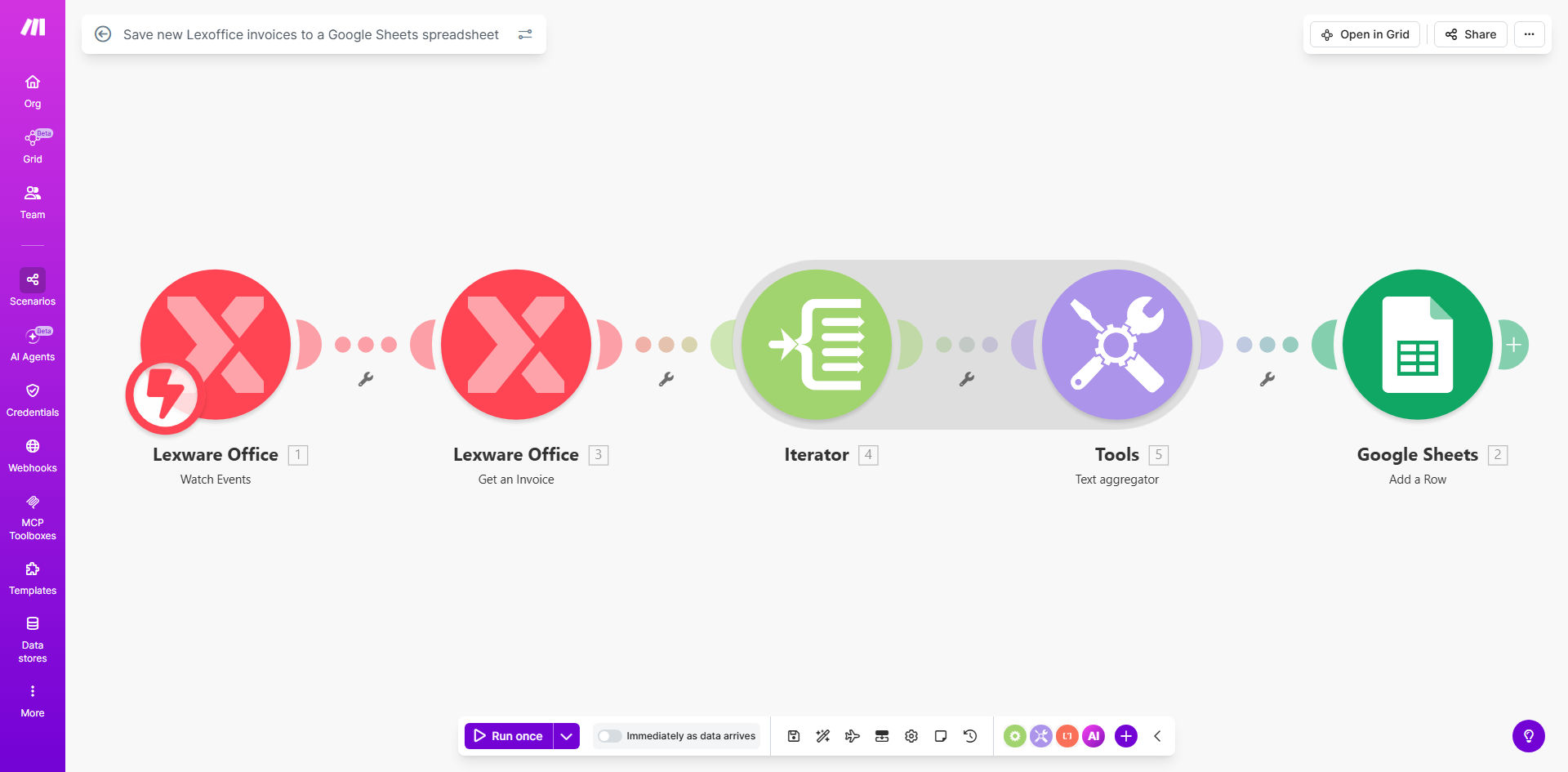
What This Workflow Does
For businesses using Lexoffice for invoicing, manually copying invoice details into a spreadsheet is a repetitive, error-prone, and time-consuming task. This process often leads to outdated records, discrepancies during reconciliation, and lost opportunities for real-time financial insight.
This automated workflow solves that problem completely. It acts as a digital bridge between Lexoffice and Google Sheets. Every time a new invoice is created or finalized in your Lexoffice account, the workflow instantly triggers. It captures key details like the invoice number, date, client, amounts, and status, then appends them as a perfectly formatted new row in your designated Google Sheets spreadsheet. The result is a continuously updated, centralized log of all your invoices without you lifting a finger.
Pro tip: Use the synchronized Google Sheet as a source for live financial dashboards. Connect tools like Google Data Studio or Looker Studio to visualize your revenue, outstanding invoices, and client payment trends automatically.
How It Works
The automation runs on Make.com, monitoring your Lexoffice account and writing data to Google Sheets in a reliable, secure sequence.
Step 1: Monitor for New Invoices
The workflow starts with a Lexoffice module set to watch for new "invoice created" events. This trigger can be scheduled to check at regular intervals (e.g., every hour) or can use webhooks for instant real-time updates whenever an invoice is issued.
Step 2: Extract and Structure Invoice Data
Once a new invoice is detected, Make.com retrieves the full invoice object from Lexoffice. The workflow then maps and extracts the specific fields you need—such as invoiceNumber, totalNetAmount, contactName, invoiceDate, and dueDate—structuring them into a clean data package.
Step 3: Add Row to Google Sheets
The final step takes the structured data and uses the Google Sheets module to "Add a row" to your pre-defined spreadsheet. The template maps each piece of invoice data to the correct column, ensuring your spreadsheet remains organized and ready for analysis.
Who This Is For
This automation is a game-changer for freelancers, small business owners, accountants, and finance teams who use Lexoffice and rely on spreadsheets for oversight. It's perfect for anyone who wants to:
- Stop switching between apps to copy-paste data.
- Maintain a master invoice register for quick lookups.
- Prepare data for monthly accounting, VAT returns, or client reports.
- Share invoice summaries with team members or external accountants without providing direct access to Lexoffice.
- Build a historical database of transactions for business analysis.
What You'll Need
- A Make.com account (free tier available).
- An active Lexoffice account with invoices.
- A Google account with access to Google Sheets.
- The sample Google Sheet (provided in the template) or your own spreadsheet with a defined column structure.
- 5-10 minutes for initial configuration.
Quick Setup Guide
You can have this automation running in under 10 minutes by following these steps:
- Get the Template: Click "Get This Workflow" to open the pre-built scenario in your Make.com account.
- Copy the Sample Sheet: Make a copy of the linked sample Google Sheets spreadsheet to your own Google Drive. This will be your destination.
- Connect Your Apps: In Make.com, authorize the connections to your Lexoffice and Google Sheets accounts by following the secure OAuth prompts.
- Map Your Data: Review the data mapping. The template is pre-configured, but you can customize which Lexoffice fields go into which Sheets columns.
- Test & Activate: Run a single test cycle with an existing invoice to ensure data flows correctly into your sheet. Then, turn the scenario on. It will now run automatically based on your chosen schedule.
Pro tip: Start with a hourly schedule to test reliability. Once confident, you can increase the frequency or explore setting up instant webhook triggers from Lexoffice for real-time updates.
Key Benefits
Save 2-5 hours per month on manual data entry. Eliminate the tedious task of transferring invoice details, freeing up time for higher-value financial analysis or core business activities.
Achieve 100% data accuracy and consistency. Remove the risk of human error from typos, missed invoices, or incorrect amounts, ensuring your financial records are always reliable.
Gain real-time visibility into your finances. With invoices logging instantly, your Google Sheets report or dashboard always reflects the current state of your receivables, enabling faster cash flow decisions.
Create a simplified audit trail. Maintain a clean, timestamped record of every invoice issued in a universally accessible format (Google Sheets), simplifying compliance and review processes.
Build a foundation for advanced automation. This synchronized spreadsheet becomes a powerful data hub. You can easily connect it to other tools for analytics, reporting, or triggering further actions like payment follow-ups.