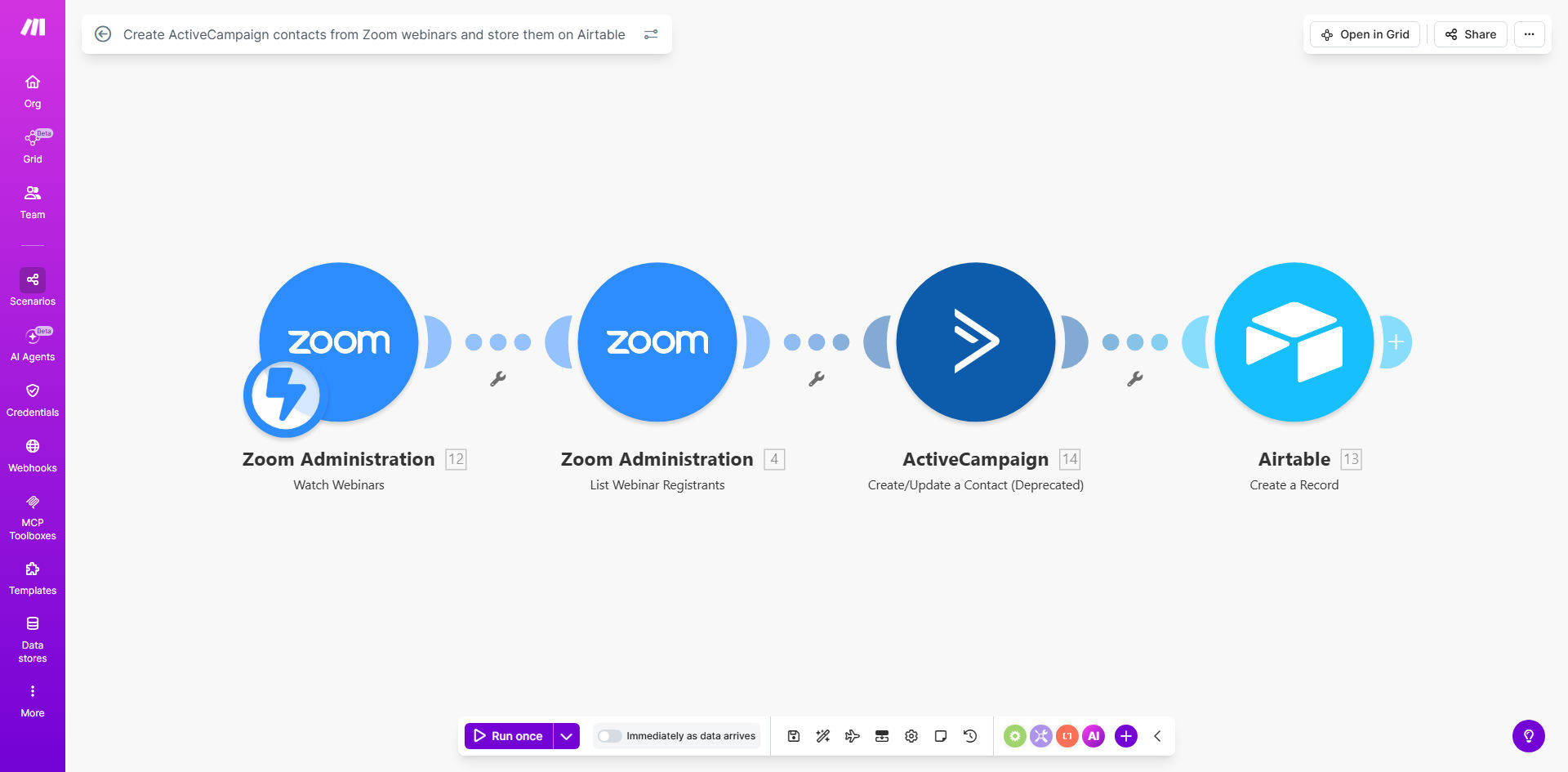
What This Workflow Does
Hosting webinars is a powerful lead generation strategy, but the manual follow-up process is a major bottleneck. Marketing teams often waste hours after each event downloading Zoom registrant lists, cleaning data, uploading contacts to their CRM, and then manually entering details into a separate spreadsheet for analysis. This delay means hot leads go cold, and human errors can corrupt your valuable contact data.
This automated workflow solves that by creating a seamless bridge between your webinar platform and your marketing stack. Whenever a new Zoom webinar begins, this Make.com scenario is instantly triggered. It retrieves all approved registrants, creates or updates their contact records in ActiveCampaign to kickstart email nurturing sequences, and simultaneously adds a structured record for each contact into a designated Airtable base. This turns a multi-hour, error-prone task into a fully hands-off process that runs in the background.
How It Works
The automation follows a logical, reliable sequence to ensure data integrity and timely action.
Step 1: Zoom Webinar Trigger
The workflow is activated the moment a scheduled Zoom webinar starts. Make.com watches for this specific event, ensuring the automation runs at the perfect time to capture the final, approved registration list.
Step 2: Retrieve Registrant Data
The scenario connects to your Zoom account and fetches the list of registrants for that specific webinar. It pulls key details like name, email address, registration time, and any custom questions answered during sign-up.
Step 3: Create/Update ActiveCampaign Contacts
Each registrant is processed individually. The workflow checks if the email already exists in your ActiveCampaign account. If it does, the contact is updated (e.g., tagged as a webinar attendee). If not, a new contact is created. This prevents duplicates and ensures your list stays clean.
Step 4: Add Records to Airtable
In parallel, a detailed record for each contact is sent to your Airtable base. This includes the contact's information, the webinar topic, date, and a timestamp. This creates a searchable, relational database of all webinar leads for future reporting and segmentation.
Pro tip: Use the provided Airtable template as your starting base. It's pre-structured with fields for webinar data, lead status, and follow-up notes, making analysis and team collaboration effortless from day one.
Who This Is For
This template is ideal for marketing teams, coaches, consultants, and B2B SaaS companies that run regular webinars as part of their sales funnel. It's perfect for anyone tired of manual data entry who wants to ensure no lead falls through the cracks. If you use Zoom for events and ActiveCampaign for email marketing, this automation will become an essential part of your tech stack.
What You'll Need
- A Make.com account (free or paid plan) to host and run the automation.
- A Zoom account with webinar capabilities and admin access to generate API credentials.
- An ActiveCampaign account with an API key to allow the creation and updating of contacts.
- An Airtable account and a base (you can use the provided template) with an API key for writing data.
Quick Setup Guide
- Clone the Template: Click "Get This Workflow" to copy the scenario into your Make.com account.
- Connect Your Apps: In the Make.com scenario editor, establish connections (called "connections") for Zoom, ActiveCampaign, and Airtable using your API keys.
- Configure the Zoom Module: Select the specific Zoom webinar you want to trigger the automation, or set it to watch all webinars.
- Map Your Airtable Base: Point the Airtable module to your base and table, ensuring the field names (like "Email", "Webinar Title") match the data coming from Zoom.
- Test and Activate: Run a single test execution with a past webinar to verify contacts flow into ActiveCampaign and Airtable correctly. Then, turn the scenario "ON" to automate future webinars.
Key Benefits
Eliminate 2-5 hours of manual work per webinar. This automation completely removes the tedious process of downloading CSV files, formatting data, and uploading contacts, freeing your team for high-value tasks like engagement and sales calls.
Achieve 100% lead capture accuracy. By automating the data transfer, you eliminate human typos, missed entries, and duplicate uploads, ensuring your marketing list is clean and reliable.
Speed up your sales follow-up by days. Contacts are added to ActiveCampaign and tagged within minutes of a webinar starting, allowing you to trigger immediate "thank you" or nurture sequences while the topic is fresh in attendees' minds.
Build a centralized lead analysis hub. Storing all webinar data in Airtable gives you a single source of truth to analyze attendance trends, lead sources, and campaign ROI over time.
Scale your webinar program effortlessly. As you host more events, this automation scales with you, handling 10 or 10,000 registrants with the same reliability, without any additional effort from your team.