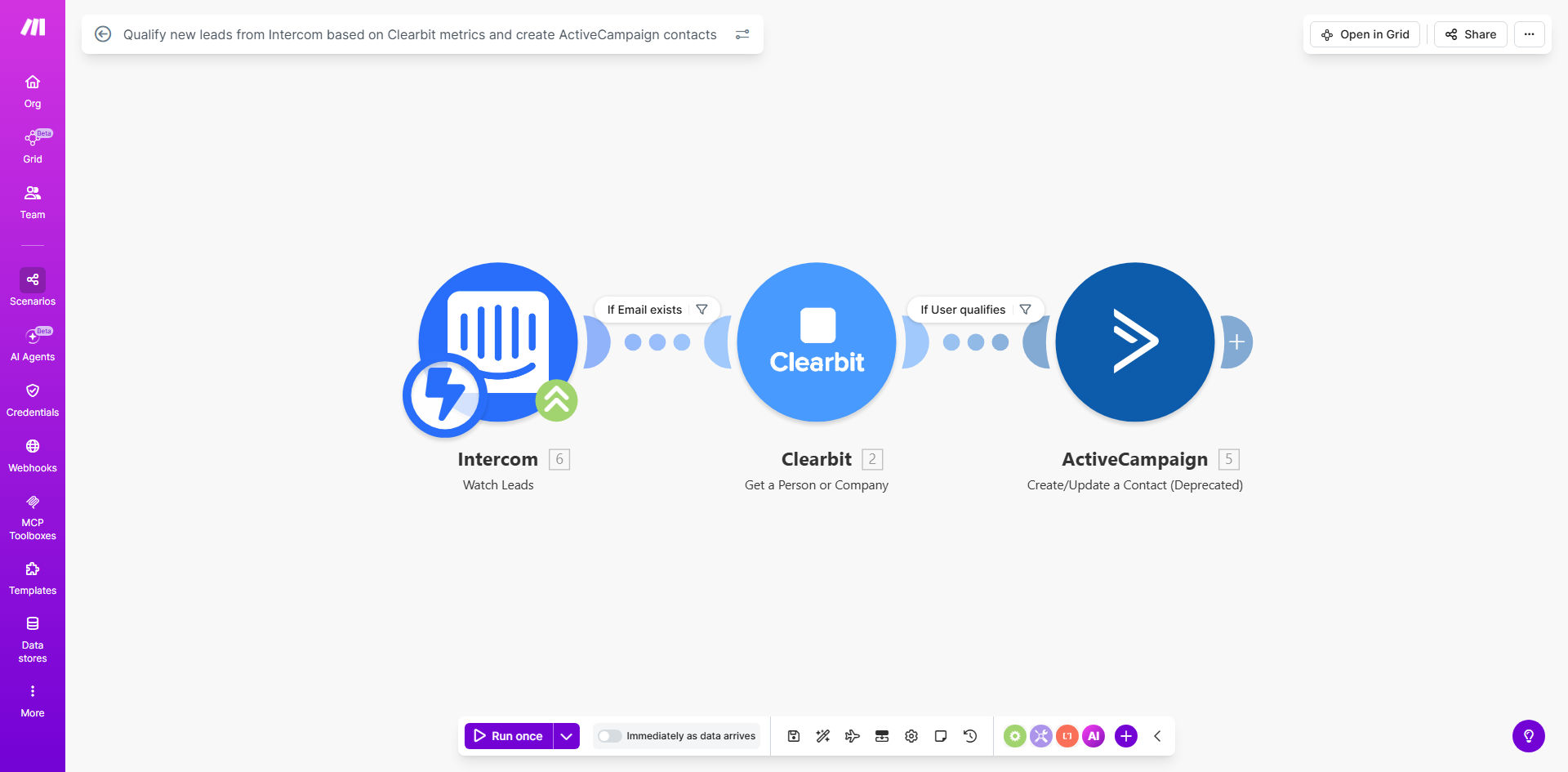
What This Workflow Does
Every new lead that messages you via Intercom holds potential, but not all are worth your sales team's immediate time. Manually researching each company—checking size, industry, and funding—is a repetitive task that delays response and wastes resources. This automation solves that by instantly qualifying leads the moment they engage.
The workflow listens for new leads in Intercom, enriches their profile with Clearbit's powerful company database, and applies your custom qualification rules. If a lead meets your criteria (like being from a mid-sized tech company), it's automatically created as a contact in ActiveCampaign, ready for a targeted sales sequence. Unqualified leads can be tagged for nurturing, keeping your CRM clean and your team focused.
How It Works
The process is a seamless, three-app handoff that runs in the background, turning raw inquiries into actionable sales opportunities.
Step 1: Capture a New Lead from Intercom
The automation is triggered whenever a new user or lead is created in your Intercom workspace. This could be from a website chat, help request, or contact form submission. The workflow instantly captures their name, email, and any initial message.
Step 2: Enrich Lead Data with Clearbit
Using the lead's email domain, the workflow queries Clearbit's Company API. Within seconds, it retrieves vital firmographic data: company size (employee count), industry, estimated annual revenue, location, and technology stack. This transforms a simple email address into a rich company profile.
Step 3: Apply Qualification Rules & Filter
Here, you set the rules. The workflow checks the Clearbit data against your predefined criteria. For example, you might only want leads from companies with 50+ employees in the SaaS industry. If the lead passes the filter, the workflow proceeds. If not, it can be routed to a different list or simply logged.
Step 4: Create a Contact in ActiveCampaign
For qualified leads, the workflow creates a new contact in your ActiveCampaign CRM. It maps all the valuable data—the original Intercom info plus the enriched Clearbit fields—into custom fields. This contact can then automatically be added to a specific list, tagged as "Sales Qualified," and trigger a personalized welcome or sales outreach email sequence.
Pro tip: Use the Clearbit "tags" or "technology" data to add specific tags in ActiveCampaign. For example, tag leads who use a competing software, allowing for highly targeted competitor-switch campaigns.
Who This Is For
This automation is ideal for B2B SaaS companies, agencies, and tech service providers who generate leads through Intercom and need to prioritize sales efforts. It's perfect for sales teams drowning in unqualified inquiries, marketing teams wanting to measure lead quality, and founders who need to ensure their small team focuses on the highest-value opportunities.
What You'll Need
- A Make.com account (free tier available) to build and run the automation.
- An active Intercom account with users/leads coming in.
- A Clearbit API key (available from their website, with a free tier for basic enrichment).
- An ActiveCampaign account with administrator access to create contacts and custom fields.
- Clear qualification criteria defining your ideal customer profile (e.g., min company size, target industries).
Quick Setup Guide
After cloning the template, follow these steps to configure it for your business:
- Connect Your Apps: In the Make.com scenario, authorize the connections to your Intercom, Clearbit, and ActiveCampaign accounts.
- Define Your Filters: In the "Router" or "Filter" module, set up your conditions. For example: "Company size is greater than 50" AND "Industry contains 'Software'."
- Map ActiveCampaign Fields: In the "Create a Contact" module, map the incoming data (from Intercom and Clearbit) to the corresponding custom fields in ActiveCampaign (e.g., map Clearbit "metrics.employees" to a custom "Employee Count" field).
- Set Up ActiveCampaign Automation: In ActiveCampaign, create an automation that triggers when a contact is added to the "Qualified Lead" list, initiating your sales follow-up sequence.
- Test & Activate: Use the Make.com testing mode to simulate a new Intercom lead. Verify the data flows correctly, the filter works, and a contact appears in ActiveCampaign. Then, schedule the scenario to run in real-time.
Key Benefits
Eliminate 15+ minutes of manual research per lead. Your sales team receives a complete company dossier automatically, allowing them to craft personalized outreach from the first touchpoint instead of spending time on LinkedIn and Crunchbase.
Improve lead response time from hours to seconds. High-potential leads are identified and routed to sales instantly, dramatically increasing the chance of conversion by engaging them while their interest is hottest.
Ensure 100% data consistency in your CRM. Every qualified contact enters ActiveCampaign with the same set of enriched fields, eliminating human error in data entry and making segmentation and reporting accurate and powerful.
Sharpen your ideal customer profile (ICP) over time. By analyzing which Clearbit-qualified leads actually convert, you can refine your automation filters, creating a self-improving system that gets smarter and more efficient.
Maximize your sales team's capacity. By filtering out leads that don't fit your ICP, you protect your team's time, allowing them to focus on closing deals that matter and directly impact revenue.