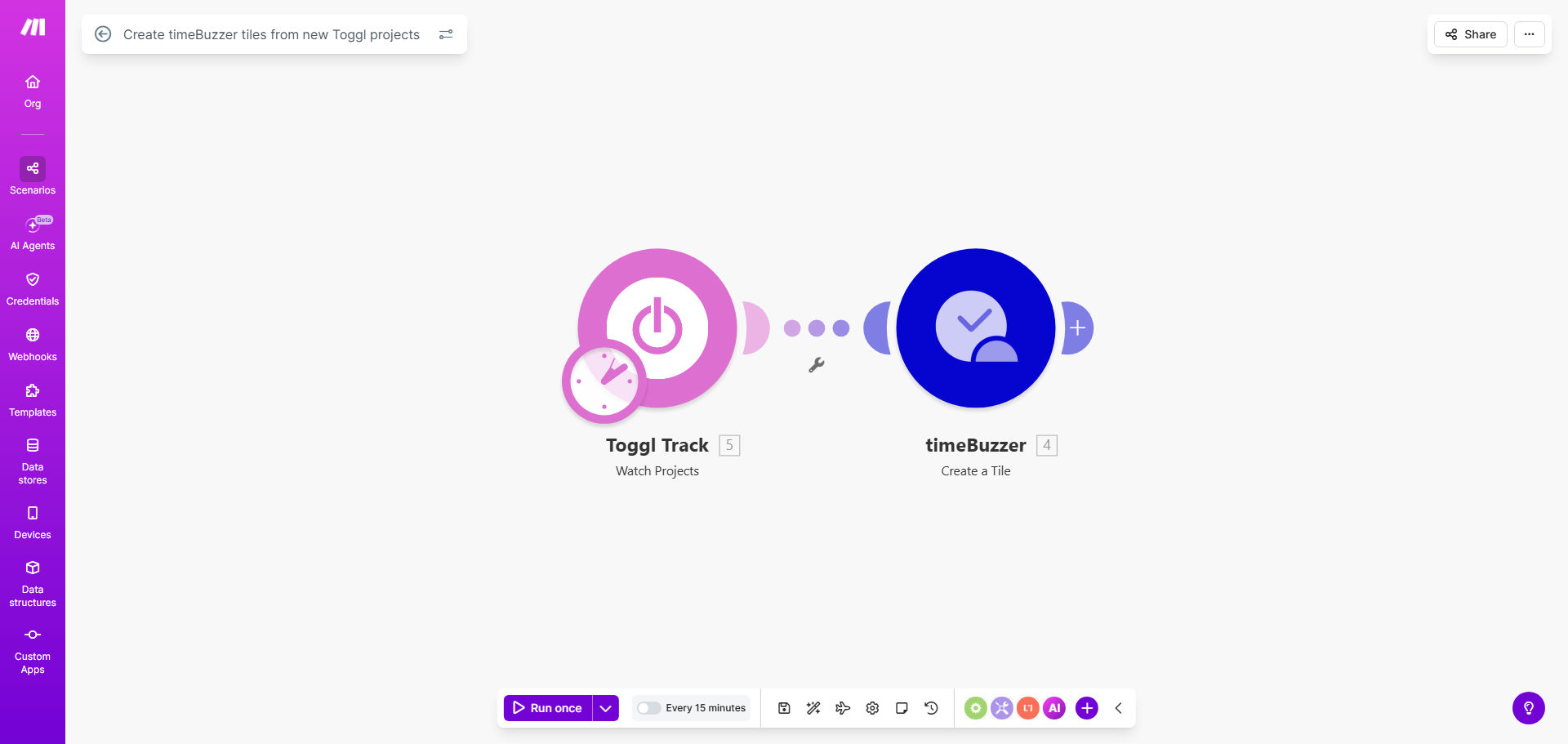
What This Workflow Does
For agencies, consultants, and product teams, managing projects across multiple tools is a constant source of friction and wasted time. A common scenario: a project manager creates a new client project in Toggl to track billable hours, but the development or creative team uses timeBuzzer to manage tasks and milestones. This disconnect forces someone to manually duplicate the project setup, leading to delays, inconsistencies, and potential errors in project data.
This free Make.com workflow solves that problem by creating a seamless, automatic bridge between Toggl and timeBuzzer. The moment a new project is born in your time tracking software, a corresponding tile is instantly generated in your project management platform. This ensures both systems are perfectly synchronized from day one, giving everyone on your team immediate visibility and a unified place to collaborate.
The business value is clear: you eliminate redundant administrative work, accelerate project kick-offs, and guarantee data consistency. No more chasing team members to set up boards or worrying if time is being logged against the correct project. The automation handles it all, saving your team several hours per week and reducing the risk of costly billing mistakes.
How It Works
The automation is triggered by a simple event and executes a series of reliable actions to keep your tools in sync.
Step 1: Monitor for New Toggl Projects
The workflow uses Make.com's Toggl module to watch for new project creations. This can be set to check at regular intervals (e.g., every 15 minutes) or can be configured to use webhooks for instant triggering. When a new project is detected, the workflow captures all relevant details like the project name, client, estimated budget, and any custom fields.
Pro tip: Use Toggl's project tags or custom fields to add metadata (like "Department" or "Priority") that can be passed to timeBuzzer. This allows for smarter filtering and board organization automatically.
Step 2: Map and Transform the Data
Before creating the tile, the workflow maps the Toggl project data to the correct format required by timeBuzzer. This step is crucial for compatibility. You can set rules here—for example, only creating tiles for projects belonging to specific clients or with budgets above a certain threshold.
Step 3: Create the timeBuzzer Tile
Make.com then connects to your timeBuzzer account via its API and creates a new tile on your specified board. The tile is populated with the mapped data from Toggl, creating a ready-to-use project card with the correct title, description, and linked client information. The workflow can also assign the tile to a team member or add initial checklist items based on your predefined templates.
Who This Is For
This automation is a game-changer for any business that uses Toggl for time tracking and timeBuzzer for project execution. It's ideal for:
- Digital Agencies: Sync new client projects from time tracking to task management instantly, ensuring creative teams can start work without delay.
- Consulting Firms: Automatically create project boards for new engagements, improving visibility for consultants and streamlining client reporting.
- Software Development Teams: Link new development sprints or feature projects from time tracking to the team's agile board in timeBuzzer.
- Freelancers & Solopreneurs: Keep your own project management organized by automatically generating task boards for every new project you start tracking time on.
What You'll Need
- A Make.com account (free tier available).
- An active Toggl Track account with admin or project creation permissions.
- An active timeBuzzer account with API access enabled.
- Your Toggl API token (found in your Toggl profile settings).
- Your timeBuzzer API key (available in your timeBuzzer account settings).
Quick Setup Guide
You can have this automation running in under 30 minutes by following these steps:
- Get the Template: Click "Get This Workflow" to copy the template into your Make.com account.
- Connect Toggl: In the first module, add your Toggl connection using your API token. Test the connection to ensure it can read your projects.
- Connect timeBuzzer: In the tile creation module, add your timeBuzzer connection using your API key. Specify the target board ID where new tiles should be created.
- Map Your Data: Review the data mapping between the Toggl project fields and the timeBuzzer tile properties. Adjust any field names (like "Project Name" to "Tile Title") to match your preferred naming convention.
- Run a Test: Create a test project in Toggl (e.g., "Onboarding Automation Test") and run the scenario once manually. Verify that a tile appears on your correct timeBuzzer board.
- Activate & Schedule: Turn on the scenario's scheduler. Set it to run every 15-30 minutes for near-real-time syncing, or configure a webhook for instant updates if supported.
Key Benefits
Save 2-5 hours per week on manual project setup. Eliminate the repetitive task of creating duplicate projects across tools. This time can be reinvested into higher-value client work or strategic planning.
Ensure 100% data consistency between time tracking and project management. By automating the sync, you remove human error. Project names, clients, and budgets are always identical in both systems, leading to accurate reporting and billing.
Accelerate project kick-offs by 80%. Your team can begin work on a new project the moment it's created in Toggl, without waiting for a project manager to manually configure the timeBuzzer board. This improves client responsiveness and team velocity.
Gain real-time visibility into project status. Managers and stakeholders have a single, unified view. They can see which projects are active in Toggl and track their corresponding progress in timeBuzzer, all without switching contexts or asking for updates.
Build a scalable foundation for your tech stack. This automation is a building block. Once proven, you can extend it to archive tiles when projects are completed in Toggl, send Slack notifications to the team, or update project budgets based on time spent.