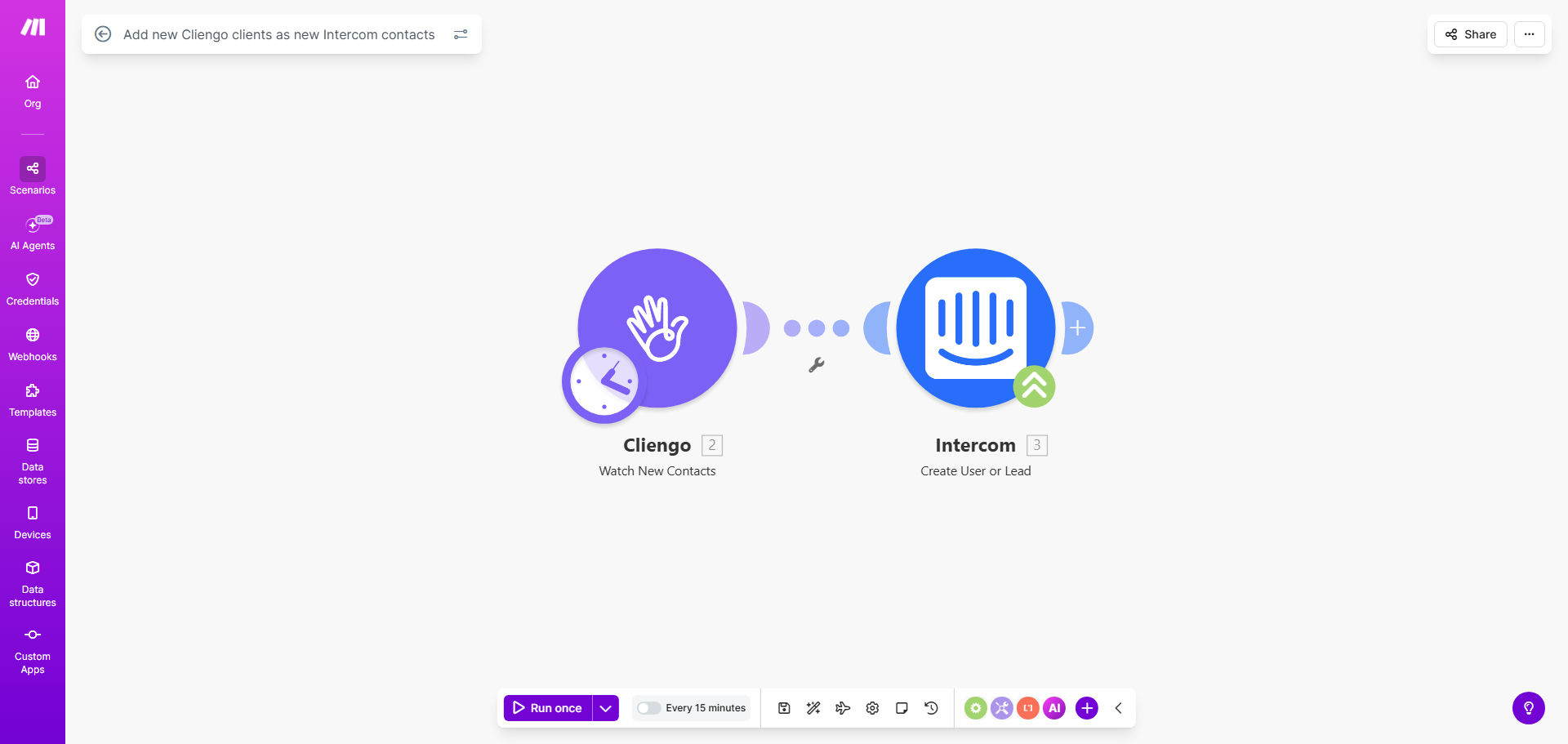
What This Workflow Does
Every conversation on your website chat is a potential customer. But when sales and support teams have to manually check Cliengo and then create contacts in Intercom, leads get cold, data gets mistyped, and opportunities are lost. This disconnect between your lead capture tool and your customer communication platform creates a frustrating bottleneck.
This automated workflow solves that by creating a seamless bridge between Cliengo and Intercom. It acts as a diligent assistant that checks for new chat clients at a regular interval (every 15 minutes by default) and instantly creates a corresponding, enriched contact in your Intercom workspace. This means the moment a visitor becomes a lead, your team can see them in Intercom and start a personalized follow-up sequence without lifting a finger.
How It Works
The automation follows a simple but powerful sequence to ensure no lead is missed and all data is accurately transferred.
Step 1: Scheduled Trigger
The workflow is initiated by a Schedule module set to run automatically every 15 minutes. This acts as the heartbeat of the automation, consistently polling for new data without any manual intervention.
Step 2: Fetch New Cliengo Clients
Once triggered, the scenario connects to your Cliengo account via the Make.com module. It searches for and retrieves a list of new clients (leads) that have been created since the last time the automation ran. This ensures it only processes the most recent conversations.
Step 3: Process and Map Lead Data
Each new client's data is processed. Key information like the visitor's name, email address, phone number, initial message, and the page URL where the chat started is extracted and structured for the next step.
Pro tip: You can easily customize this step within Make.com to include custom fields from Cliengo, such as "Company Name" or "Product Interest," to create even more detailed Intercom contact profiles.
Step 4: Create Contact in Intercom
The workflow then connects to your Intercom account. For each new Cliengo client, it creates a new contact. The mapped data from Cliengo populates the Intercom contact fields, instantly building a prospect profile that your sales and support teams can use.
Step 5: (Optional) Trigger Internal Notifications
As an advanced step, you can extend this template to send an instant notification to a Slack channel or via email when a high-value lead is captured, ensuring your team reacts with lightning speed.
Who This Is For
This automation is a game-changer for businesses that rely on website chat for lead generation and use Intercom for customer communication. It's ideal for:
- B2B SaaS Companies: To instantly qualify and follow up with trial sign-ups or demo requests from chat.
- E-commerce Stores: To capture pre-sale questions and add those potential customers to a nurturing sequence in Intercom.
- Marketing Agencies: To ensure every new client inquiry from a website chat is logged and assigned immediately.
- Startups and SMBs: Where small teams need to operate efficiently and can't afford to let warm leads go cold due to manual processes.
What You'll Need
- A Make.com account (free tier available).
- An active Cliengo account with API access enabled.
- An active Intercom account with admin permissions to create API keys.
- Your Cliengo and Intercom API keys (the template will guide you on where to insert them).
Quick Setup Guide
You can have this automation running in under 10 minutes.
- Clone the Template: Click the "Get This Workflow" button to open the template on Make.com and create a copy in your own account.
- Connect Cliengo: In the first module, click to add a connection. You'll be prompted to log into your Cliengo account and authorize Make.com to access your data.
- Connect Intercom: Do the same for the Intercom module, authorizing the connection with your Intercom workspace.
- Adjust the Schedule (Optional): By default, it runs every 15 minutes. You can click the Schedule module to change it to hourly, daily, or even more frequently for real-time needs.
- Turn it On: Flip the scenario switch to "ON." The automation will now run on its scheduled time, syncing new leads automatically.
Key Benefits
Eliminate 100% of manual data entry between your chat and CRM. This reclaims 2-5 hours per week for sales or support staff that was previously spent on copy-pasting lead information.
Improve lead response time from hours to minutes. When a contact is instantly created in Intercom, they can be automatically added to a targeted message sequence or assigned to a team member, dramatically increasing conversion rates.
Ensure absolute data accuracy and consistency. Automated syncing removes the risk of typos, missed fields, or forgotten follow-ups that are common with manual processes.
Build a unified customer journey. By having the initial chat conversation logged in Intercom, your team has full context from the first touchpoint, enabling personalized and effective communication throughout the customer lifecycle.
Scale your lead capture process effortlessly. As your website traffic and chat volume grow, this automation handles the increased load without requiring additional staff, allowing your business to grow efficiently.