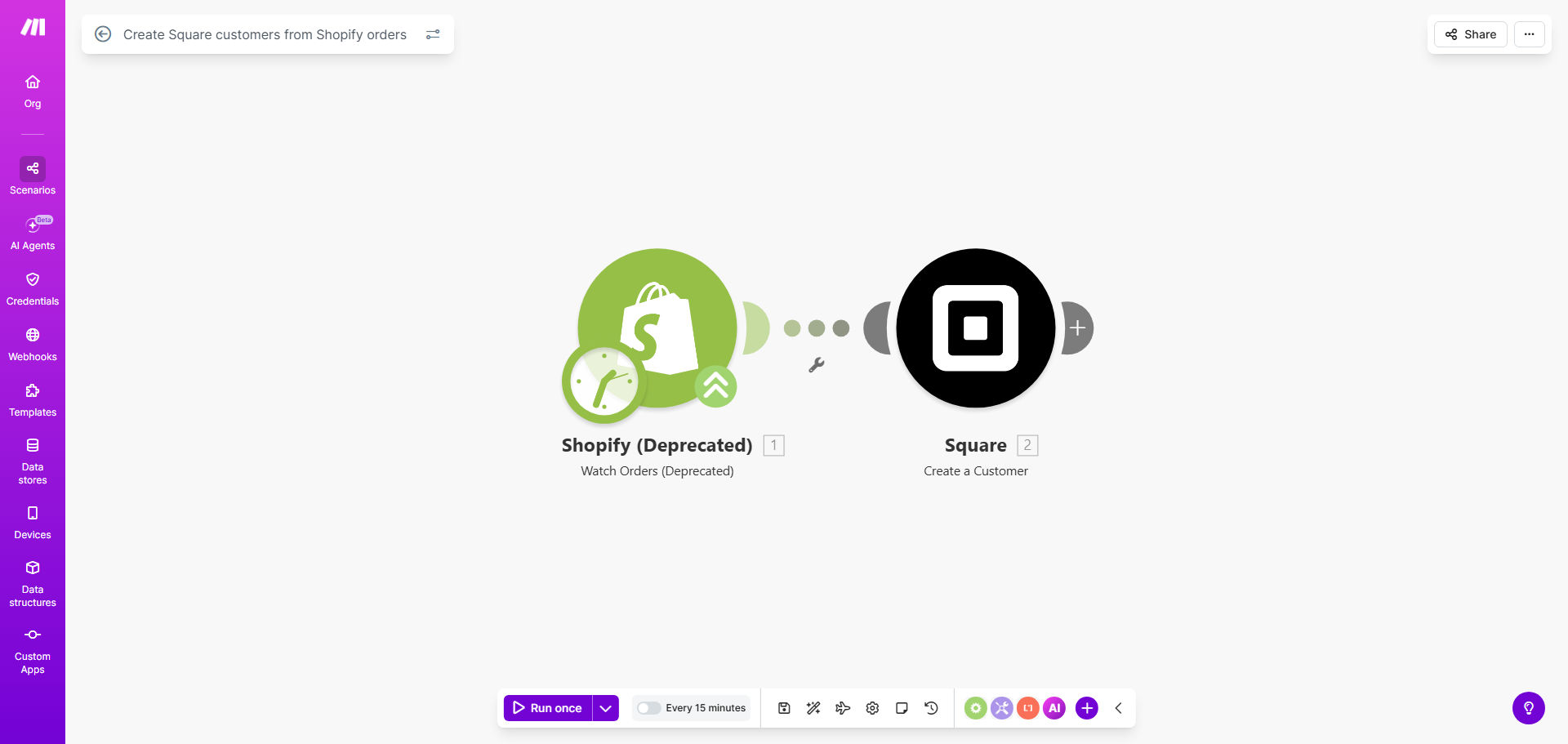
What This Workflow Does
If you sell both online via Shopify and in-person using Square, you likely have two separate, disconnected customer lists. This fragmentation hurts your business. You can't track a customer's lifetime value across channels, your marketing lacks personalization, and you miss opportunities to build loyalty with your best buyers.
This automation solves that by instantly connecting the dots. Every time a new order is placed on your Shopify store, this workflow automatically creates a corresponding customer profile in your Square Point of Sale system. The customer's name, email, phone, and address are transferred seamlessly, building a unified customer database without you lifting a finger.
The result is a complete view of each customer, whether they shop online or at your brick-and-mortar location. This enables targeted email campaigns, personalized offers, and loyalty programs that work across all sales channels, ultimately driving repeat business and increasing average order value.
How It Works
The workflow is a straightforward, reliable sequence that runs in the background on Make.com. Here’s the step-by-step process:
Step 1: Monitor for New Shopify Orders
The automation starts by watching your Shopify store for a new "Order created" event. Make.com connects to your Shopify admin and listens in real-time. As soon as a customer completes a purchase, the workflow is triggered, capturing all the order and customer details.
Pro tip: You can filter this trigger to only run for orders from certain locations, with specific tags, or above a certain value, ensuring you only sync your most valuable customers.
Step 2: Extract and Format Customer Data
The workflow then parses the incoming Shopify data. It extracts the essential information needed for a Square customer profile: first and last name, email address, phone number, and billing/shipping addresses. This data is cleaned and formatted to match Square's expected input structure.
Step 3: Check for Existing Customers in Square
Before creating a new entry, a crucial duplicate check occurs. The workflow searches your existing Square customer directory using the customer's email address as a unique identifier. This prevents cluttering your Square account with multiple profiles for the same person.
Step 4: Create or Update the Square Customer Profile
Based on the search result, the workflow takes action. If the customer is new to Square, it creates a brand new customer profile with all the details from Shopify. If the customer already exists, it can update their existing profile with any new information (like a changed address), keeping your records current.
Who This Is For
This automation is a game-changer for any business operating both an online and physical retail presence.
Brick-and-Click Retailers: Stores that sell products both in a physical location and through a Shopify online store. This sync ensures a customer who discovers you online and later visits your store is recognized and can be marketed to effectively.
Service Businesses with Online Booking: Businesses like salons or repair shops that use Shopify for product sales and Square for in-person services. Syncing customers helps track product purchases alongside service history.
Brands Building a Loyalty Program: Companies aiming to launch a unified loyalty program that rewards purchases across all channels. A single customer database in Square is the essential first step.
Marketing Teams Needing Better Data: Teams frustrated by siloed data who want to segment email lists based on total spend (online + in-store) or create targeted re-engagement campaigns.
What You'll Need
To set up this automation, you will need the following accounts and access:
- A Make.com account (free or paid plan). This is the platform that runs the automation.
- An active Shopify store with admin access to generate API credentials.
- A Square Developer account and access to your Square Point of Sale dashboard to create an application and obtain API keys.
- (Recommended) A basic understanding of where to find API settings in Shopify and Square, though step-by-step guides are available.
Quick Setup Guide
You can have this automation running in under 30 minutes by following these steps:
- Get the Template: Click the "Get This Workflow" button above to copy the ready-made template to your Make.com account.
- Connect Shopify: In the first module, click to add a connection. You'll be prompted to log into your Shopify admin and authorize Make.com to access your store data.
- Connect Square: In the Square module, create a new connection using your Square Developer application credentials (Client ID and Client Secret).
- Test the Flow: Use the "Run once" feature in Make.com to test the automation. Place a test order in your Shopify store (or use a recent real order) and watch as it creates a customer in your Square account.
- Activate: Once testing is successful, turn the scenario's scheduler to "On." It will now run automatically for every new order.
Pro tip: Start by running the scenario in "test mode" or on a limited set of orders (e.g., only orders with a specific tag) to ensure it works perfectly before syncing your entire customer base.
Key Benefits
Eliminate Manual Data Entry: Save 2-5 hours per week previously spent copying and pasting customer information from Shopify to Square or other systems. This time can be reinvested into growing your business.
Improve Customer Lifetime Value (CLV): By recognizing customers across channels, you can market to them more effectively. Studies show that omnichannel customers have a 30% higher lifetime value than single-channel customers.
Launch Targeted Marketing Campaigns: Use Square's marketing tools to send personalized offers to customers based on their complete purchase history. For example, target online-only buyers with an incentive to visit your store.
Enhance In-Store Experience: When a known online customer visits your physical location, your staff can access their purchase history via Square, enabling personalized service and recommendations.
Build a Future-Proof Foundation: This unified customer database becomes the core for advanced automations, like post-purchase review requests, loyalty point calculations, or automated replenishment reminders.