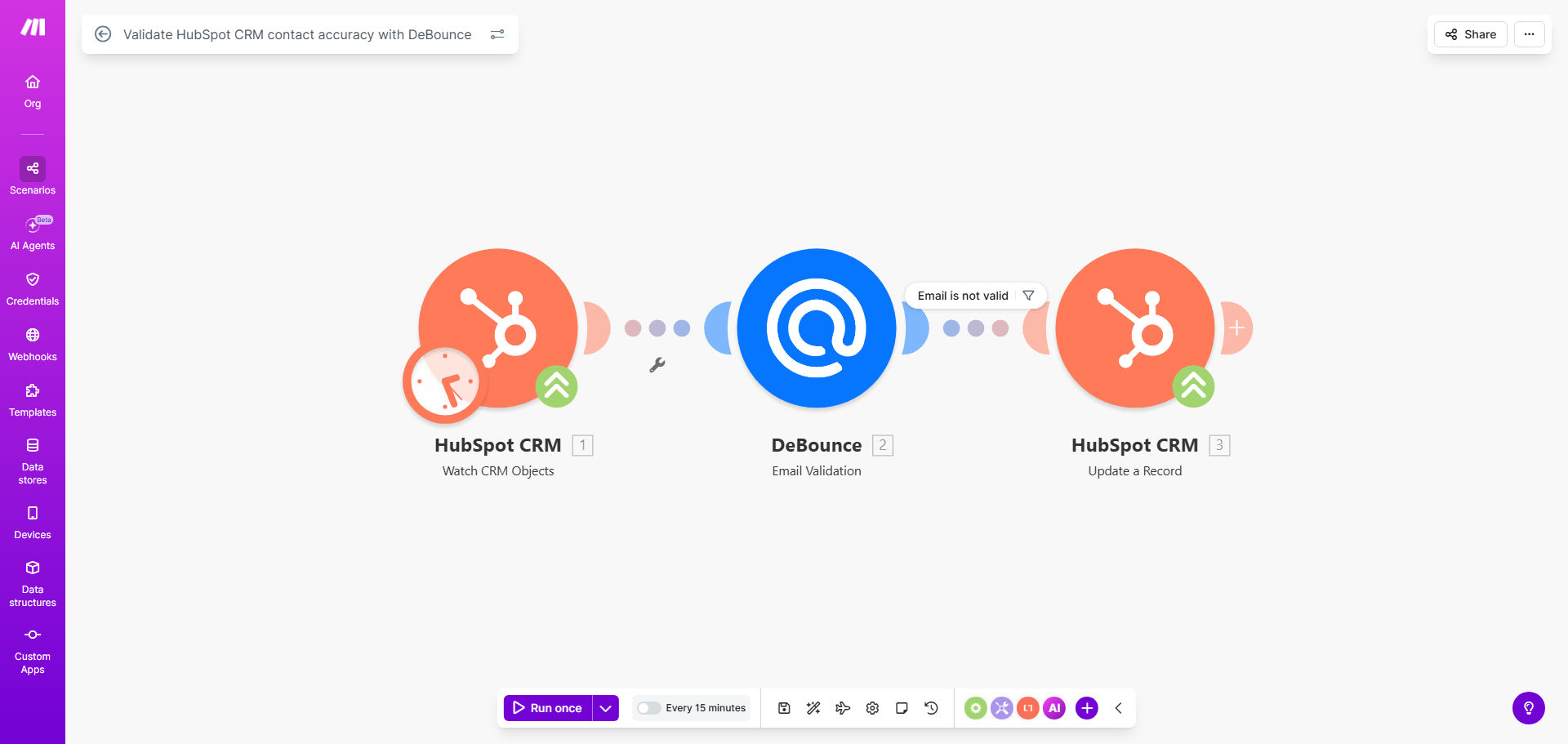
What This Workflow Does
A dirty CRM is a silent revenue killer. Invalid email addresses from web forms, list uploads, or sales entries pollute your database, leading to wasted marketing spend, damaged sender reputation, and sales teams chasing ghosts. This automation solves that problem at the source.
This Make.com workflow acts as a gatekeeper for your HubSpot CRM. Every time a new contact is created, it instantly routes the email address to DeBounce for validation. Based on the result—whether the email is valid, risky, or invalid—the workflow automatically updates the contact record in HubSpot. This ensures your marketing lists are clean, your sales outreach is targeted, and your overall data integrity is maintained without manual intervention.
How It Works
The automation operates on a simple but powerful trigger-action principle, creating a seamless bridge between your CRM and email verification service.
Step 1: New Contact Trigger
The workflow is activated the moment a new contact is added to a specified HubSpot list or created in the CRM. Make.com watches for this event in real-time, capturing the contact's details, primarily the email address.
Step 2: Email Validation with DeBounce
The captured email is sent to the DeBounce API. DeBounce performs a deep check, verifying syntax, domain existence, mailbox availability, and checking for disposable or role-based addresses. It returns a detailed status (e.g., "Valid", "Invalid", "Risky").
Pro tip: Configure the workflow to handle "Risky" emails (like catch-alls) by tagging them for manual review instead of outright deactivation. This can save potentially good leads.
Step 3: Smart CRM Update
Based on DeBounce's response, the workflow takes predefined action in HubSpot. For invalid emails, it can deactivate the contact, add a "Invalid Email" tag, or move it to a separate list. For valid emails, it can add a "Verified" tag, boosting its score for sales prioritization.
Step 4: Notification & Logging (Optional)
You can add modules to notify your team (via Slack or email) when a batch of invalid contacts is caught or to log all validations to a Google Sheet for audit and analysis of data quality trends.
Who This Is For
This template is essential for any business that relies on HubSpot for marketing and sales and values data quality.
- Marketing Teams: To protect email campaign metrics, improve deliverability, and ensure budget is spent reaching real people.
- Sales Teams & SDRs: To work from a verified lead list, increasing call/email efficiency and improving conversion rates.
- Operations & RevOps Managers: To enforce data hygiene policies automatically, maintain accurate reporting, and improve overall CRM health.
- Startups & Scale-ups: To build a foundation of clean data from the start, preventing costly clean-up projects down the line.
What You'll Need
- A Make.com account (free or paid plan).
- An active HubSpot CRM account with admin or integration access.
- A DeBounce account with an API key (they offer pay-as-you-go credits).
- Decide on the HubSpot contact list or creation trigger you want to monitor (e.g., "All New Contacts", "Form Submissions List").
Quick Setup Guide
You can have this automation running in under 20 minutes.
- Clone the Template: Click "Get This Workflow" to copy the template into your Make.com account.
- Connect HubSpot: In the first module, authorize Make.com to access your HubSpot account and select the trigger (e.g., "Contact Created").
- Connect DeBounce: In the validation module, add your DeBounce API key from your account settings.
- Configure Actions: Map the DeBounce response (like `result` = "Invalid") to the desired action in HubSpot (e.g., "Update Contact" to set a property like `hs_contact_is_deactivated` to true).
- Test & Activate: Run a test with a known invalid email (like `[email protected]`) to see the flow in action. Once confirmed, turn the scenario on.
Key Benefits
Boost Email Deliverability by up to 25%: By removing invalid and risky emails from your sending lists, you protect your sender score with ISPs, ensuring your legitimate marketing and sales emails consistently reach the inbox.
Save 5-10 Hours per Month on Manual Cleaning: Eliminate the tedious, recurring task of exporting lists, running them through bulk validators, and manually updating the CRM. This automation handles it instantly and continuously.
Increase Sales Team Efficiency by 15%: Provide your SDRs and AEs with a contact list where every email is verified. This reduces time wasted on bounced emails and increases meaningful conversations, directly impacting pipeline generation.
Improve Marketing ROI and Data Accuracy: Ensure your campaign performance metrics reflect engagement with real prospects. Clean data leads to more accurate lead scoring, segmentation, and forecasting.
Proactive Data Governance: Shift from reactive, quarterly data clean-ups to a proactive, always-on hygiene system. Bad data is neutralized upon entry, maintaining the long-term health and value of your CRM as a business asset.