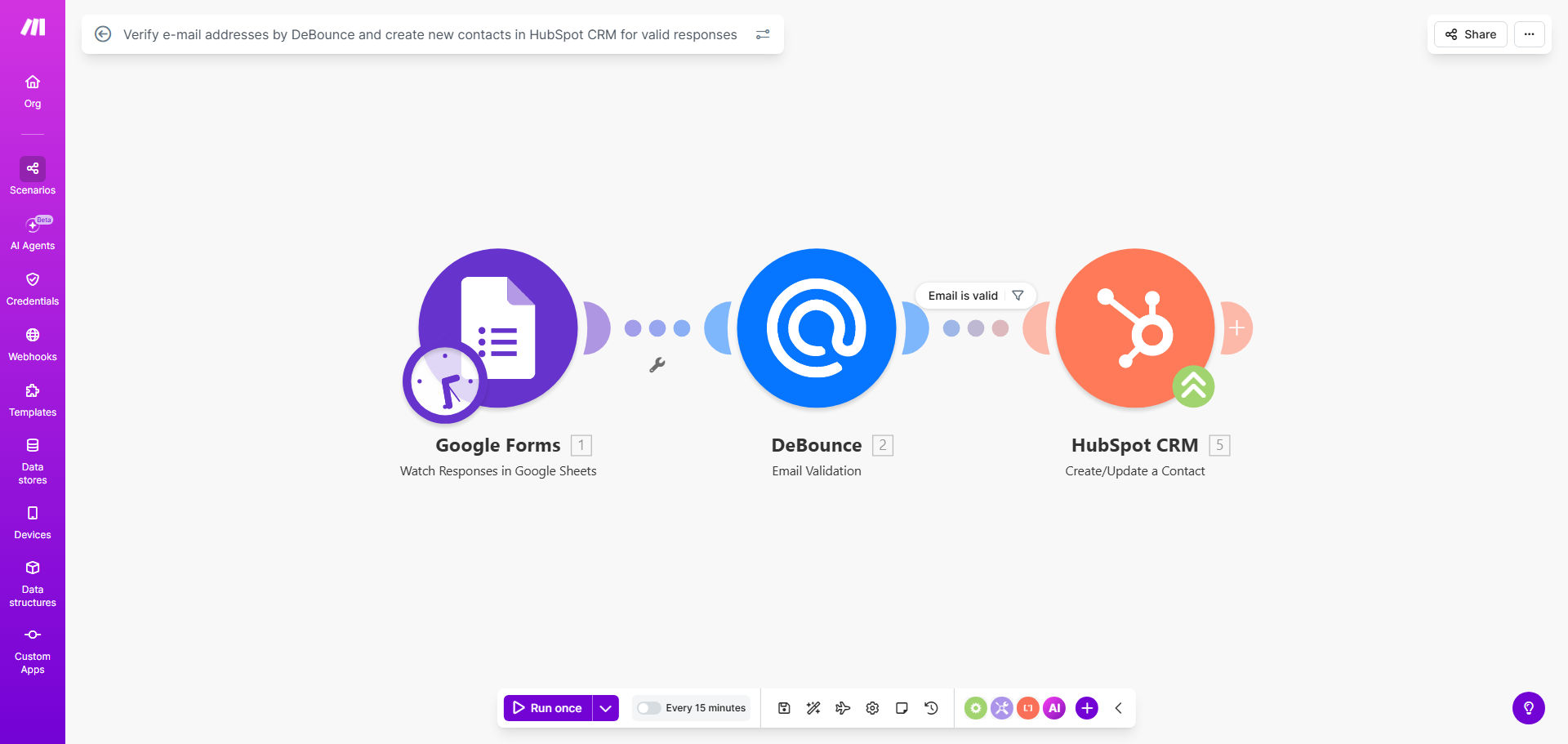
What This Workflow Does
Every business collecting leads online faces the same problem: data pollution. Up to 20% of email addresses submitted via forms can be fake, mistyped, or disposable. This wastes sales time, damages email sender reputation, and clutters your precious CRM with useless contacts. Manually checking each submission is slow and unsustainable as you scale.
This automated workflow solves that by creating a seamless, intelligent gatekeeper for your lead funnel. It connects your Google Forms directly to professional email verification via DeBounce and then into HubSpot CRM. The moment someone submits a form, their email is validated in real-time. Only genuine, deliverable addresses become new contacts in HubSpot, ready for your sales team to engage. Invalid submissions are filtered out, keeping your database clean and your team focused on real opportunities.
How It Works
The automation acts as a smart bridge between your form, verification service, and CRM, executing a precise sequence of steps for every submission.
Step 1: Trigger from Google Forms
The workflow is activated instantly whenever a new response is submitted to your connected Google Form. It captures all the response data, with a primary focus on the email address field.
Step 2: Email Verification with DeBounce
The captured email address is sent to the DeBounce API. DeBounce performs a deep check, verifying syntax, domain validity, mailbox existence, and risk score (e.g., if it's a disposable or role-based address). It returns a clear result: "Valid", "Invalid", or "Risky".
Pro tip: Configure the workflow to also check for "catch-all" domains. While technically valid, these domains accept all emails and can lower engagement rates. You might choose to flag them for manual review.
Step 3: Decision & Routing
A router module evaluates DeBounce's result. If the email is classified as "Valid", the workflow proceeds to create a CRM contact. If it's "Invalid" or "Risky", the workflow can branch to a different path—logging the submission to a separate sheet, sending a notification, or simply stopping.
Step 4: Contact Creation in HubSpot
For valid emails, the workflow maps the form data (like name, company, phone number) to the corresponding contact properties in HubSpot. It then uses the HubSpot module to create a new contact record instantly. You can even add tags or set lead scores based on the form answers at this stage.
Who This Is For
This automation is a game-changer for marketing teams, sales operations managers, and business owners who rely on inbound leads. It's perfect for businesses using Google Forms for event registrations, content downloads, consultation requests, or newsletter sign-ups. If you're spending hours cleaning lists, seeing high bounce rates, or your sales team complains about dead leads, this workflow is for you. Agencies managing lead generation for clients will also find immense value in ensuring only quality data enters their clients' CRMs.
What You'll Need
- A Make.com account (formerly Integromat) to build and run the automation.
- A Google Forms setup where you collect lead information.
- A DeBounce account with an API key. They offer pay-as-you-go credits for verification.
- A HubSpot CRM account (Sales Hub or Marketing Hub) with admin access to generate API keys.
- Basic knowledge of how to connect APIs within Make.com (the template provides most of the structure).
Quick Setup Guide
Getting this automation live takes about 30 minutes. Follow these steps after cloning the template in Make.com.
- Connect Your Apps: In the Make.com scenario, update each module's connection. Authorize access to your specific Google account, input your DeBounce API key, and connect your HubSpot portal.
- Select Your Form: Point the Google Forms module to the exact form you want to use as the trigger.
- Map the Data: Ensure the email address field from your form is correctly mapped to the DeBounce verification module. Then, map all other form fields (First Name, Last Name, etc.) to the corresponding HubSpot contact properties.
- Set Your Validation Rules: Decide what DeBounce result you consider "Valid" (e.g., only "Valid", not "Risky"). Adjust the router's filter conditions accordingly.
- Test and Activate: Run a few test submissions using real and test email addresses. Check that valid ones appear in HubSpot and invalid ones are handled as desired. Once confirmed, turn the scenario on.
Key Benefits
Save 5–10 hours per month on manual data cleaning. Eliminate the tedious task of exporting lists, running them through standalone verification tools, and manually importing clean data back into your CRM.
Improve sales team productivity by up to 15%. By ensuring every contact in HubSpot has a verified email, your sales reps won't waste time chasing dead ends, allowing them to focus on engaging real prospects.
Protect your email marketing sender reputation. Sending campaigns to invalid addresses leads to high bounce rates, which can blacklist your domain with ISPs. This automation acts as a first line of defense.
Gain accurate lead generation analytics. With a clean database, your reports on conversion rates, lead source effectiveness, and campaign ROI will be based on reliable data, enabling better strategic decisions.
Enhance the customer experience from the first touchpoint. You can instantly trigger a personalized welcome email or a task for a sales rep the moment a valid lead comes in, making your business responsive and professional.