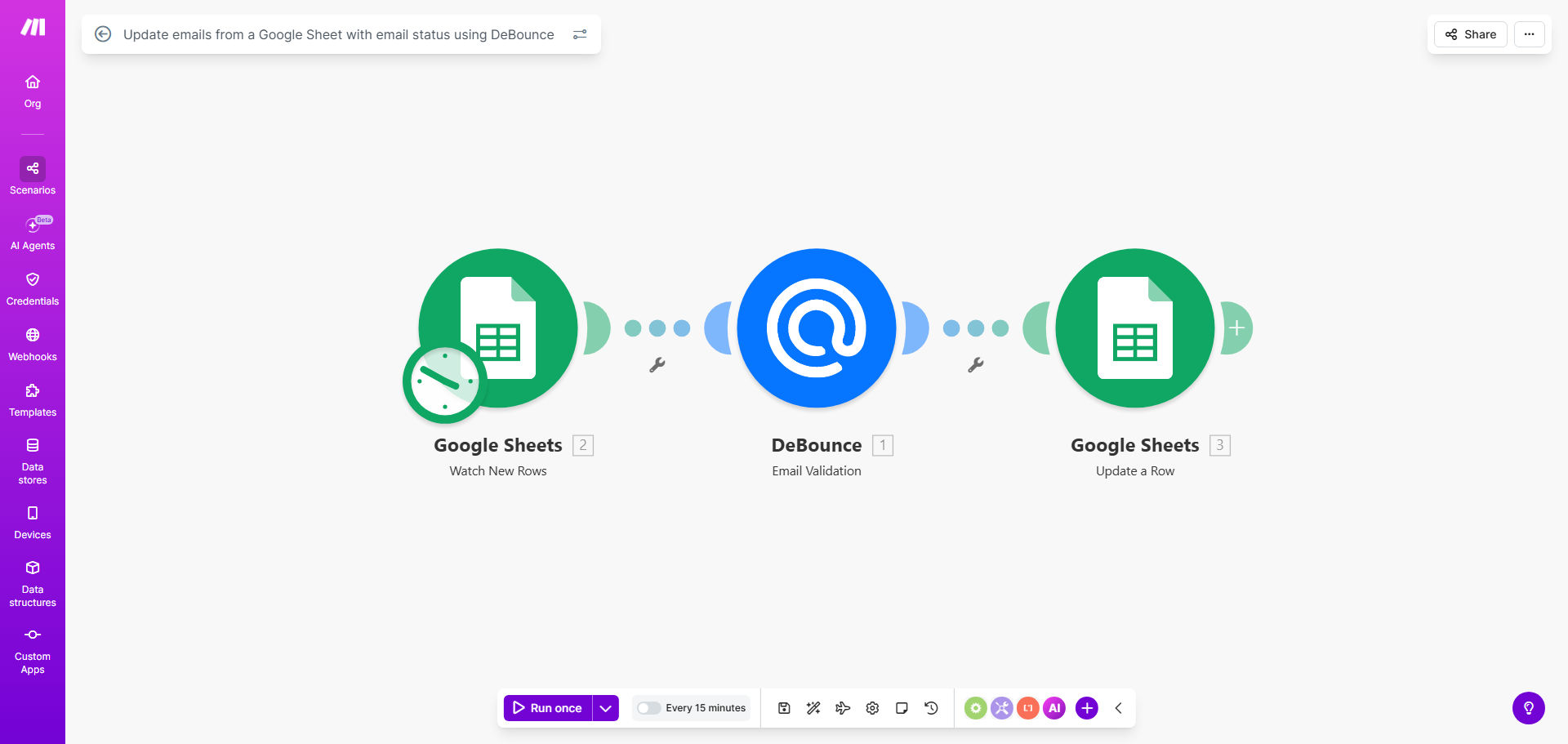
What This Workflow Does
Maintaining a clean email list is one of the most overlooked yet critical aspects of digital marketing and sales operations. Businesses collect emails from various sources—website forms, lead magnets, event sign-ups, and purchases—but without validation, these lists quickly accumulate invalid, risky, or disposable addresses. This decay directly hurts deliverability, damages sender reputation, and wastes marketing budget.
This automated workflow solves that problem proactively. Every time a new row containing an email address is added to your designated Google Sheet, the system instantly triggers. It sends the email to DeBounce, a professional email validation service, for real-time verification. The result—whether the email is Valid, Invalid, Risky, or Unknown—is then written back into your spreadsheet automatically. This creates a self-cleaning, always-accurate email database without any manual intervention.
How It Works
The automation follows a precise, reliable sequence to ensure every new email is verified and your records are updated.
Step 1: Monitor Google Sheets for New Rows
The workflow starts by watching your specified Google Sheet for changes. It's configured to trigger whenever a new row is added. The system captures the email address from the designated column, along with any associated data you want to track, like the lead's name or source.
Step 2: Send Email to DeBounce for Validation
The captured email address is immediately sent to the DeBounce API. DeBounce performs multiple checks: syntax validation, domain/MX record verification, and mailbox existence confirmation (without sending an email). It also screens for disposable email addresses, role-based accounts (like info@), and other risk factors.
Pro tip: Use the "Risky" status from DeBounce to create a separate segment for follow-up. These emails might be valid but belong to catch-all domains or temporary inboxes—different messaging or verification steps can improve engagement.
Step 3: Parse the Validation Result
Make.com receives the detailed response from DeBounce. The workflow logic parses this response to extract the core status and often a quality score or reason code. This data is formatted for clear understanding, turning technical API feedback into simple status labels like "Valid - Safe to Send" or "Invalid - Domain Does Not Exist".
Step 4: Update the Original Google Sheet Row
Finally, the workflow updates the very same row in Google Sheets that triggered the process. It writes the validation status, and optionally the score or timestamp, into new columns you specify. This closes the loop, leaving you with an auditable, clean record where the data hygiene process is transparent and complete.
Who This Is For
This automation is invaluable for any business or professional that relies on email communication and maintains a contact list. It's perfect for marketing teams running email campaigns who need high deliverability rates. Sales teams and SDRs benefit by ensuring their outreach lists contain only real, reachable leads, saving hours of prospecting time. Small business owners and solopreneurs who collect emails through a website contact form or newsletter sign-up can use this to automatically filter out spam sign-ups. Event managers and community builders collecting registrations via Sheets can validate attendee emails instantly. Even freelancers and agencies managing client lists can implement this to provide added data-quality service.
What You'll Need
To implement this workflow successfully, you'll need a few accounts and basic setup:
- A Make.com account (free tier available). This is the automation platform that orchestrates the entire process.
- A Google Sheets document with your email list. Ensure you have edit access and the sheet is set up with a clear column for email addresses.
- A DeBounce account and API key. Sign up for a DeBounce plan that offers API access; they have pay-as-you-go options suitable for most businesses.
- Basic understanding of your data flow. Know where new emails are added to your sheet (manually, via form, etc.) and decide which columns should store the validation results.
Quick Setup Guide
Follow these steps to get your automated email validation system running in under 30 minutes:
- Clone the Template: Click "Get This Workflow" and duplicate the provided Make.com scenario into your own account.
- Connect Your Apps: In the Make.com scenario, establish the connections (called "modules") to your specific Google Sheet and your DeBounce account using your API key.
- Configure the Trigger: Point the Google Sheets module to watch the correct spreadsheet and worksheet. Set it to trigger on "New Row".
- Map the Data: Tell the workflow which column in your sheet contains the email address to validate. Map this field to the DeBounce module.
- Set the Update Action: Configure the final Google Sheets "Update Row" module. Specify which columns should be populated with the validation status (e.g., "Status", "Last Validated").
- Test and Activate: Turn on the scenario and test it by manually adding a new email row to your sheet. Check that the status updates correctly within seconds.
Key Benefits
Save 5–10 hours per month on manual list cleaning. Eliminate the tedious process of exporting lists, uploading to validation tools, and re-importing results. This automation handles it all in the background, freeing your team for higher-value tasks.
Improve email deliverability rates by up to 25%. By removing invalid and risky addresses before you send, you dramatically reduce hard bounces. Internet Service Providers (ISPs) see you as a trustworthy sender, which improves inbox placement for all your campaigns.
Protect your sender reputation and domain authority. High bounce rates are a primary factor that gets domains blacklisted. Continuous validation acts as a shield, ensuring only quality emails leave your system, which preserves your ability to communicate with customers long-term.
Gain accurate, real-time insights into list health. With statuses automatically recorded in Sheets, you can create dashboards to see what percentage of your list is valid, track decay over time, and make data-driven decisions about list acquisition sources.
Scale your operations without proportional overhead. Whether you add 10 or 10,000 new emails, the workflow processes them instantly and at the same marginal cost. This allows your marketing and sales efforts to grow efficiently.