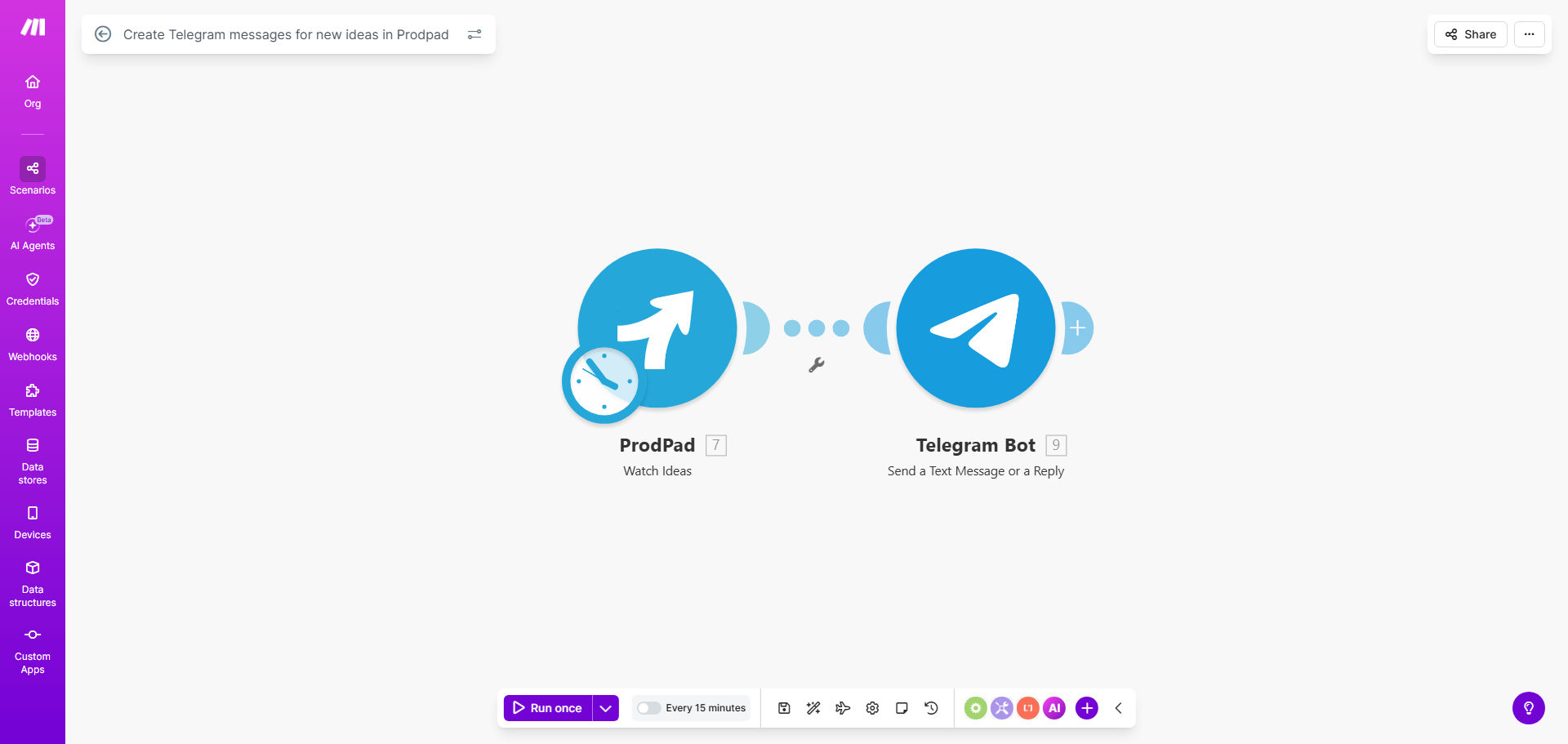
What This Workflow Does
Product teams often struggle with feedback lag. Ideas submitted by customers, support, or sales reps into ProdPad can sit unnoticed until someone manually checks the dashboard. This delay means missed opportunities for quick validation and slows down your entire product development cycle.
This automation solves that by creating a real-time bridge between your product feedback repository (ProdPad) and your team's communication hub (Telegram). Every time a new idea is logged, it instantly triggers a formatted message in your designated Telegram channel or group. This ensures your product managers, designers, and engineers are aware of new input the moment it arrives, fostering immediate discussion and prioritization.
The workflow eliminates the need for manual copy-pasting or scheduled digest emails. It turns product feedback from a static list into a dynamic, conversational stream, integrating seamlessly into your team's daily workflow where they are already collaborating.
How It Works
The automation acts as a vigilant connector, watching for new entries in ProdPad and delivering them precisely to your team's chat.
Step 1: Monitor ProdPad for New Ideas
The workflow continuously watches your ProdPad account using a "Watch Events" or scheduled check module. The instant a new idea record is created, the automation captures all its details: title, description, submitter, tags, and any custom fields you use.
Step 2: Format the Notification Message
Make.com then structures this data into a clear, actionable Telegram message. You can customize this to include a direct link back to the idea in ProdPad, highlight the priority, mention the customer segment, or format it with emojis for quick scanning.
Pro tip: Structure your message with a clear call-to-action like "Review?" or "Needs sizing." This prompts immediate next steps within the chat thread.
Step 3: Send to Your Telegram Channel
Finally, the workflow uses the Telegram Bot API to post the formatted message into your pre-configured Telegram group or channel. Your team sees it appear alongside other conversations, enabling them to react, comment, or assign follow-up tasks instantly, all within the same environment.
Who This Is For
This template is ideal for product-led companies and teams that value speed and transparency. Specifically, it's perfect for:
- Product Managers who need to stay on top of customer and internal feedback without constant dashboard refreshing.
- Remote or Hybrid Teams that rely on tools like Telegram for daily communication and want to integrate work streams.
- Startups and Scale-ups with rapid iteration cycles where delaying feedback review by even a day can impact the roadmap.
- Companies using ProdPad as a central feedback hub that want to push insights to various stakeholder groups (e.g., leadership, engineering, design).
What You'll Need
- A ProdPad account with API access enabled (typically available on paid plans).
- A Telegram account and administrative access to a group or channel where you want notifications posted.
- A Telegram Bot Token, which you can create by talking to @BotFather on Telegram. This bot will need to be added to your target group/channel.
- A Make.com account (free tier works) to host and run the automation scenario.
Quick Setup Guide
- Get the Template: Click "Get This Workflow" to copy the ready-made scenario into your Make.com account.
- Connect ProdPad: In the first module, authenticate your ProdPad account using your API credentials.
- Connect Telegram: In the Telegram module, add the Bot Token you created and specify the exact Chat ID of your target group or channel.
- Customize the Message: Edit the "Send Message" module to format the notification how your team prefers. Include key fields like {idea_title} and {idea_link}.
- Test & Activate: Turn on the scenario, then create a test idea in ProdPad. Within seconds, you should see a notification appear in your Telegram chat.
Key Benefits
Reduce idea-to-awareness time from hours to seconds. Eliminate the lag between feedback submission and team visibility, accelerating your product discovery process.
Prevent valuable insights from getting lost in the backlog. By pushing ideas directly into an active conversation, you ensure they are seen and discussed, not buried.
Save 2-3 hours per week per PM on manual feedback triage. Automate the tedious work of checking dashboards and compiling updates, freeing up time for strategic analysis.
Improve cross-functional alignment. When engineering, design, and PM all see the same feedback simultaneously in their main chat, it fosters shared context and faster consensus.
Create an auditable feedback pipeline. The Telegram thread becomes a searchable record of when ideas arrived and initial team reactions, adding transparency to your process.