Make.com Productboard Google Sheets Product Management Feedback Automation

Automate Product Feedback: Google Sheets to Productboard

Turn scattered customer insights into structured product notes automatically. Save hours of manual entry and keep your roadmap aligned with real user needs.

Get This Workflow Make.com · Google Sheets & Productboard · Free Template
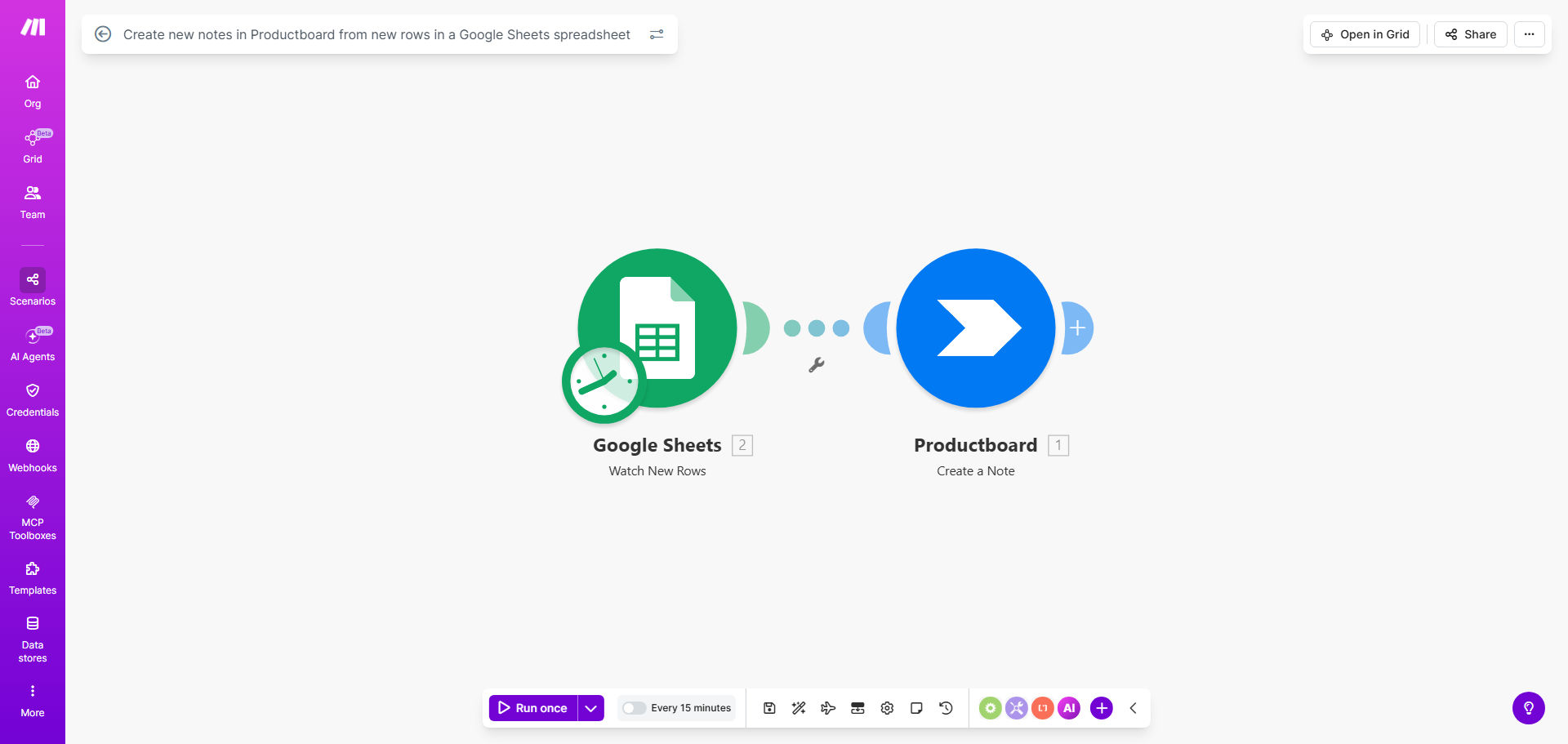
Diagram showing automation from Google Sheets rows to Productboard notes

What This Workflow Does

Product teams often collect feedback through multiple channels—support tickets, survey responses, sales calls, and community forums. Manually consolidating this data into Productboard is a tedious, error-prone task that steals time from actual product strategy. This automation solves that by creating a seamless pipeline from Google Sheets, a universal collection tool, directly into Productboard as structured notes.

The workflow periodically checks a designated Google Sheet for new rows. Each row, representing a piece of feedback or a feature request, is automatically transformed into a Productboard note. Fields like title, description, tags, and user persona are mapped from your Sheet columns, ensuring every insight is captured consistently and is immediately actionable for your product team.

How It Works

The automation runs on a schedule you control, creating a hands-off flow that keeps your product backlog fresh.

Step 1: Monitor Google Sheets for New Rows

The scenario starts by watching your specified Google Sheet. It uses a "Watch Rows" module to detect any new rows added since the last check. You define the sheet and worksheet, and the automation only processes new entries, avoiding duplicates.

Step 2: Structure the Data

Each column from the row is parsed. You can map columns like "Feedback Summary" to the note title, "Detailed Description" to the note body, and "Request Type" to Productboard tags. This step ensures the data fits Productboard's format.

Step 3: Create the Note in Productboard

The workflow authenticates with your Productboard account and creates a new note in your chosen project. It populates all mapped fields, attaches the submitting user's details if available, and can even set initial sentiment or priority based on Sheet data.

Pro tip: Use a standardized Google Form to feed data into your Sheet. This guarantees consistent column structure and data quality, making the automation mapping flawless and reliable.

Who This Is For

This template is ideal for product managers, product operations specialists, and customer success teams in SaaS or tech companies. It's perfect for teams using Productboard for roadmap management but collecting raw feedback elsewhere. If your team wastes time copying user quotes from spreadsheets, CSAT surveys, or meeting notes into your product tool, this automation will give you that time back.

Startups and scale-ups will find it invaluable for building a customer-centric culture without adding administrative overhead. It also serves larger enterprises looking to unify feedback from multiple departments (Support, Sales, Marketing) into a single product intelligence hub.

What You'll Need

  1. A Make.com account (free tier works for this workflow).
  2. A Google Sheets spreadsheet with your feedback data. You can start with the provided sample template.
  3. A Productboard account with API access enabled (available on paid plans).
  4. API connection details for both services (Make.com will guide you through the secure OAuth process).

Quick Setup Guide

You can have this automation running in under 15 minutes.

  1. Get the template: Click "Get This Workflow" to copy the scenario to your Make.com account.
  2. Prepare your Sheet: Duplicate the sample Google Sheet or adapt your own, ensuring column headers are clear.
  3. Connect accounts: In Make.com, authorize the Google Sheets and Productboard modules by logging into your accounts.
  4. Map the fields: Point the Google Sheets module to your specific file and worksheet. Then, map each Sheet column to the corresponding Productboard note field (e.g., Column A → Note Title).
  5. Set the schedule: Configure the scheduler to run as often as needed (default is every 15 minutes). Activate the scenario.

Key Benefits

Eliminate manual data entry and save 5-10 hours per week. Product managers and ops teams no longer need to act as human routers for feedback, freeing them for strategic analysis and customer interviews.

Improve product decision quality with complete, real-time data. By automatically funneling all feedback into Productboard, you build a comprehensive picture of user needs, reducing bias from only the loudest voices or most recent inputs.

Speed up your feedback loop and increase team responsiveness. Customer suggestions appear in the product team's workflow within minutes of submission, not days, allowing for quicker acknowledgment and prioritization.

Create a scalable system for gathering insights from any source. Use Google Sheets as a universal inbox for feedback from Typeform, email parsers, Slack bots, or Zendesk, then let this automation handle the final mile into Productboard.

Frequently Asked Questions

Common questions about product feedback automation and integration

Connecting Google Sheets to Productboard centralizes customer feedback and ideas, turning scattered data into structured product insights. It eliminates manual copy-pasting, reduces human error, and ensures your product team always has the latest feedback directly in their roadmap tool.

This integration speeds up prioritization and decision-making because insights are no longer trapped in siloed spreadsheets. For example, feedback from sales calls logged in a Sheet can automatically become Productboard notes tagged for the next quarterly planning session.

  • Creates a single source of truth for user feedback.
  • Reduces context switching for product managers.
  • Ensures no valuable insight is forgotten or overlooked.

You can send any customer feedback, feature requests, bug reports, or survey results stored in Google Sheets. Common data includes user quotes, pain points, suggested features, priority scores, customer segments, and submission dates.

The automation maps these columns to Productboard note fields like title, description, tags, and user persona. For instance, a column for "Customer Tier" could automatically assign a "Enterprise" tag to the note, helping filter feedback by audience.

  • Feature requests with estimated impact scores.
  • Bug reports with severity and reproduction steps.
  • NPS or CSAT survey verbatim comments.

Automation ensures no valuable feedback gets lost in email threads or separate documents. It creates a single source of truth in Productboard, allowing teams to quantify demand, spot trends, and link feedback directly to features.

This leads to data-driven roadmaps, faster response to user needs, and better alignment between customer voices and development work. Teams spend less time gathering data and more time analyzing it to make strategic bets.

  • Enables trend analysis across hundreds of data points.
  • Links customer pain directly to shipped features for impact reporting.
  • Reduces meeting time spent on "what did we hear?" updates.

Yes. Google Sheets acts as a universal aggregator. You can consolidate feedback from Typeform surveys, Zendesk tickets, Slack channels, or email into one master Sheet.

The automation then funnels everything into Productboard, giving you a unified view of all incoming requests without needing separate integrations for each source. This simplifies your tech stack and creates a consistent process for the entire company.

  • Use Zapier or Make to send data from other apps to your Sheet.
  • Maintain one clean, governed pipeline into Productboard.
  • Apply uniform tagging and formatting rules across all sources.

Teams save 5-10 hours per week by eliminating manual data entry and context switching. Product managers no longer need to log into Sheets, copy data, reformat it, and create notes manually.

The workflow runs every 15 minutes (or your chosen schedule), keeping Productboard updated in near real-time, which also reduces meeting time spent syncing on feedback. This reclaimed time can be redirected toward customer research and roadmap validation.

  • No more weekly "feedback dump" sessions.
  • Instant visibility for the entire product team.
  • Scalable process that doesn't add overhead as feedback volume grows.

Use standardized Sheets templates with dropdowns for priority and category to maintain consistency. Add data validation rules and required columns. The automation can include filter steps to skip incomplete rows or flag anomalies.

Regularly review the Sheet structure with your team to ensure columns match Productboard's expected fields for smooth mapping. A simple intake form (Google Form) feeding the Sheet is the best way to enforce quality at the source.

  • Implement dropdown menus for standardized values.
  • Use a "Status" column to mark rows as "Ready for Import".
  • Add a moderation step for high-volume or public submissions.

Absolutely. GrowwStacks specializes in building tailored automation systems that connect your unique feedback sources to Productboard. We can integrate with your CRM, support tools, internal apps, and set up advanced filtering, scoring, and routing logic to match your product workflow.

Every product team has different processes. We'll design a solution that fits your specific intake forms, approval steps, and reporting needs, ensuring the automation enhances—not disrupts—your existing workflow. Book a free consultation to discuss your specific needs.

  • Integration with Salesforce, HubSpot, or Intercom.
  • Custom scoring algorithms for request prioritization.
  • Automated notifications and reporting for stakeholders.

Need a Custom Product Feedback Automation?

This free template is a starting point. Our team builds fully tailored automation systems for your specific business needs.