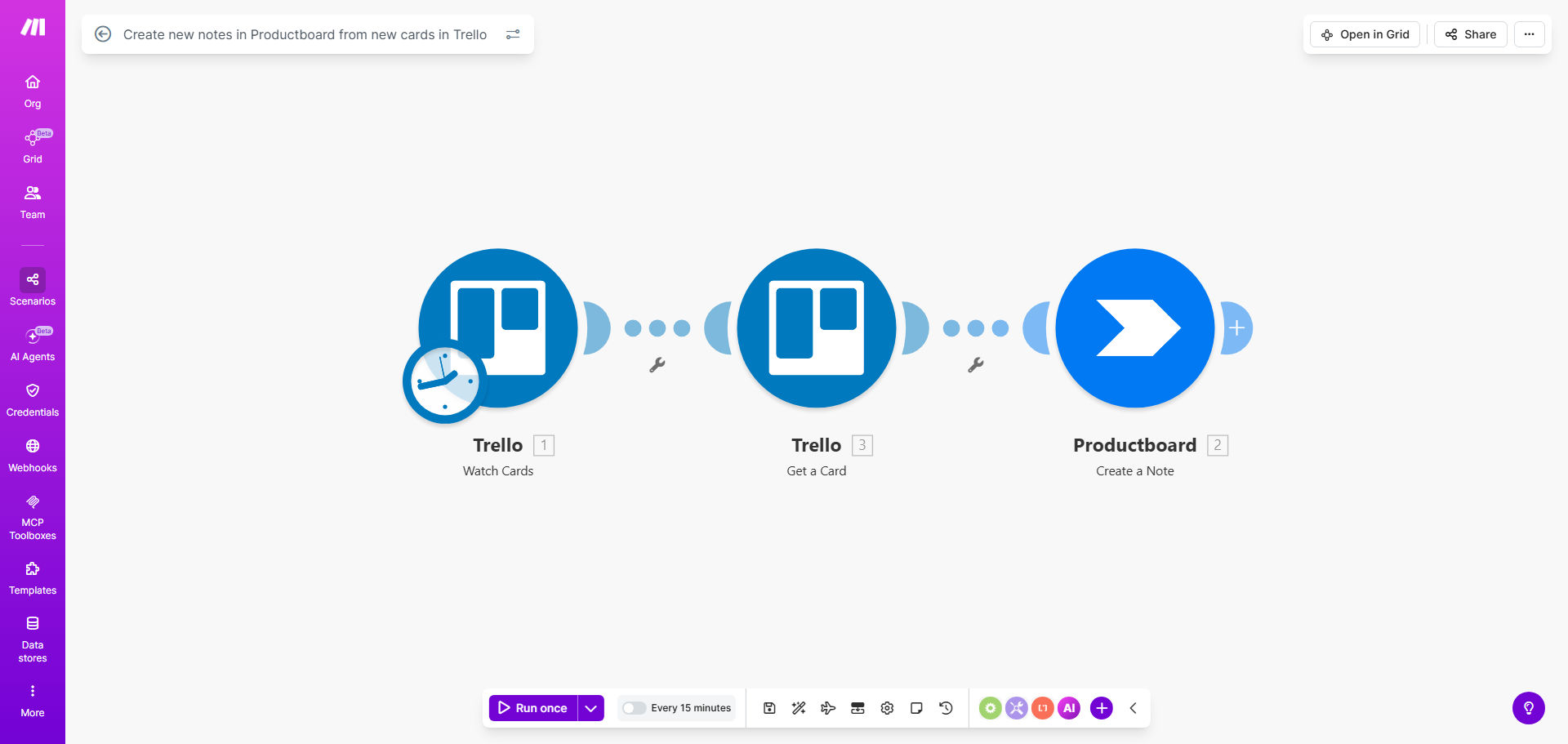
What This Workflow Does
Product teams often use Trello for collaborative brainstorming and capturing feedback from various channels—support tickets, sales calls, team meetings. Meanwhile, Productboard serves as the strategic hub for prioritizing features and building the roadmap. The disconnect happens when valuable insights get stuck in Trello, requiring product managers to manually re-enter data, which is time-consuming and error-prone.
This automation solves that by creating a seamless bridge between execution and strategy. Every time a new card is added to a specific Trello board or list, this workflow automatically captures its title, description, labels, and other metadata, then creates a corresponding note in your Productboard account. It turns Trello into a powerful input channel for your product insights, ensuring nothing falls through the cracks.
The template runs on a schedule you control (default every 15 minutes), providing near-real-time synchronization without overwhelming your tools. It’s designed for product managers, product owners, and operations teams who want to close the loop between idea collection and roadmap planning.
How It Works
The workflow follows a simple trigger-action pattern, reliably moving data from one platform to another while preserving all important context.
Step 1: Monitor Trello for New Cards
A scheduled module periodically checks your specified Trello board for any cards created since the last run. You can configure it to watch specific lists (like "Feedback Inbox" or "Feature Requests") and filter by labels or members to ensure only relevant cards are processed.
Step 2: Extract and Structure Card Data
For each new card found, the workflow extracts key information: the card name becomes the note title, the description becomes the note content, and Trello labels can be mapped to Productboard tags or custom fields. Checklists, comments, and due dates can also be included to provide full context for the product team.
Step 3: Create a Note in Productboard
Using the structured data, the automation makes an API call to Productboard to create a new note. You can specify which Productboard product the note belongs to, assign it to a specific component or feature, and even categorize it (e.g., "Problem," "Idea," "Feature Request") based on the Trello source.
Pro tip: Use Trello labels like "P0," "Customer-Reported," or "Quick Win" to automatically set priority or type fields in Productboard. This adds an extra layer of intelligence to your sync.
Step 4: Logging and Error Handling
The workflow includes basic error handling and logging. If a note fails to create in Productboard (maybe due to a missing field), the error is captured, and the process can be configured to retry or send a notification, ensuring data integrity.
Who This Is For
This automation is ideal for any product-led organization using both Trello and Productboard. Specifically, it benefits:
- Product Managers & Owners: Who need to centralize scattered feedback from sales, support, and internal teams into their roadmap tool.
- Startups and Scale-ups: Where resources are tight, and manual data entry is a poor use of valuable time.
- Cross-functional Product Teams: Where non-product team members (e.g., Customer Success) contribute ideas via Trello but shouldn't need access to Productboard.
- Companies with Democratic Roadmapping: That collect input from many stakeholders in Trello before prioritizing in Productboard.
What You'll Need
To set up this workflow, ensure you have the following ready:
- An active Make.com account (free tier works).
- Admin or member access to the Trello board you want to monitor.
- A Productboard account with API access enabled (available on all paid plans).
- Your Trello API key and token (generated from Trello's Power-Ups).
- Your Productboard API token (found in Productboard settings under "Integrations & API").
- A clear understanding of which Trello lists/labels contain product insights versus operational tasks.
Quick Setup Guide
You can have this automation running in under 10 minutes by following these steps:
- Clone the Template: Click "Get This Workflow" to copy the template into your Make.com account.
- Connect Trello: In the first module, authorize Make.com to access your Trello account and select the specific board and list to watch.
- Connect Productboard: In the Productboard module, add your API token and select the target product and project.
- Map Your Fields: Define how Trello card data (title, description, labels) maps to Productboard note fields (title, description, tags, type).
- Set the Schedule: Adjust the scheduler module to run as often as you need—every 15 minutes, hourly, or daily.
- Test and Activate: Create a test card in your Trello board and run the scenario once to verify a note appears in Productboard. Then turn the scenario on.
Key Benefits
Save 3–5 hours per week on manual data entry. Eliminate the tedious copy-paste work between tools, freeing up your product team for higher-value strategic analysis and customer conversations.
Ensure 100% capture of customer feedback and ideas. No more lost Trello cards or forgotten suggestions. Every piece of input is systematically logged in your product insights repository, making your roadmap more customer-informed.
Accelerate your insight-to-roadmap cycle. Reduce the lag between when feedback is received and when it's considered for the roadmap from days or weeks to minutes, allowing you to respond to market needs faster.
Improve cross-team alignment and transparency. When teams see their Trello contributions automatically appear in Productboard, they feel heard and understand how their input shapes product direction, fostering a stronger product culture.
Create a scalable, repeatable process. As your team and feedback volume grow, this automation scales effortlessly, handling hundreds of cards without any additional manual overhead or risk of human error.