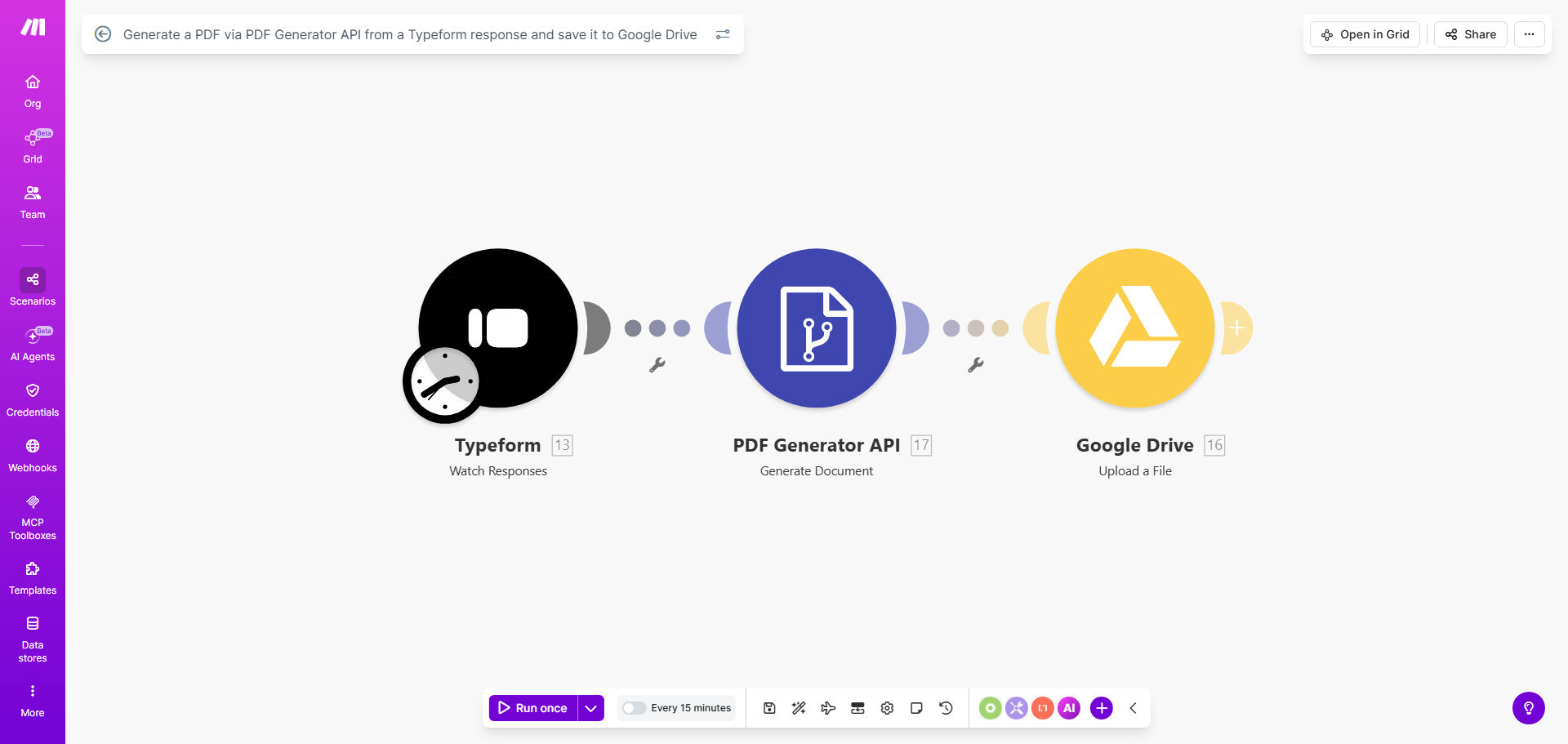
What This Workflow Does
Businesses that use Typeform for surveys, applications, registrations, or feedback often need to generate formal documents from the responses. Manually copying data from Typeform into a PDF template is a repetitive, time-consuming task prone to errors. This automation solves that by instantly converting every new Typeform submission into a formatted PDF and saving it to a designated Google Drive folder.
The workflow acts as a digital document factory. It watches for new Typeform entries, extracts the respondent's answers, uses the PDF Generator API to build a professional document with that data, and then uploads the final PDF to your cloud storage. This creates a seamless, paperless process from data collection to document archiving.
Whether you're generating certificates for course completions, creating proposal summaries from client inquiries, or compiling interview notes into reports, this automation ensures every piece of form data is instantly transformed into a shareable, permanent record.
How It Works
Step 1: Trigger on New Typeform Responses
The workflow is scheduled to check your Typeform account every 15 minutes (you can adjust this interval). When a new response is submitted, the automation triggers and retrieves all the answer data, including text, choices, and file uploads if present.
Step 2: Map Data to PDF Template
The collected responses are mapped into variables. These variables are then passed to the PDF Generator API module. You configure the API to use your pre-designed PDF template, inserting the Typeform answers into specific fields like name, email, answers to questions, dates, and scores.
Pro tip: Design your PDF template in the PDF Generator service first, marking fields for dynamic data. This ensures the final document looks exactly how you want.
Step 3: Generate and Format the PDF
The PDF Generator API processes the request, merges the data with your template, and creates a finished PDF document. The API can handle complex formatting, including tables, images from the Typeform response, and custom fonts, producing a polished, business-ready file.
Step 4: Save to Google Drive
The newly generated PDF file is automatically uploaded to a specified folder in your Google Drive. You can set rules for naming the file (e.g., "Application_[FirstName]_[Date].pdf") and organize them into subfolders based on response data, making retrieval and management effortless.
Who This Is For
This automation is ideal for any business or professional that relies on Typeform for data collection and needs to produce tangible documents from that data. Educational institutions can automate certificate generation for workshop attendees. HR departments can turn job application forms into standardized candidate profiles. Consultants can create summary reports from client intake surveys. Event organizers can generate personalized confirmations or tickets from registration forms.
Freelancers, coaches, and small business owners who use Typeform for client onboarding will benefit greatly, as it removes the manual step of creating proposals or service agreements from form submissions. Essentially, anyone who says, "I fill out a PDF based on what people submit in this form" should automate it with this workflow.
What You'll Need
- A Typeform account with at least one form collecting data.
- Access to a PDF Generator API service (like PDF.co, DocRaptor, or a similar provider) and a pre-designed template within that service.
- A Google Drive account with a folder ready to receive the generated PDFs.
- A Make.com account (free tier available) to host and run the automation.
- The API keys or connection credentials for Typeform, your PDF Generator service, and Google Drive.
Quick Setup Guide
1. Clone the Template: Click "Get This Workflow" to copy the template into your Make.com account.
2. Connect Your Apps: In Make.com, establish connections (modules) for your Typeform, PDF Generator API, and Google Drive accounts by entering your API keys or logging in.
3. Configure the Trigger: Select your specific Typeform and set the schedule (e.g., every 15 minutes, hourly, or instantly via webhook if supported).
4. Set Up PDF Generation: In the PDF Generator module, input your template ID from your PDF service and map the Typeform response fields to the template variables.
5. Define Google Drive Destination: Choose the target Google Drive folder and set the naming convention for the uploaded PDF files.
6. Test and Activate: Submit a test response to your Typeform and run the scenario once to verify the PDF is created and saved correctly. Then activate the automation.
Key Benefits
Save hours of manual document creation each week. For businesses receiving multiple forms daily, automating PDF generation can reclaim 5-10 hours per week previously spent on copy-pasting data and formatting documents.
Ensure 100% accuracy and consistency. Automated data transfer eliminates human error. Every PDF is generated with the exact information submitted, following the same professional template, guaranteeing uniform output.
Improve response time and customer experience. Documents can be created and stored immediately after form submission, enabling faster follow-up. Clients receive their certificates, reports, or confirmations sooner, enhancing their perception of your service.
Centralize and organize records effortlessly. All generated PDFs are automatically filed in Google Drive with consistent naming, creating a searchable digital archive. This simplifies compliance, auditing, and record retrieval.
Scale your operations without adding administrative overhead. As the volume of form submissions grows, the automation handles the increased workload seamlessly. You can process hundreds of documents daily without any additional manual effort.