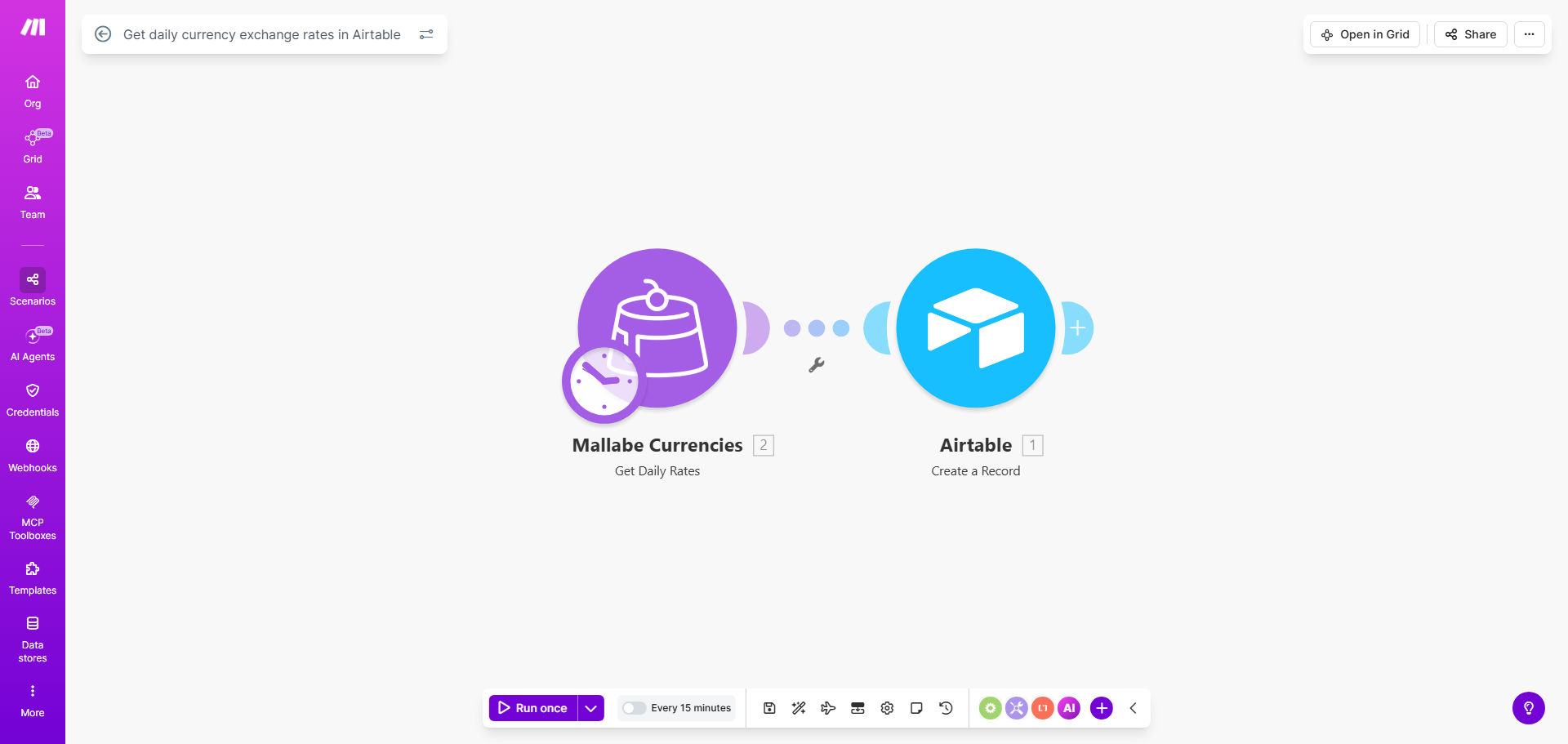
What This Workflow Does
For any business operating across borders—whether you're an e-commerce store, a freelance consultant with international clients, or a company with overseas suppliers—managing currency exchange rates is a constant, manual headache. Relying on sporadic manual checks or static spreadsheets leads to outdated pricing, inaccurate financial reporting, and potential revenue loss.
This automated workflow solves that by turning a daily chore into a seamless, hands-off process. It connects a reliable currency data source (like Mallabe Currencies) directly to your Airtable base. Every day, at a scheduled time, it fetches the latest exchange rates for the currencies you specify and logs them as new records. This creates a clean, timestamped history of rate fluctuations that your entire team can access and use for real-time decision-making.
The value is immense: you gain a single source of truth for all currency-related data. Your finance team can generate accurate reports, your sales team can quote prices with confidence, and your operations team can budget projects without currency guesswork. It transforms a reactive, error-prone task into a proactive strategic asset.
How It Works
The automation acts as a dedicated financial data assistant, working silently in the background. Here's the step-by-step process:
Step 1: Scheduled Trigger
The workflow is initiated by a schedule module in Make.com. You set it to run daily (e.g., at 9 AM UTC when major financial markets have updated). This trigger kicks off the entire process automatically, requiring zero manual intervention.
Step 2: Fetch Live Exchange Rates
Make.com calls a currency API, such as Mallabe Currencies. You configure the module to request specific currency pairs (like USD to EUR, GBP to JPY). The API returns the latest, mid-market exchange rate with high accuracy.
Step 3: Structure the Data
The raw API response is parsed and formatted. The workflow extracts the key details: base currency, target currency, exchange rate, and the timestamp of the quote. It can also handle multiple pairs in a single run, efficiently batching the updates.
Step 4: Create Records in Airtable
The formatted data is sent to your designated Airtable base. The workflow creates a new record in your "Exchange Rates" table for each currency pair fetched. Each record includes the date, rate, and currency codes, building a searchable historical database.
Pro tip: Extend this workflow by adding a module that sends a daily Slack or email digest with the top 3 currency movements, keeping your team informed without them needing to check Airtable.
Who This Is For
This template is a game-changer for businesses and professionals who deal with multiple currencies:
- E-commerce & Dropshipping Stores: To dynamically price products in local currencies and accurately calculate international profit margins.
- Freelancers & Agencies with Global Clients: To invoice in client currencies and track earnings in your home currency without manual conversion.
- Import/Export & Procurement Teams: To monitor supplier costs and hedge against unfavorable rate movements when planning purchases.
- Finance & Accounting Departments: To automate the reconciliation of multi-currency transactions and generate accurate financial statements.
- SaaS Companies with Global Subscriptions: To manage tiered pricing in different regions and forecast revenue accurately.
What You'll Need
To clone and use this template effectively, ensure you have the following set up:
- A Make.com account (free tier available).
- An Airtable account and a base with a table ready to receive exchange rate data. Columns should include Date, Base Currency, Target Currency, and Exchange Rate.
- Access to a currency exchange rate API. The template uses Mallabe Currencies, but you can use others like ExchangeRate-API, Open Exchange Rates, or a paid service for more pairs or higher frequency.
- (Optional) A basic understanding of how to retrieve an API key from your chosen currency data provider.
Quick Setup Guide
You can have this automation running in under 15 minutes:
- Clone the Template: Click the "Get This Workflow" button above. This will copy the scenario into your Make.com workspace.
- Connect Your Apps: In the Make.com scenario, authorize the connections to Airtable and your chosen currency API (e.g., Mallabe Currencies). You'll need your Airtable API key and base ID, and your currency API key.
- Configure the Trigger: Set the schedule module to your preferred time (e.g., daily at 09:00).
- Set Your Currency Pairs: In the API module, specify which currency pairs you want to track (e.g., USD/EUR, GBP/AUD).
- Map to Airtable: Point the "Create Record" module to your specific Airtable base and table. Map the data fields (rate, currencies, date) to the correct columns.
- Test & Activate: Run a single test execution to ensure data flows correctly into Airtable. Once confirmed, turn the scenario on. It will now run automatically on your schedule.
Key Benefits
Eliminate Daily Manual Work: Save 15-30 minutes every single day previously spent looking up rates and typing them into spreadsheets. Over a year, that's over 100 hours returned to your team for higher-value tasks.
Ensure Absolute Data Accuracy: Remove human error from the equation. Automated data pulls guarantee that the rates in your system are precise, timely, and directly from the source, leading to more reliable financial decisions.
Create a Valuable Historical Dataset: Automatically build a searchable history of exchange rates. This data becomes invaluable for spotting trends, performing retrospective analysis, and providing audit trails for financial reporting.
Improve Decision-Making Speed: With rates updated automatically, your sales, finance, and procurement teams can make real-time decisions based on current data, whether it's quoting a project, converting revenue, or locking in a supplier payment.
Scale Your International Operations: As you add more currencies or need more frequent updates, the automation scales effortlessly. You can add new currency pairs or trigger updates multiple times a day without increasing manual workload.