Make.com RSS Raindrop.io Content Curation Automation

Save New RSS Feed Items to Raindrop.io

Automatically bookmark every new article from your favorite blogs, news sites, and publications directly into your Raindrop.io collections.

Get This Workflow Make.com · RSS · Free Template
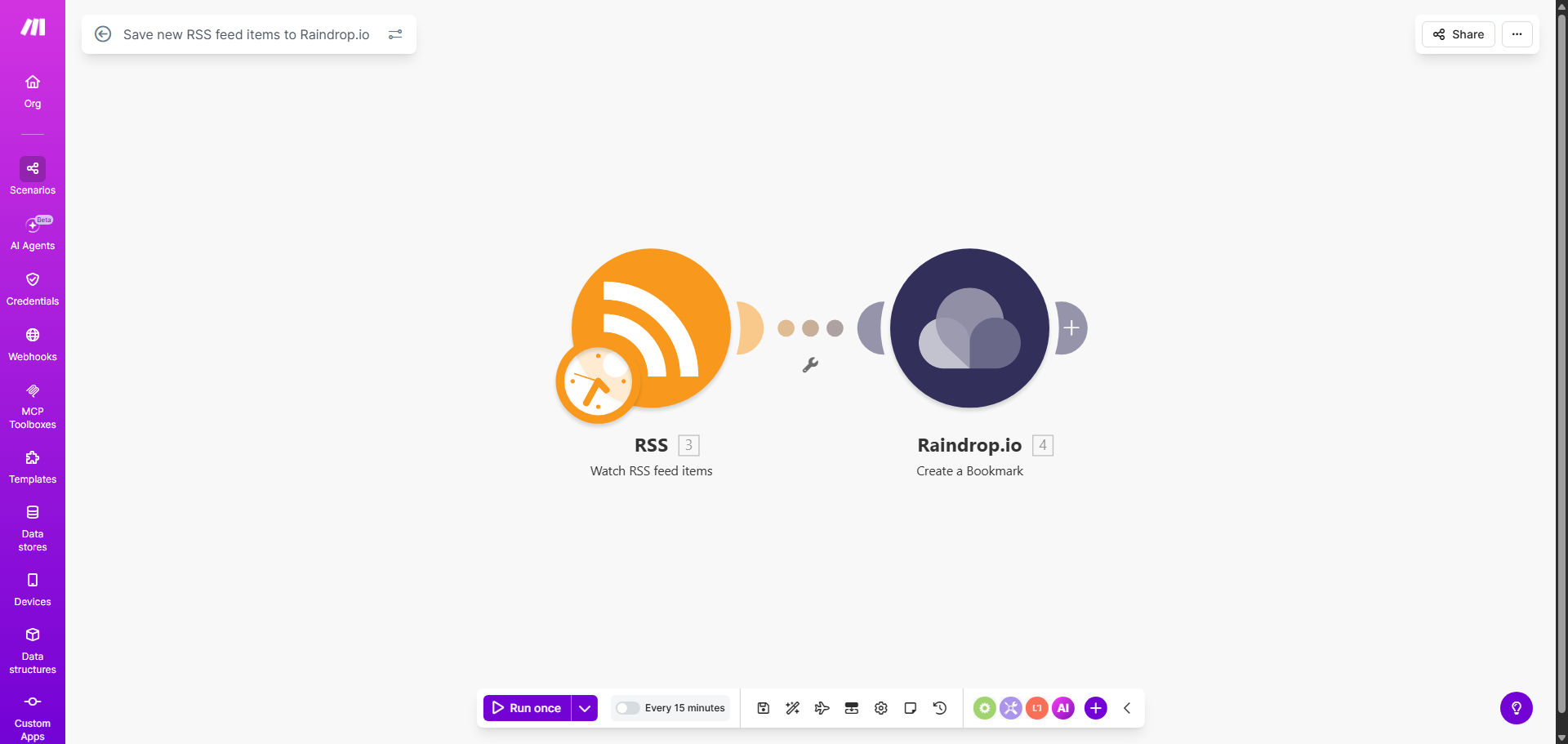
Make.com workflow diagram showing RSS feed connecting to Raindrop.io for automatic bookmarking

What This Workflow Does

For content curators, researchers, and avid readers, manually checking RSS feeds and saving interesting articles is a repetitive, time-consuming task. It's easy to miss important updates or let valuable content slip through the cracks, leading to fragmented knowledge and lost opportunities.

This automated workflow solves that by acting as your personal research assistant. It continuously monitors your specified RSS feeds and, the moment a new item is published, it captures the title, link, description, and publication date, then seamlessly adds it as a bookmark to your chosen Raindrop.io collection. This creates a centralized, organized, and searchable archive of everything you want to read or reference later, without you lifting a finger.

How It Works

The automation runs on a schedule or trigger, connecting two powerful tools to handle the entire process.

Step 1: Monitoring the RSS Feed

The workflow begins by polling your chosen RSS feed URL at regular intervals you define (e.g., every hour). Make.com's RSS module checks for new items since the last run. It identifies new posts based on their unique GUID or publication date.

Step 2: Processing the Feed Data

Each new item's data is extracted, including the article title, direct URL, a snippet or full description, the author's name, and the publish date. This data is formatted and prepared to be sent to Raindrop.io.

Pro tip: Use this step to add filters. For example, you can set a rule to only save items that contain specific keywords relevant to your project, ensuring your Raindrop.io collection stays focused.

Step 3: Creating the Raindrop.io Bookmark

The workflow then uses the Raindrop.io API to create a new bookmark in your specified collection. It passes the article title as the bookmark name, the URL as the link, and the description as notes. You can pre-configure tags and other metadata, making your saved content instantly organized.

Who This Is For

This automation is a game-changer for professionals and enthusiasts who rely on curated information. It's perfect for market researchers tracking competitor blogs, content marketers gathering inspiration, academics following journal publications, developers watching tech news, and anyone who wants to build a personal knowledge base without manual effort. If you regularly find yourself copying links to read later, this workflow is for you.

What You'll Need

  1. A Make.com account (free tier available).
  2. A Raindrop.io account (free or paid).
  3. Your Raindrop.io API token, available in your account settings.
  4. The RSS feed URL(s) of the websites, blogs, or publications you want to monitor.
  5. The ID of the Raindrop.io collection where you want bookmarks saved.

Quick Setup Guide

You can have this automation running in under 10 minutes.

  1. Clone the template: Click "Get This Workflow" to open the template in your Make.com account and create a copy.
  2. Connect Raindrop.io: In the Raindrop.io module, add a new connection using your API token.
  3. Configure the RSS trigger: Paste your RSS feed URL into the "Watch RSS Feed Items" module and set your preferred polling schedule.
  4. Set the destination: In the "Create a Bookmark" module, select your target Raindrop.io collection. You can also set default tags here.
  5. Test and activate: Run the scenario once to test. Check Raindrop.io to confirm a bookmark was created correctly, then turn the scenario on.

Key Benefits

Save 2–5 hours per week by eliminating the manual process of checking feeds and saving bookmarks. The automation works 24/7, even when you're offline.

Never miss an important update from your critical sources. The instant an item is published, it's captured and archived, creating a reliable historical record.

Build a searchable, organized knowledge base in Raindrop.io. With automatic tagging and collection sorting, finding any saved article later takes seconds, not minutes.

Scale your curation effortlessly. Easily add more RSS feeds to the same workflow. Monitor dozens of sources and have them all funnel into neatly organized collections.

Improve focus and reduce digital clutter. By automating the capture, you can schedule dedicated time to review your curated collection, leading to more focused reading and analysis.

Frequently Asked Questions

Common questions about RSS and bookmark automation

Automating RSS saves to a bookmark manager like Raindrop.io eliminates manual copying and pasting, ensuring you never miss important content. It centralizes your reading list, saves hours per week, and allows you to categorize and tag articles automatically for later reference.

This transforms a reactive, scattered habit into a proactive, organized system. For example, a marketing team can automatically save all competitor blog posts into a "Competitor Analysis" collection, ready for their weekly review meeting.

Raindrop.io offers powerful organization with collections, tags, and search, making it ideal for content curation. It syncs across all devices, allows offline reading, and integrates with many tools. Automating saves from RSS feeds turns it into a dynamic, self-updating knowledge base for research or inspiration.

Unlike browser bookmarks, Raindrop.io is designed for curation. You can create beautiful, shareable collections, add detailed notes, and use its full-text search to instantly find any article you've saved, even if you don't remember the title.

Yes, with automation platforms like Make.com, you can set up filters based on keywords, authors, or publication dates before saving to Raindrop.io. This ensures only relevant content is bookmarked, keeping your collections clean and focused on your specific interests or projects.

For instance, you could monitor a broad tech news feed but only save items containing "AI" or "machine learning" to your "AI Trends" collection. This precision saves you from information overload.

  • Filter by keywords in title or description.
  • Exclude items from certain authors or domains.
  • Only save items published within the last 24 hours for news.

For researchers and marketers, automating RSS feeds provides a constant stream of curated industry news without manual effort. It enables faster competitive analysis, trend spotting, and content ideation by having all relevant articles automatically organized and ready for review in one central platform.

This shifts their role from content gatherers to content analysts. Instead of spending time finding information, they can immediately spend time deriving insights from the pre-organized information delivered to them.

An RSS reader is for consumption and often has a cluttered interface. Saving to Raindrop.io is for curation and long-term storage. Automation moves items you want to keep from the transient feed into a structured, searchable archive you own and can organize with custom tags and collections.

Think of your RSS reader as a daily newspaper you skim. Raindrop.io is your personal library where you shelve the articles worth keeping. Automation is the librarian that does the filing for you.

Absolutely. Automation workflows can monitor dozens of RSS feeds simultaneously. Each new item from any feed can be processed and saved to Raindrop.io in a dedicated collection, allowing you to build comprehensive topic-specific libraries from multiple sources automatically, 24/7.

You can design a single workflow with multiple RSS triggers or create separate, parallel workflows for different topics. This scalability means your curation system grows with your needs without increasing your workload.

Yes, GrowwStacks specializes in building custom automation solutions. We can design a system that aggregates content from your specific list of RSS feeds, applies your filtering rules, and saves them to Raindrop.io or another platform with your preferred tagging structure, saving your team significant time.

We go beyond basic templates to create tailored workflows. For example, we can integrate sentiment analysis, add items to a project management tool like Trello, or generate weekly digest emails from your saved content.

  • Tailored filtering and routing logic.
  • Integration with other business tools (Slack, Notion).
  • Ongoing support and optimization.

Need a Custom RSS Automation?

This free template is a starting point. Our team builds fully tailored automation systems for your specific business needs.