Make.com Airtable LinkedIn Social Media Marketing Automation

Automate LinkedIn Posts from Your Airtable Database

Turn new Airtable records into professional image posts on your LinkedIn profile automatically. Save hours every week on social media management.

Get This Workflow Make.com · LinkedIn & Airtable · Free Template
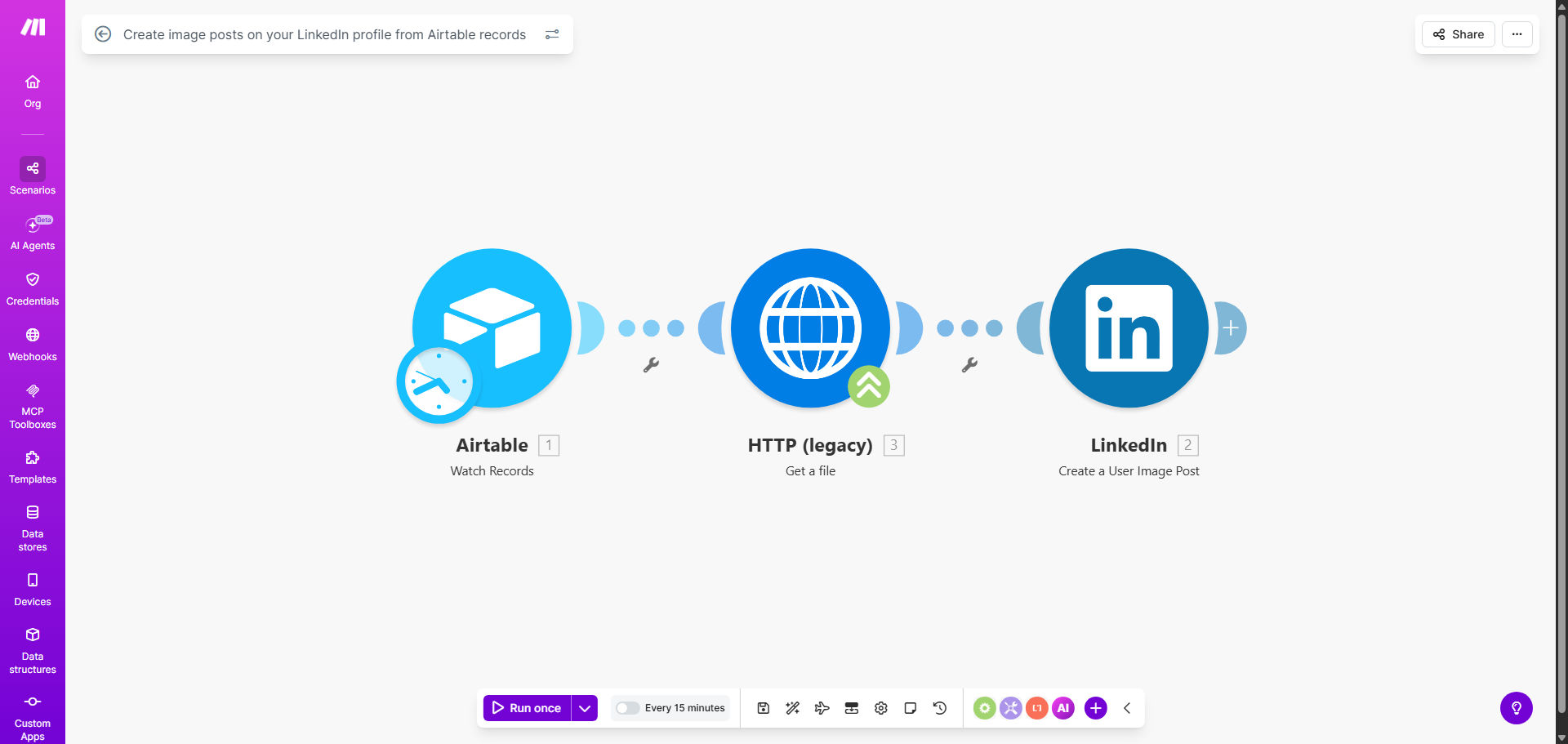
Make.com automation workflow diagram connecting Airtable to LinkedIn for post creation

What This Workflow Does

Manually creating and posting content on LinkedIn is a repetitive, time-consuming task that distracts marketing teams and business leaders from strategic work. You have great content planned in a spreadsheet or database, but the act of formatting, uploading, and publishing it consistently often falls through the cracks.

This automation workflow solves that by creating a seamless bridge between your content repository in Airtable and your LinkedIn profile. Whenever you or your team adds a new record with post content—like a headline, body text, and an image URL—the system automatically crafts and publishes it as a polished image post on LinkedIn. It transforms your Airtable base into a powerful, collaborative social media command center.

The business value is clear: reclaim 5-10 hours per month per team member, eliminate missed posting opportunities, and ensure your LinkedIn presence remains active and professional without daily manual intervention. It brings reliability and scalability to your personal or company branding efforts.

How It Works

The workflow is triggered in Make.com and follows a logical sequence to transfer data from Airtable to LinkedIn.

Step 1: Monitor Your Airtable Base

The scenario starts by watching a specific Airtable table for new records. You can configure it to trigger on creation or when a record is marked as "Ready to Publish." This gives you control over the timing and allows for internal drafts and approvals before anything goes live.

Step 2: Retrieve Post Content

Once a new record is detected, Make retrieves all the necessary fields. This typically includes the post headline, the main body text, a URL to the featured image (hosted on a service like Dropbox or Google Drive), and a set of relevant hashtags. The data is mapped and prepared for the next step.

Step 3: Format and Create the LinkedIn Post

Make then connects to your LinkedIn account via its secure API. It uses the retrieved data to construct a post with the specified text and attaches the image from the provided URL. The post is then published directly to your LinkedIn profile or company page, appearing exactly as if you had posted it manually.

Pro tip: Use a "Status" field in Airtable (e.g., Draft, Approved, Posted). Configure your automation to only trigger on records with "Approved" status. This builds a simple but effective content approval workflow into the process.

Who This Is For

This automation is ideal for solopreneurs, marketing managers, content creators, and small business teams who use LinkedIn for professional networking and lead generation.

Marketing Agencies: Manage content calendars for multiple clients from a single, organized Airtable base. Founders & Executives: Maintain a consistent thought leadership presence without it becoming a daily chore. Consultants & Coaches: Systematically share insights and case studies to attract new clients. Small Marketing Teams: Collaborate on content creation in Airtable and automate the distribution, freeing up time for engagement and strategy.

What You'll Need

  1. A Make.com account (free tier available).
  2. An Airtable account with a base containing your post content (fields for title, text, image URL, etc.).
  3. A LinkedIn account (personal profile or access to a Company Page).
  4. Your post images hosted online with a publicly accessible URL (e.g., via Google Drive, Dropbox, or a CDN like ImageKit).

Quick Setup Guide

You can have this automation running in under 30 minutes by following these steps.

  1. Get the Template: Click the "Get This Workflow" button to copy the ready-made scenario into your Make.com account.
  2. Connect Your Apps: In the Make scenario, authorize the connections to your specific Airtable base and your LinkedIn account. This is a secure, one-time OAuth process.
  3. Map Your Fields: Point the Airtable module to the correct table and map the fields from your record (e.g., "Post Title," "Body Text," "Image URL") to the corresponding variables in the workflow.
  4. Set the Trigger: Decide if the workflow runs instantly on new records or on a schedule. For testing, start with a manual trigger.
  5. Test & Activate: Create a test record in Airtable and run the scenario once to see the post appear on LinkedIn. Verify the formatting, then turn the scenario to "On" for continuous automation.

Key Benefits

Save 5+ Hours Monthly: Eliminate the daily context-switching and manual effort of composing, formatting, and posting content. That time can be reinvested in creating better content or engaging with your audience.

Guaranteed Consistency: A dormant LinkedIn profile hurts credibility. This automation ensures you maintain a regular posting schedule, which is key to algorithm visibility and audience growth, even during busy periods.

Reduce Human Error: No more forgotten posts, broken image links, or typos from rushed manual posting. The workflow executes precisely as configured every single time.

Improve Team Collaboration: Airtable becomes your single source of truth. Multiple team members can contribute, edit, and approve content in a structured environment before it goes live.

Scalable Content Engine: What works for one post works for a hundred. This system allows you to scale your content output effortlessly without adding overhead or complexity to your process.

Frequently Asked Questions

Common questions about LinkedIn and Airtable automation and integration

Automating LinkedIn posts from Airtable saves significant time, ensures consistent publishing, and reduces human error. It allows your marketing or sales team to manage content in a collaborative database like Airtable, while the automation handles the tedious posting schedule. This keeps your LinkedIn profile active with professional content without daily manual effort.

For example, a consultant can batch-create a month's worth of insight posts in Airtable on a Monday. The automation then publishes them throughout the week, maintaining their presence while they focus on client work. The separation of content creation and distribution is a key productivity multiplier.

Thought leadership articles, company updates, product announcements, and curated industry insights work perfectly. The key is having structured content in Airtable: a clear headline, body text, relevant image URL, and optional hashtags. Visual content like infographics or quote images typically gets higher engagement and is ideal for this type of automation.

Content that requires real-time interaction or is highly reactive to news is less suitable. The sweet spot is evergreen, valuable content that builds your professional brand over time. This system excels at distributing that foundational content reliably.

  • Use high-resolution images (1200 x 627 pixels is ideal).
  • Keep body text concise for better mobile readability.
  • Include 3-5 relevant hashtags in a dedicated Airtable field.

It creates a centralized content hub. Your team can plan, draft, and approve posts in Airtable—a tool built for collaboration. The automation then executes the distribution flawlessly. This separation of planning and publishing improves workflow, allows for easy content calendaring, and ensures your LinkedIn strategy is data-driven and consistent, not haphazard.

You can track performance by adding fields in Airtable for engagement metrics later. This turns your content base into a living library where you can see what topics or formats perform best, directly informing future content creation. It closes the loop between planning, execution, and analysis.

Yes, absolutely. While the basic trigger is a new Airtable record, you can incorporate scheduling logic. Add a date/time field in Airtable for your desired publish time. The Make.com scenario can include a 'Schedule' module to pause execution until that specific time arrives, then post to LinkedIn. This gives you full control over your publishing calendar.

For instance, you could load Airtable with posts for the entire quarter, each with a scheduled date. The automation will publish each one on its designated day and time, maximizing reach when your audience is most active. It's like having a virtual social media manager working around the clock.

The biggest mistakes are not having a content approval process, forgetting to include error handling for failed posts, and using low-quality or incorrectly sized images. Also, over-automation without a human touch can make content feel robotic. Always include a review step in your Airtable workflow and test your image formats before full automation.

Another pitfall is neglecting to monitor the automation. Set up simple email alerts in Make.com to notify you if a post fails to publish. This ensures you catch issues quickly. Remember, automation handles the repetitive task, but strategy and quality control still require human oversight.

Yes, when using reputable platforms like Make.com. They use LinkedIn's official API with OAuth 2.0 authentication. You grant permission once, and the connection is encrypted. The automation tool only has permissions to perform the actions you explicitly set up (like creating posts). It cannot access private messages or sensitive account data.

You maintain full control and can revoke access at any time from your LinkedIn settings. This is far safer than sharing login credentials with team members or virtual assistants. The API connection is the standard, secure method for software integration.

Track time saved per week previously spent on manual posting. Calculate the monetary value of that time. Monitor engagement metrics (likes, comments, shares) before and after automation—consistency often boosts them. Finally, assess lead generation from LinkedIn. If automated posts free up time for more strategic engagement, that's a major ROI.

For a concrete example, if a marketing manager saves 2 hours a week, that's over 100 hours a year. At a conservative rate, that's thousands of dollars in productivity returned. The increased profile visibility and lead flow from consistent posting often deliver an even greater financial return.

Yes, GrowwStacks specializes in building custom automation solutions. While this template is a great start, we can design a system tailored to your specific content approval flows, multi-channel distribution (Twitter, Facebook), advanced scheduling, or integration with your CRM. We handle the technical build so you can focus on creating great content.

Our team can implement features like automatic content repurposing, sentiment analysis on comments, or pulling data from other sources into your Airtable content calendar. We start with a free consultation to understand your unique workflow and business goals, then deliver a robust, maintainable automation system.

  • Tailored to your existing tools and processes.
  • Includes comprehensive testing and documentation.
  • Ongoing support and optimization available.

Need a Custom LinkedIn Automation?

This free template is a starting point. Our team builds fully tailored automation systems for your specific business needs.