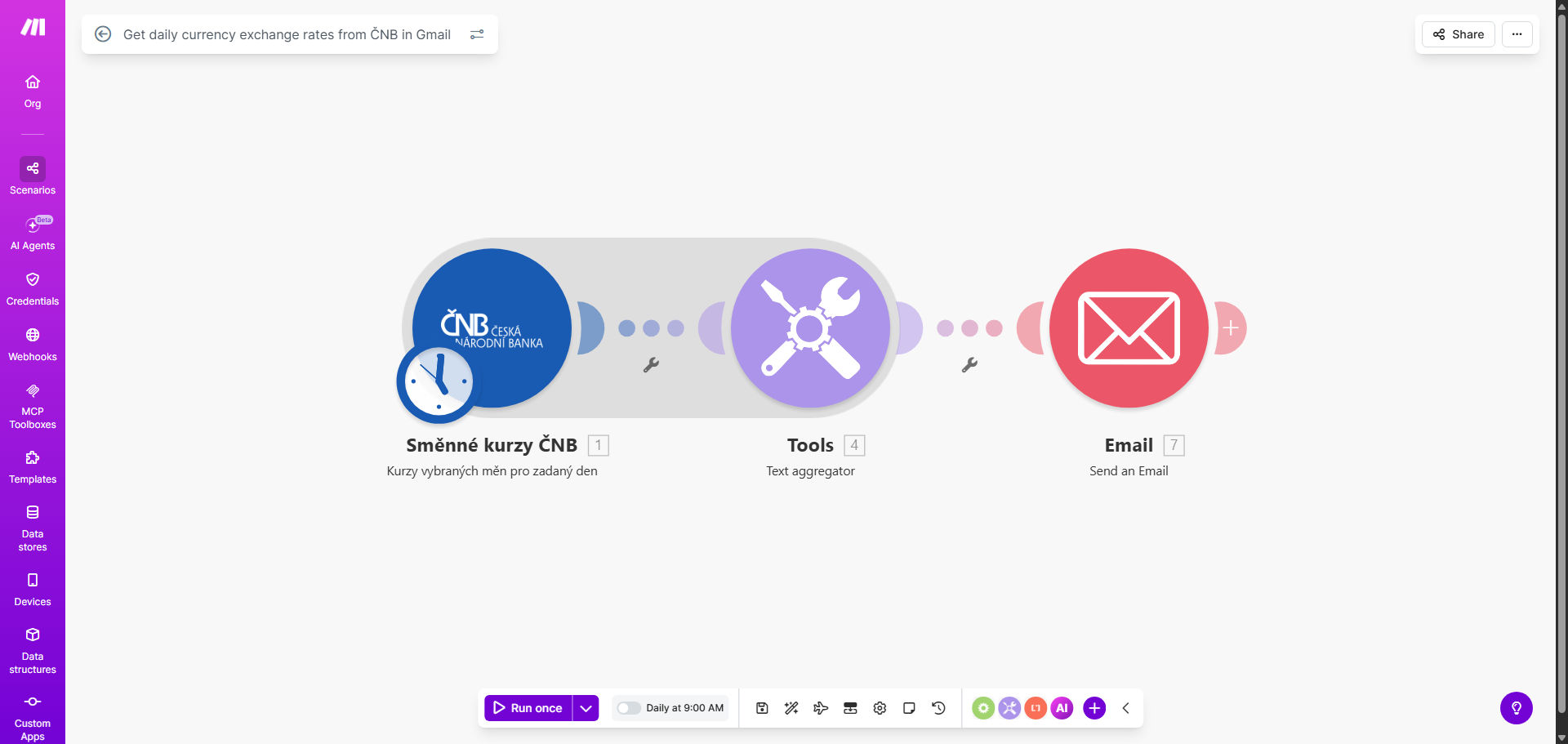
What This Workflow Does
For businesses operating in or with the Czech Republic, staying updated on the Czech Koruna (CZK) exchange rate is a daily operational necessity. Manual visits to the Czech National Bank (ČNB) website, copying rates, and emailing them to colleagues is a repetitive, time-consuming task that is prone to error and delay.
This automation workflow solves that problem entirely. It acts as your digital finance assistant, connecting directly to the official ČNB data feed on a schedule you set (e.g., every weekday morning). It retrieves the latest, authoritative exchange rates, formats them into a clear, professional email, and sends it automatically to a designated list of recipients—your finance team, procurement officers, or sales managers.
The value is immediate: elimination of manual work, guaranteed accuracy from the primary source, and timely information delivery that enables faster, more informed financial decisions regarding pricing, procurement, and reporting.
How It Works
The workflow follows a simple, reliable sequence triggered by time, ensuring your team gets data when they need it.
Step 1: Scheduled Trigger
The automation is initiated by a Schedule module in Make.com. You configure it to run at a specific time, such as 9:00 AM on business days. This replaces the need for an employee to remember to check the rates manually.
Step 2: Fetch Data from ČNB
Once triggered, the scenario uses an HTTP or API module to call the Czech National Bank's public exchange rate data feed. It retrieves the official mid-rate for CZK against key currencies like EUR, USD, GBP, and others in a structured JSON or XML format.
Step 3: Parse and Format the Data
The raw data from the bank is processed within Make.com. The workflow extracts the specific currency pairs and rates you care about, often formatting dates and numerical values for better readability. It prepares this data to be inserted into an email template.
Step 4: Send the Email via Gmail
The final step uses the Gmail module to send an email. The workflow populates a pre-designed email template with the parsed rates, adds a subject line (e.g., "Daily ČNB Exchange Rates - [Date]"), and sends it to your predefined list of recipients. The email lands directly in their inbox, ready for use.
Pro tip: Extend this workflow by adding a Router after fetching the data. Create a branch that only sends an alert email if a specific rate (like CZK/EUR) moves beyond a predefined threshold that impacts your costs. This turns a simple report into an intelligent alert system.
Who This Is For
This automation delivers tangible value to several key roles and business types:
- Finance & Treasury Teams: Professionals who need accurate, timely forex data for daily reporting, reconciliation, and cash flow management.
- Import/Export Businesses: Companies that buy from or sell to Czech partners and need the latest CZK rates to calculate costs, set prices, and issue invoices accurately.
- E-commerce Stores: Online retailers with customers in the Czech Republic, helping them manage dynamic currency pricing or understand revenue in their base currency.
- Accounting Firms & Consultants: Advisors serving clients with Czech operations, providing them with automated data for financial statements and tax calculations.
- Small Business Owners: Entrepreneurs who wear multiple hats and need to automate routine financial data gathering to focus on core business activities.
What You'll Need
To clone and use this template successfully, ensure you have the following set up:
- A Make.com account (free or paid plan).
- A Gmail account or Google Workspace account from which the emails will be sent. You'll need to authenticate this connection within Make.com.
- Basic information about the ČNB data source URL (the template typically includes this).
- A list of recipient email addresses (internal team members, stakeholders, or yourself).
- 5-10 minutes to configure the schedule and recipient list after importing the template.
Quick Setup Guide
Getting this automation live is a quick, four-step process:
- Get the Template: Click the "Get This Workflow" button above. This will open the template in your Make.com account where you can copy it to your own scenarios.
- Authenticate Connections: In your new scenario, click on the Gmail module and authenticate it with your Google account. This grants Make.com permission to send emails on your behalf.
- Configure the Schedule: Open the Schedule module. Set your preferred time zone and the exact time (and days of the week) you want the rates to be fetched and emailed.
- Set Your Recipients: In the Gmail "Send an Email" module, replace the placeholder email addresses with your actual recipient list. You can also customize the email subject and body text to match your company's tone.
Once these steps are complete, click "Run once" to test. If the test email arrives with correct rates, turn the scenario ON. It will now run automatically according to your schedule.
Key Benefits
Save 2-3 hours of manual work per week. Eliminate the daily ritual of visiting websites, copying data, and compiling emails. This time can be redirected to strategic financial analysis or other core tasks.
Ensure 100% data accuracy and reliability. By pulling directly from the Czech National Bank, you remove the risk of human transcription error and guarantee you're using the official, legally-recognized exchange rate.
Improve decision-making speed across departments. When procurement, sales, and finance all receive the same accurate rate simultaneously, they can make pricing, purchasing, and reporting decisions faster and with greater confidence.
Create a consistent, auditable information trail. Automated emails serve as a perfect log of daily rates received. This can be invaluable for historical analysis, auditing purposes, or resolving discrepancies with partners.
Scale your operations without adding overhead. Whether you need to add five new recipients or change the report format, the automation handles it instantly. It's a scalable solution that grows with your business needs.