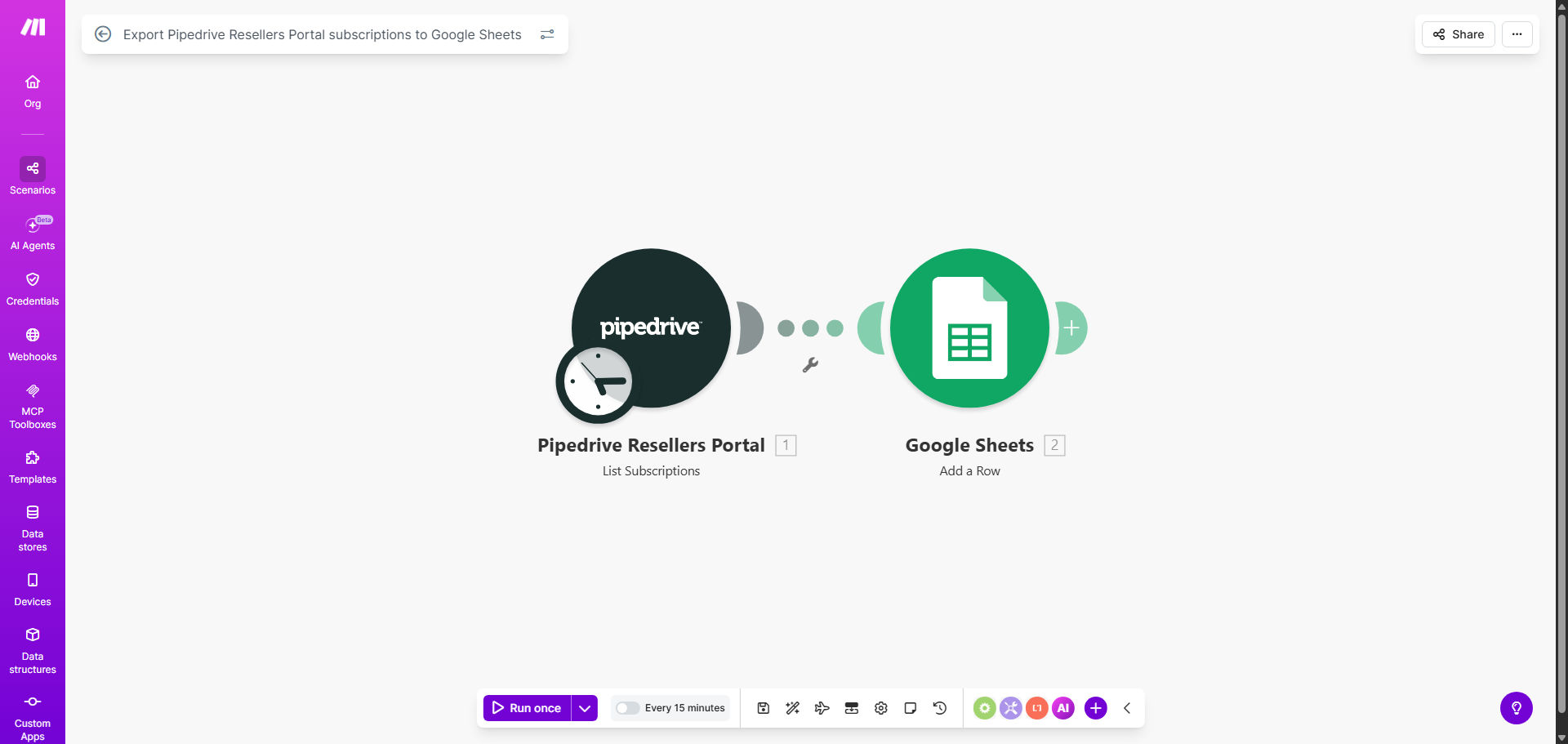
What This Workflow Does
Managing a network of resellers or partners is complex, especially when subscription data is trapped inside Pipedrive's Resellers Portal. Manually exporting this information to spreadsheets is a repetitive, error-prone task that consumes valuable time each week. This automation solves that by creating a seamless, scheduled bridge between Pipedrive and Google Sheets.
The workflow automatically extracts key subscription details—such as customer name, plan type, renewal date, payment status, and associated reseller—and appends them to a designated Google Sheet. This transforms your static partner data into a dynamic, central source of truth that can be used for forecasting, commission calculations, and performance dashboards.
By eliminating manual data entry, you ensure accuracy, gain real-time visibility into your partner ecosystem, and free up your team to focus on strategic growth and partner support instead of administrative busywork.
How It Works
The automation runs on a schedule you define, ensuring your spreadsheet is always current without any manual intervention.
Step 1: Trigger on a Schedule
The workflow is initiated at regular intervals (e.g., daily or hourly) by Make.com's scheduler module. This sets the automation in motion without you having to remember to run it.
Step 2: Fetch New & Updated Subscriptions
Make.com connects to your Pipedrive Resellers Portal via API and retrieves a list of subscriptions. It can be configured to fetch all subscriptions or only those that have been created or modified since the last sync, making the process efficient.
Step 3: Structure the Data
The raw data from Pipedrive is parsed and mapped into a clean, consistent format. Key fields like Reseller Name, Subscription ID, Customer Email, Monthly Recurring Revenue (MRR), Next Billing Date, and Status are organized for easy reading in Sheets.
Step 4: Update Google Sheets
Finally, the formatted data is sent to your specified Google Sheets spreadsheet. The workflow can add new rows for fresh subscriptions and update existing rows if information has changed, maintaining a perfect historical record.
Pro tip: Use a separate tab in your Google Sheet for "raw" data from this automation. Then, use another tab with QUERY or FILTER functions to create live dashboards for sales, finance, and partner managers.
Who This Is For
This template is ideal for SaaS companies, software distributors, and any business that operates a reseller, affiliate, or partner program through Pipedrive. It's perfect for Partner Managers who need to track performance, Finance teams responsible for calculating commissions, and Operations leaders who require reliable data for forecasting.
If you're tired of compiling monthly partner reports manually, struggling to verify commission payments, or lacking visibility into which subscriptions are renewing soon, this automation is your solution.
What You'll Need
- A Make.com account (free tier available).
- A Pipedrive account with the Resellers Portal feature enabled and admin API access.
- A Google Sheets spreadsheet set up with column headers for the data you wish to capture (e.g., Date, Reseller, Customer, Plan, MRR, Status, Renewal Date).
- API connection credentials (API keys) for both Pipedrive and Google Sheets, which Make.com will guide you to provide securely.
Quick Setup Guide
You can have this automation running in under 15 minutes by following these steps:
- Clone the Template: Click "Get This Workflow" and duplicate the provided Make.com scenario into your own account.
- Connect Pipedrive: In the first module, authorize Make.com to access your Pipedrive account using your API key or OAuth.
- Connect Google Sheets: Authorize the connection to Google and select the specific spreadsheet and worksheet where data should be sent.
- Map Your Fields: Review the data mapping to ensure the Pipedrive subscription fields correspond correctly to your Google Sheet columns. Adjust if necessary.
- Set the Schedule: Configure the scheduler to run as often as you need—daily is a great starting point for most businesses.
- Test & Activate: Run a single test cycle to ensure data flows correctly into your sheet. Once verified, turn the scenario on.
Key Benefits
Save 5–10 hours per month on manual data entry and reporting. This automation completely eliminates the weekly ritual of logging into Pipedrive, exporting CSVs, and copying data into spreadsheets, freeing your team for higher-value work.
Eliminate costly errors in partner commissions and renewal tracking. Human error in manual entry leads to overpayments, underpayments, and missed renewals. Automated data transfer ensures 100% accuracy in your financial records.
Gain real-time visibility into your reseller channel performance. With data flowing automatically into Sheets, you can build live dashboards showing MRR growth, churn rates, and top-performing partners, enabling data-driven decisions.
Improve partner relationships with transparency and timely reporting. Automated systems allow you to generate and share accurate performance reports with your resellers faster, building trust and alignment.
Create a scalable foundation for your partner operations. As your reseller network grows, this automated process scales effortlessly, handling hundreds of subscriptions as easily as it handles ten.