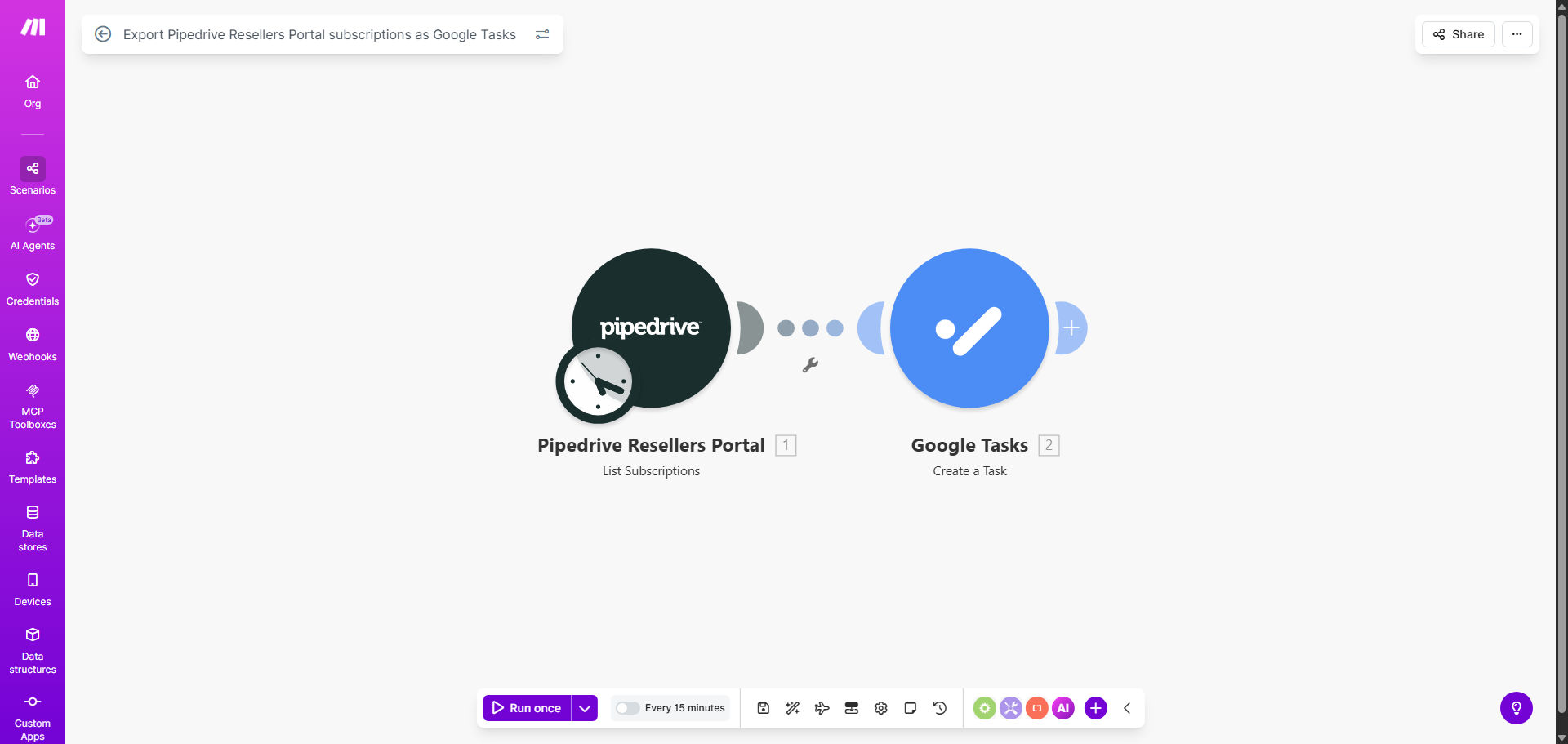
What This Workflow Does
For businesses managing reseller or partner networks through Pipedrive, keeping track of active subscriptions is a constant, manual headache. Missed renewal dates lead to lost revenue and strained partner relationships. This automation solves that by creating a seamless bridge between your Pipedrive Resellers Portal and your daily task management in Google Tasks.
The workflow automatically exports new or updated subscriptions from Pipedrive and creates corresponding tasks in Google Tasks. Each task can include crucial details like the partner name, subscription plan, renewal date, and value. This transforms static subscription data into actionable reminders that live where you already work—in your Google ecosystem—ensuring timely follow-ups and proactive account management.
By eliminating the need for manual spreadsheets or calendar entries, this system saves administrative time, reduces human error, and provides a clear, centralized view of all upcoming subscription actions for your team.
How It Works
The automation runs on a schedule you define, quietly working in the background to keep your task list perfectly synced with your subscription pipeline.
Step 1: Trigger on New or Updated Subscriptions
The scenario is triggered either on a schedule (e.g., every hour) or by a webhook from Pipedrive. It searches the Pipedrive Resellers Portal module for subscription records. You can filter these to only process subscriptions with a specific status, like "Active," or those with a renewal date approaching within the next 30 days.
Step 2: Map and Format the Data
For each subscription found, the workflow extracts key fields: the reseller company name, subscription ID, product name, renewal date, and monthly/annual value. This data is then structured into a clear title and description for the Google Task, such as "Renewal: [Company] - [Product] due on [Date]".
Step 3: Create or Update Tasks in Google Tasks
The formatted data is sent to Google Tasks API. The automation checks if a task for this specific subscription already exists (to avoid duplicates) and then either creates a new task or updates an existing one. The task is assigned to the appropriate Google Task list (e.g., "Partner Renewals") and the due date is set to the subscription's renewal date.
Pro tip: Add a buffer by setting the task due date 7 days before the actual renewal. This gives your team ample time to prepare and reach out to the partner, turning a simple reminder into a strategic touchpoint.
Who This Is For
This automation is ideal for channel managers, partner success teams, and SaaS companies that operate a reseller or affiliate program through Pipedrive. If your business revenue depends on recurring partner subscriptions and you need a foolproof system to manage renewals, this workflow is for you. It's also perfect for small business owners who wear multiple hats and need critical dates to appear automatically in their personal task management system without manual data entry.
What You'll Need
- A Make.com account (free or paid plan).
- A Pipedrive account with the Resellers Portal feature enabled and API access.
- A Google Account with access to Google Tasks (part of any standard Google Workspace or personal Gmail account).
- Your Pipedrive API key and your Google OAuth credentials to authorize the connection in Make.com.
Quick Setup Guide
- Clone the Template: Click "Get This Workflow" and duplicate the scenario into your Make.com account.
- Connect Pipedrive: In the first module, authorize your Pipedrive account and select your Resellers Portal. Set up a search filter (e.g., "Subscription status is Active").
- Connect Google Tasks: Authorize your Google account in the Tasks module. Select or create a specific Task List (e.g., "Partner Renewals") where new tasks will be added.
- Map Your Fields: Ensure the data from Pipedrive (company name, renewal date, etc.) is correctly mapped to the Title, Notes, and Due Date fields in Google Tasks.
- Set the Schedule: Configure the scenario to run on a schedule that fits your business—daily or multiple times a day for real-time updates.
- Test & Activate: Run a single execution to test. Check your Google Tasks list for a correctly formatted task. Once confirmed, activate the scenario.
Key Benefits
Eliminate Revenue Leakage from Missed Renewals. By automating reminder creation, you ensure 100% visibility into upcoming subscription expirations, directly protecting your recurring revenue stream.
Save 5–10 Hours Per Month on Administrative Tracking. No more manual exports, spreadsheet updates, or calendar entries. The automation handles the grunt work, freeing your team for higher-value partner engagement.
Improve Partner Satisfaction with Proactive Communication. Timely, informed outreach before a renewal date demonstrates professionalism and strengthens partner relationships, leading to higher retention rates.
Centralize Action Items in a Tool Your Team Already Uses. Google Tasks syncs seamlessly with Google Calendar and is accessible on any device, ensuring follow-ups are always top-of-mind without introducing a new, complex tool.
Gain a Scalable System for Growth. As your reseller network grows from 10 to 100 partners, this automated process scales effortlessly without requiring additional headcount or creating process bottlenecks.